LoL Ping Test
This LoL ping test measures the round trip from your browser to public data centres in or near the cities that host each League of Legends region, from NA and EUW to KR, OCE and SEA. Under 60 ms is comfortable for ranked, 60 to 100 ms is playable, and anything above 150 ms will cost you fights. The test takes about 20 seconds and needs no download.
LoL Ping Test
Measures the round trip from your browser to a public data centre in or near the city where Riot hosts each region's game server. Not Riot's servers (a browser cannot ping those), but close enough to tell you which region is playable from where you sit.
| Region | Probe (Riot server area) | Median | Best | Verdict |
|---|
How does this LoL ping test work?
It times real network requests, nothing more. A browser is not allowed to send the ICMP packets that the classic ping command uses, and Riot’s regional web addresses all sit behind one global network, so timing them says nothing about the game server. So the tool does the next honest thing: it sends small HTTPS requests to Amazon’s public storage endpoints in Ohio, London, Frankfurt, Seoul, Sao Paulo, Sydney, Tokyo and Singapore, which sit in or near the cities where Riot hosts those shards.
Each region gets one warm-up request first. That one opens the connection, with its DNS lookup and TLS handshake, and is thrown away, because the game client keeps a connection open too and never pays that cost mid-fight. Then come five timed requests, or ten if you pick the slower mode. The table shows the median, which ignores one unlucky spike, and the best single result, which is the closest thing to your line’s floor.
Thing is, a probe near Chicago is not Riot’s machine in Chicago. Routes can differ by a few hops, and the browser’s timer is coarser than the client’s. The rows marked “rough”, LAN, LAS, TR, RU and ME, are further off, because Amazon has no public endpoint close to those server cities. Treat them as a direction, not a number.
Ping test results: what counts as good ping in LoL?
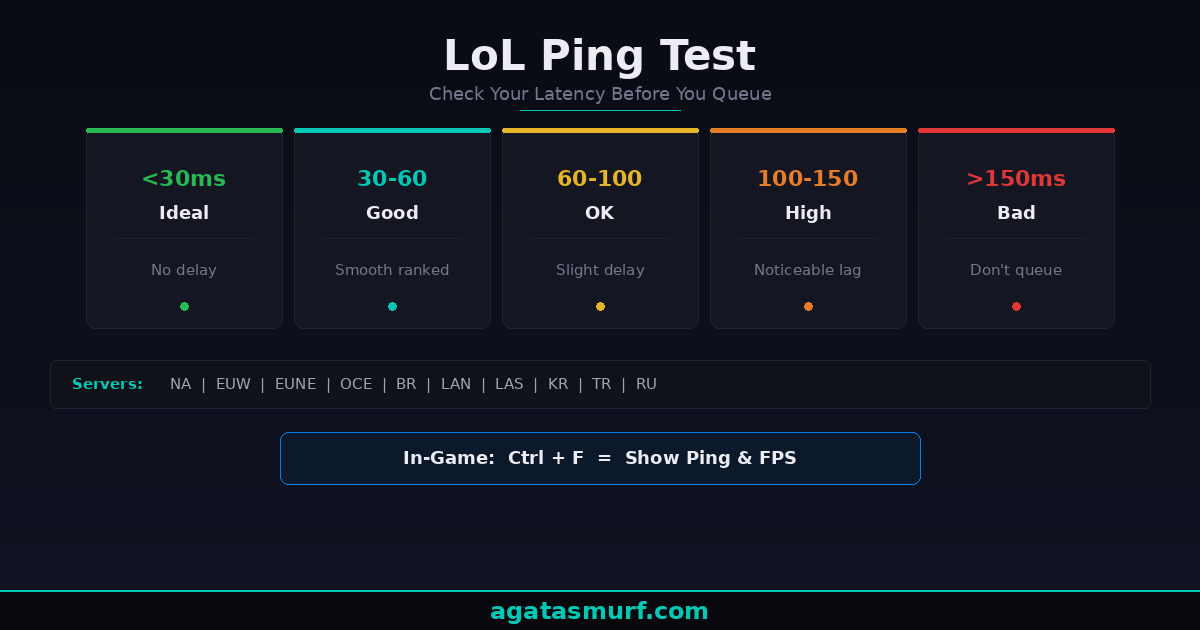
Below 60 ms is good, and below 30 ms is about as clean as online play gets. The verdict column in the tool uses these bands:
| Ping | Verdict | What you notice in game |
|---|---|---|
| Under 30 ms | Ideal | Nothing. Inputs feel instant. |
| 30 to 60 ms | Good | Smooth for every role, including mechanical champions. |
| 60 to 100 ms | Playable | Slight delay on flash plays, animation cancels and last hits under tower. |
| 100 to 150 ms | Rough | Dodging skillshots turns into guessing; trades feel late. |
| Over 150 ms | Unplayable for ranked | Abilities land after you meant them, and fights are decided before you react. |
In practice, stability matters as much as the number. A steady 70 ms is easier to play around than a line that sits at 25 and jumps to 200 every few minutes, because your hands adapt to a constant delay and never adapt to a random one. That is why the tool shows a median and a best value side by side: a big gap between them means jitter, and jitter is usually Wi-Fi or a busy network at home.
How do you check your ping inside League?
Press Ctrl+F during a match. Your ping and FPS appear in the top-right corner and update live, and that number is the one that counts, since it comes from the game’s own connection.
No numbers after Ctrl+F? Then the hotkey is probably unbound, which happens after some settings resets. Fix it like this:
- Press Escape in a game and open the Hotkeys tab.
- Scroll to the Display section.
- Find Toggle FPS Display and bind it to Ctrl+F or any free key.
- Close the menu and press the new key.
Watch it through a whole game, not just loading in. A ping that climbs from 40 to 180 during teamfights points to your own network, such as someone streaming or a cloud backup kicking in, while a ping that is high from the first second points to distance or routing.
Can you run a LoL ping test from Command Prompt?
Mostly no, and old guides have not caught up. For years the advice was to run ping 104.160.131.3 -t for NA or 104.160.141.3 for EUW. When we tried the whole list of those community addresses in October 2026, not one of them answered a ping, while a control ping to a public DNS server came back in under 35 ms on the same line. Riot simply does not reply to ICMP on those addresses any more, if it ever promised to.
So a “100% packet loss” result from Command Prompt does not mean your connection is broken. It means the target ignores pings. The browser test above, the in-game Ctrl+F counter and a traceroute (more on that below) are the methods that still return real numbers.
Why is your LoL ping high on fast internet?
Because bandwidth and latency are different things. A 500 Mbps plan describes how much data fits through the pipe per second; ping is how long one small packet takes to get to the server and back. League sends tiny packets, so it barely uses bandwidth at all, and a 20 Mbps connection with a short route will beat a gigabit line with a long one.
The usual causes, roughly in the order we would check them:
- Wi-Fi. Walls, distance from the router and neighbours on the same channel all add delay and, worse, jitter.
- Something else on the network uploading: game updates, cloud sync, a stream on another device.
- Playing on a far region, for example an NA account from Europe, where the ocean alone adds well over 70 ms.
- A VPN or proxy left running after work.
- Peak-hour congestion at your provider, which is why evening results look worse than morning ones.
- Old network drivers (rare, but real).
How to lower your ping in League of Legends
Start with the cable. For what it’s worth, it is the single best fix. Plugging the PC into the router with an Ethernet cable removes the biggest source of jitter in one move, and a long flat cable costs less than a skin. If a cable is impossible, a powerline adapter is the usual compromise. Then run the LoL ping test again and compare the median with your first run.
Next, close what competes for the line. Task Manager (Ctrl+Shift+Esc) has a Network column; sort by it before a session and pause anything heavy. Restart the router and modem if they have been up for weeks (modem first, router once the modem is online). Turn off any VPN unless you need it to reach the region at all.
If ping is fine everywhere except League, run Riot’s Hextech Repair Tool from Riot Support. It checks the client install and firewall rules, and it fixes more “League-only” connection problems than you’d expect. Wired connection still acting up only in League? Our guide to League not working on Ethernet covers adapter and firewall fixes step by step.
The last lever is the region itself. Real talk: no setting fixes geography. If the tool shows 140 ms to your current region and 35 ms to another one, the closer region is the honest answer. A region transfer costs 2,600 RP. Or you can create a free account on the closer shard and play a few normals there first.
Traceroute: where does your ping go?
A traceroute lists every hop between you and a destination along with its delay, and that tells you whose problem the lag is. On Windows, open Command Prompt and run tracert followed by an address; on Mac or Linux the command is traceroute. The catch is that Riot’s own machines will not answer at the end. The hops on the way still do, and they are what you need.
Read it from the top. The first one or two hops are your router and your provider’s first box; high numbers there mean the problem is in your home or on your line. A sudden jump of 50 ms or more in the middle, staying high after that, usually means a congested or detoured route inside your provider or between networks. Hand that output to your provider’s support (ask for someone who handles routing, not the general script). Some providers fix it, to be fair, and some never answer.
LoL ping test fine but still lagging? Ping, FPS or packet loss
Look, plenty of “lag” is not ping at all. Hit Ctrl+F in a teamfight and watch both numbers before blaming the connection:
| Symptom | Likely cause | First fix |
|---|---|---|
| Screen stutters, ping looks normal | Low FPS (PC hardware or settings) | Lower graphics settings, update GPU drivers |
| Champion snaps back to an earlier spot | Packet loss | Switch to a cable, then contact your provider |
| Game freezes, then fast-forwards | Ping spike or packet loss | Close background uploads, restart the router |
| Every ability fires late, all game | High base ping | Check region distance and routing |
| Client will not start | Install or anti-cheat issue | See our LoL not opening fixes |
If everything on your side is clean and the whole region feels bad at once, the problem may be on Riot’s end. Our LoL server status page shows current incidents per region (honestly, check it before you restart anything).
Does ping affect your rank?
Not directly. Your MMR counts wins and losses, never latency. The effect is indirect: a player on 120 ms reacts later, loses trades they would win at 30 ms, and over a few dozen games that shows up in the win rate. Losing streak that started the same week your evening ping jumped? That is worth testing before you rework your champion pool. Our LoL MMR checker helps read where you stand once the connection is sorted.
One practical habit: run the LoL ping test at the time you normally queue, not at noon. Then run it again a week later. If the evening median stays above 100 ms on a cable, the fix is your provider or your region, and no in-game setting will change it.
FAQ
Is this LoL ping test measuring Riot’s servers?
No. Browsers cannot ping Riot’s game servers, so the test times HTTPS requests to public Amazon data centres in or near the same cities. Results for the close probes are a good guide; rows marked rough are only a direction.
What is a good ping for League of Legends?
Under 60 ms is good and under 30 ms is ideal. From 60 to 100 ms the game is playable with a slight delay, and above 150 ms ranked becomes very hard.
How do I show my ping in League of Legends?
Press Ctrl+F during a match to show ping and FPS in the top-right corner. If nothing appears, bind Toggle FPS Display under Hotkeys, Display in the game settings.
Why does pinging Riot’s IP addresses show 100% packet loss?
The commonly shared addresses such as 104.160.131.3 do not answer ICMP pings. Packet loss there does not mean your connection is down. Use the in-game counter, this browser test or a traceroute instead.
Why is my LoL ping high even with fast internet?
Bandwidth and latency are different. High ping usually comes from Wi-Fi, other devices uploading, a VPN, peak-hour congestion at your provider or playing on a region far from you.
Why is my in-game ping different from the LoL ping test?
The game uses its own connection and routes to Riot’s servers, while the test reaches nearby public data centres over HTTPS. Small differences are normal, and larger ones are expected for the rough probes.
How much does it cost to transfer to a closer LoL region?
A region transfer costs 2,600 RP. Creating a free account on the closer region first lets you check the ping there before paying.