


 through our G2G profile

 LoL Accounts
 Valorant
 WoW accounts
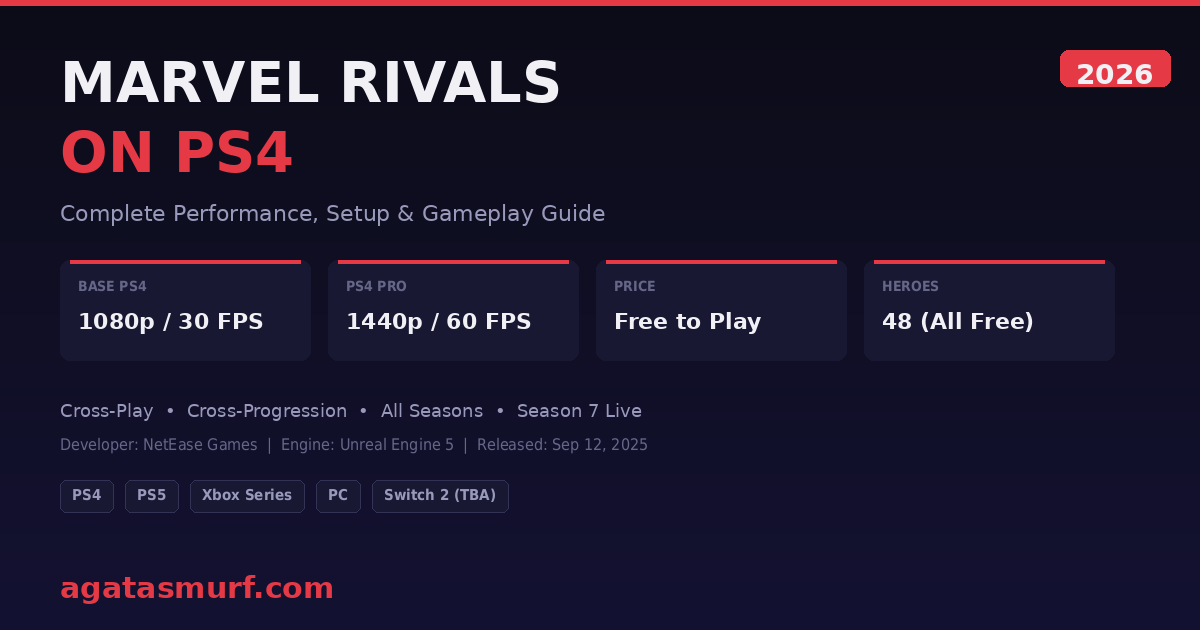
Yes, you can play Marvel Rivals on PS4. NetEase dropped the PlayStation 4 version on September 12, 2025, right alongside the Season 4: Heart of the Dragon update. Free download, no catch. You get the same heroes and maps everyone else gets, and you can queue with PS5 and PC friends. The port was rough at first but NetEase has pushed patch after patch since then, and by Season 7 it runs way better than those first few weeks.
Quick Reference: Marvel Rivals on PS4 at a Glance
| Detail | Info |
|---|---|
| Release Date | September 12, 2025 (Season 4) |
| Price | Free to play (no PS Plus required) |
| Base PS4 Performance | 1080p, 30 FPS |
| PS4 Pro Performance | 1440p, 60 FPS |
| Storage Required | ~70 GB |
| Cross-Play | Yes (PS5, Xbox Series X|S, PC) |
| Cross-Progression | Yes (same account across platforms) |
| Current Season | Season 7: The Hunt (March 2026) |
| Total Heroes | 48 (all free) |
| Developer | NetEase Games / Marvel Games |
Look, squeezing an Unreal Engine 5 game onto 2013 hardware is going to hurt somewhere. The base PS4 is locked at 30 FPS and 1080p. PS4 Pro hits 60 FPS at 1440p, and honestly? That is close to what the PS5 does in performance mode. A buddy of mine has a Pro and I played on it for a couple weeks. Felt good. Legit good. But the base PS4? Totally different vibe. You lose DualSense adaptive triggers (PS5 exclusive), load times are longer on the mechanical hard drive, and Marvel Rivals on PlayStation 4 still has the weakest overall performance of any supported platform.
Marvel Rivals PS4 Performance: What to Actually Expect
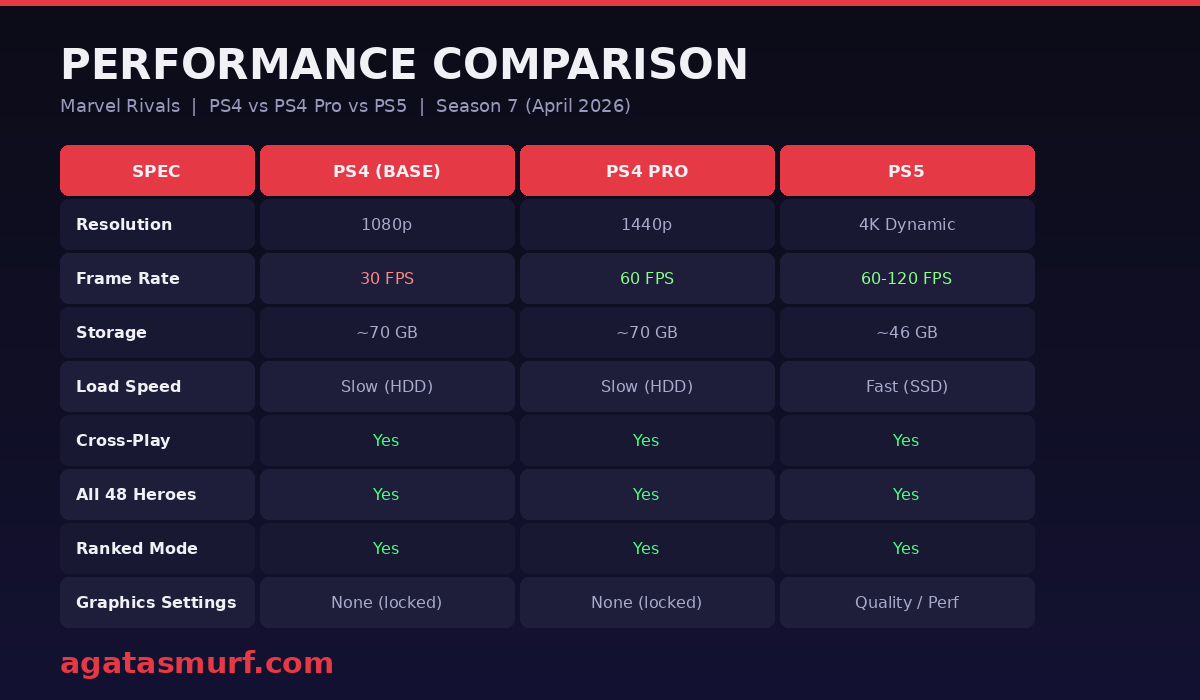
NetEase published the official specs before the PS4 launch, and they have held up pretty accurately through seven seasons of updates.
| Spec | PS4 (Base) | PS4 Pro | PS5 |
|---|---|---|---|
| Resolution | 1080p | 1440p | 4K (Dynamic) |
| Frame Rate | 30 FPS | 60 FPS | 60-120 FPS |
| Storage Required | ~70 GB | ~70 GB | ~46 GB |
| Cross-Play | Yes | Yes | Yes |
| All Heroes (48) | Yes | Yes | Yes |
| Ranked Mode | Yes | Yes | Yes |
| Hero Bans (Diamond+) | Yes | Yes | Yes |
The 30 FPS cap on base PS4 is the biggest pain point. In a fast 6v6 shooter where abilities fly everywhere, those dropped frames matter. Doctor Strange portals used to tank the framerate hard at launch, though NetEase has patched that significantly since Season 4.5. Community threads on Reddit and PSNProfiles still mention occasional screen tearing and asset pop-in, mostly on the base model.
Pro is where this game actually feels right on last-gen. 60 FPS at 1440p, basically PS5 performance mode numbers. I ran it for a few sessions and the dips were rare. You will still see the occasional hitch when Iron Man or Hela pop their ults with tons of particles on screen, but I played ranked on Pro for weeks without it ever costing me a fight.
In a November 2025 interview, game director Guangyun Chen broke down what the team actually did. They rewrote the thread scheduling to fit the PS4’s CPU, tapped into hardware-specific instruction sets, and basically rebuilt how the game renders on older hardware. The cool side effect? Figuring out how to run the game on a 12-year-old box forced NetEase to optimize things that made PC and current-gen run better too.
What About PS4 Slim?
The PS4 Slim has the same GPU and CPU as the original fat PS4. Same 1080p, same 30 FPS cap. The Slim does have slightly better Wi-Fi and a smaller form factor, but neither affects Marvel Rivals performance.
Some PS4 Slim users on PSNProfiles reported much worse experiences at launch, with framerate dipping to 15 FPS in certain modes. NetEase fixed most of that by Season 4.5 and Season 5. If you are still getting major drops on a Slim, make sure your internal drive has at least 20 GB of free space beyond the game install and try rebuilding your database through Safe Mode. A dusty PS4 Slim with restricted airflow will also thermal throttle, which tanks framerate hard.
Best Heroes for 30 FPS on Base PS4
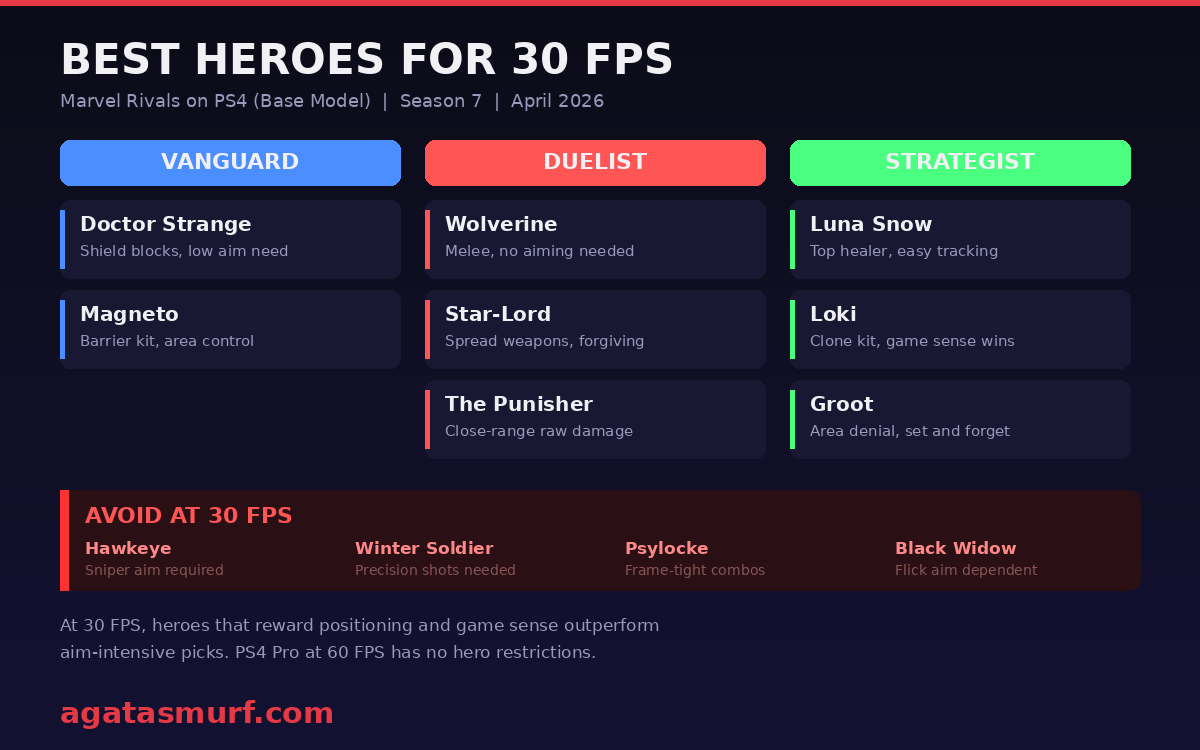
30 FPS is a real handicap in a shooter like this. Your aim inputs just feel slower than what a 60 FPS player sees, so who you pick matters way more than on Pro or PS5. From my experience, heroes that reward positioning and game sense over raw aim perform much better on base PS4.
| Role | Best Picks for 30 FPS | Why |
|---|---|---|
| Vanguard | Doctor Strange, Magneto | Shield-based kits do not need flick aim |
| Duelist | Wolverine, The Punisher, Star-Lord | Close-range or spread weapons forgive imprecise tracking |
| Strategist | Luna Snow, Loki, Groot | Healing kits reward awareness over mechanical skill |
Heroes like Hawkeye or Winter Soldier that depend on quick snipes are much harder to play at 30 FPS. On base PS4 I genuinely recommend avoiding snipers in ranked unless you have strong controller aim fundamentals. Psylocke is another tough one because her combo chains need precise timing that feels off at lower framerates.
How to Play Marvel Rivals on PS4
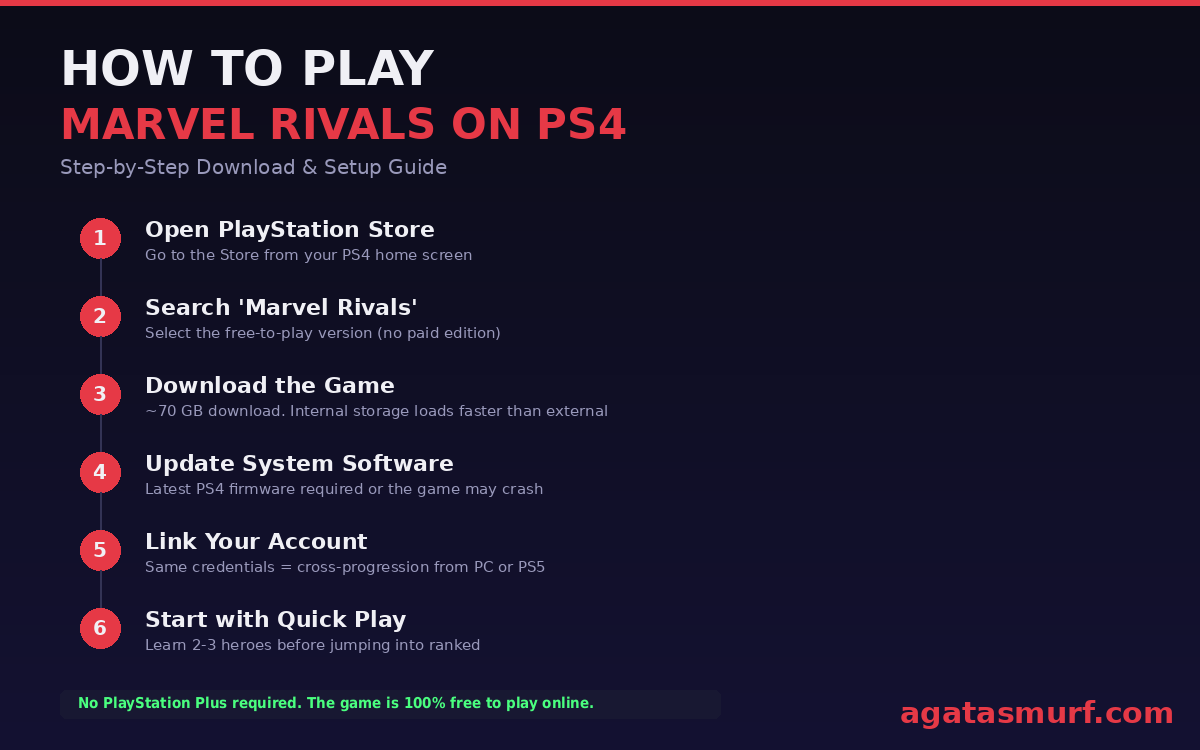
Takes about 20 minutes with decent internet:
- Open the PlayStation Store from your PS4 home screen.
- Search for “Marvel Rivals” and select the free-to-play version (there is no paid version).
- Download the game. It is approximately 70 GB, so make sure you have enough storage. Internal storage loads faster than external drives.
- Update your system software. Seriously, do this first. Old firmware = crashes on startup or the game just refuses to open.
- Create or link your account. Already play on PC or PS5? Same login, same stuff. Skins, battle pass progress, everything follows you.
- Start with Quick Play. I always recommend getting comfortable with 2-3 heroes before jumping into ranked. The training grounds let you test every hero at no cost.
And no, you do not need PS Plus. Marvel Rivals is free-to-play online with zero subscription required. Not even for ranked.
Controller Setup and Sensitivity Tips
Marvel Rivals supports full controller remapping on PS4. The DualShock 4 works fine with the default layout, but from my testing, moving dodge to the back button attachment frees up your thumbs for camera control. That matters a lot at 30 FPS where every input counts. Tweaking sensitivity down slightly also helps compensate for the lower framerate on base PS4. The Marvel Rivals PS4 controls feel responsive once you dial in your settings.
There are no graphical options to adjust on PS4. Performance is locked by design, so you cannot toggle between resolution and framerate modes like you can on PS5.
Cross-Play and Ranked Mode Explained
Marvel Rivals on PS4 supports cross-play in Quick Play and Arcade modes. You can party up with friends on PS5, Xbox Series X|S, and PC for casual matches without restrictions. I played with a friend on PC and another on PS5 from my PS4 Pro and matchmaking was fast, no issues connecting.
Ranked is a different situation. Ranked splits lobbies by input type. If you are on controller (PS4, PS5, Xbox), you play against other controller players. PC gets its own pool. Makes sense. Nobody wants to aim-duel a mouse and keyboard player on a controller. The separation applies from Season 4 onward and has been consistent through Marvel Rivals ranked tiers and competitive mode.
One concern that came up a lot on Reddit after the PS4 launch was whether 30 FPS players would drag down teams in ranked. In practice, most PS4 ranked players are on the Pro model hitting 60 FPS, and the base PS4 crowd tends to stick to Quick Play. You can absolutely grind ranked on base PS4, people do it. But be honest with yourself: at 30 FPS you are fighting with one hand tied behind your back against 60 FPS console players.
Full Content Parity Across All Platforms
This is the part that surprised me. PS4 gets the full game. PS4 gets the full game. Every hero, every map, the battle pass, seasonal events, all of it. When Season 7: The Hunt launched in March 2026 with Black Cat and White Fox, PS4 players got them on the same day as everyone else.
48 characters on 20 maps as of April 2026. Convergence, Convoy, Domination, plus the Marvel Zombies PvE mode. All of it runs on PS4. Nothing is locked behind newer hardware.
Battle passes work identically. You progress through a free track and can optionally buy the premium pass with Lattices (the in-game premium currency). Seasonal cosmetics like ranked reward skins are earned the same way across all platforms.
Upgrade or Stay? The Console Decision
Got a PS4 Pro and mainly play Marvel Rivals? You are fine staying where you are. Pro already hits 60 FPS. PS5 gives you faster loads, 4K, and adaptive triggers, but in terms of how the game actually plays? Almost the same.
Base PS4 owners have a tougher call. 30 FPS is fine for Quick Play, but once you hit Diamond and above, everyone else is running at twice your framerate and you will feel it. If you can grab a PS5, ranked becomes a completely different game.
Your stuff carries over if you switch. Skins, ranked progress, Lattices, all of it. Just use the same login credentials on both consoles.
Thinking about PC instead? An RTX 3060 build runs Marvel Rivals about as well as PS5, sometimes better. Check our Marvel Rivals system requirements breakdown for specifics, though PC has its own stuttering problems that people on Steam forums still complain about.
Common Performance Issues and Quick Fixes
The PS4 version launched rough. That first weekend was ugly. Reddit had clips of textures not loading in. Twitter had people posting voice lines just not playing. Crashes mid-match everywhere. Most of that is gone now after seven months of patches. Not all of it, but most.
Common problems and fixes:
- Crashes during matches: Update your PS4 to the latest firmware. Rebuild your database through Safe Mode (turn off PS4, hold power button until second beep, select “Rebuild Database”). Keep at least 20 GB of free space beyond the game’s install.
- Texture pop-in and blurry assets: Base PS4 just cannot load everything fast enough. Close any apps running in the background and restart your console before a session. Helps more than you would think.
- Connection errors with Cloudflare: The game uses Cloudflare for server security. If you get blocked, restart the game and your router. Do not keep mashing reconnect because that makes it worse. And plug in an Ethernet cable if you can. PS4 Wi-Fi is weak.
- Long load times: Move the game to internal storage if you have it on an external USB drive. Huge difference. Even better if you swapped in an SSD.
NetEase’s “Technically Speaking” dev diary series (launched in September 2025 alongside the PS4 version) has addressed PS4 performance directly. They confirmed ongoing optimization for last-gen hardware in every major patch going forward.
What About Xbox One and Switch 2?
No Xbox One port exists. Nobody at NetEase has even hinted at one. The PS4 already took months of custom optimization, and Xbox One’s install base is way smaller, so it probably just does not make financial sense.
Switch 2 is a different story. Danny Koo from Marvel Games confirmed in March 2026 that a Switch 2 version is being worked on. No release date yet. My guess? Sometime around Season 8 or 9 based on how long the PS4 port took.
We have a full platform breakdown on where to play Marvel Rivals online if you want the complete picture.
Gameplay Tips for Season 7
Season 7: The Hunt dropped on March 20, 2026. White Fox is the Strategist they added at launch. Black Cat drops April 17 as a Duelist. There is a new Convergence map in Lower Manhattan, and the story picks up the Alchemax Tower thread with 2099 Nueva York forces spilling into modern New York. Pretty wild lore-wise.
The biggest gameplay change in Season 7 is a 20% reduction in Ultimate energy gain across the board. This hit every role. Fights are slower and more deliberate now, which actually helps PS4 players. Fewer instant ult combos means more room for positioning and teamwork over raw reaction speed.
Season 7 also added a Performance Optimization (Beta) toggle under Settings > Other. If you have a PS4 Pro, try enabling this. It was designed for mid-to-high-end CPUs but Pro users in community threads reported smoother performance with it on. Base PS4 results are mixed, so test it yourself.
If you are playing on PS4, a few more things help:
Pick heroes that do not rely on flick aiming. On 30 FPS, tracking is more forgiving than snapping to targets. Heroes like Luna Snow, Groot, or Loki work well because their kits reward game sense over mechanical aim. If you play on the Pro at 60 FPS, pretty much anything is viable.
Plug in an Ethernet cable. PS4 Wi-Fi is garbage compared to PS5’s, and packet loss on wireless will ruin your ranked games.
Watch your storage. Season updates drop about 10 GB each, and the PS4’s 500 GB drive fills up quick. I have seen people on Reddit posting about crashes that turned out to just be a full hard drive.
Esports is officially a thing now too. The Ignite Preseason started March 27 with EMEA, AMER, OCE, and ASIA brackets. NetEase baked an Esports tab straight into the game client this season. Browse teams, watch streams, check brackets, all without alt-tabbing. Works on PS4 too, just takes a few extra seconds to load.
If you want to understand the current hero meta, our Marvel Rivals tier list breaks down every character by rank bracket.
Season History on PS4: What Each Update Changed
| Season | Launched | What Changed for PS4 |
|---|---|---|
| Season 4 | Sep 12, 2025 | PS4 launch. Angela and Daredevil added. Initial 30/60 FPS targets. |
| Season 5 | Nov 2025 | Major stability patches. Doctor Strange portal crash fixed. Asset loading improved. |
| Season 6 | Jan 16, 2026 | Deadpool and Elsa Bloodstone added. CPU rendering improvements. 200K+ concurrent players. |
| Season 7 | Mar 20, 2026 | White Fox added. 20% ult charge nerf. Performance Optimization Beta toggle. New Convergence map. |
Is Marvel Rivals on PS4 Worth Playing in 2026?
Honestly? It depends on your model. On Pro you are getting 60 FPS, every hero, cross-play with PS5 and PC friends, and your progress follows you if you ever upgrade. The game pulled 200K+ concurrent players in Season 6 and sits at 4.2 stars on the PlayStation Store. That is not a dead game.
Base PS4 is harder to recommend for ranked. You are playing at half the framerate of everyone on Pro or PS5. That gap shows in Diamond and above. Crashes are rarer than they used to be but still not zero. Quick Play and the Marvel Zombies PvE mode? Totally fine for that. Grinding to Diamond? That is going to be frustrating.
Also, the PS5 install is only ~46 GB versus ~70 GB on PS4. If your hard drive is already packed, the PS5 version takes up way less space.
So yeah, Marvel Rivals on PS4 is real and NetEase is still patching it. An Unreal Engine 5 game on 2013 hardware. Wild. If you have a Pro, you are golden. If you are on base PS4, keep expectations in check and you will be fine.
How Does It Compare to Other Shooters on PS4?
Other free-to-play shooters have been on PS4 for years. So how does Marvel Rivals on PS4 stack up?
| Game | PS4 FPS | Resolution | Storage | Cross-Play |
|---|---|---|---|---|
| Marvel Rivals | 30 FPS | 1080p | ~70 GB | Yes |
| Overwatch 2 | 60 FPS | 1080p | ~50 GB | Yes |
| Fortnite | 60 FPS | 1080p (dynamic) | ~30 GB | Yes |
| Apex Legends | 60 FPS | 1080p (dynamic) | ~60 GB | Yes |
| The Finals | 30 FPS | 1080p | ~40 GB | Yes |
The 30 FPS lock puts Marvel Rivals PS4 at a disadvantage next to Overwatch 2 and Apex Legends, both of which manage 60 FPS on base PS4. Overwatch 2 runs on an older, lighter engine and has been optimized for PS4 since 2016. Apex Legends uses Source Engine which is much less demanding than Unreal Engine 5. The Finals is the closest comparison since it also runs on UE5 and hits 30 FPS on base PS4.
Marvel Rivals requires the most storage of the bunch at ~70 GB. If your PS4’s 500 GB drive is getting full, that is a real concern. For context, the PS5 version is only ~46 GB because it uses more efficient compression.
On PS4 Pro, the gap shrinks a lot. Marvel Rivals at 60 FPS on Pro feels pretty close to Overwatch 2 or Apex. The visual quality is lower (reduced textures, no ray tracing, less particle detail), but gameplay-wise it holds up. If you want a deeper look at how the Marvel Rivals maps play across different platforms, that guide covers layout differences and mode breakdowns.
FAQ
Can you play Marvel Rivals on PS4?
Yes. Marvel Rivals launched on PlayStation 4 on September 12, 2025, alongside the Season 4 update. The game is free to download from the PlayStation Store and receives the same content updates as PS5, PC, and Xbox.
What FPS does Marvel Rivals run at on PS4?
Marvel Rivals runs at 30 FPS on the base PS4 at 1080p resolution. The PS4 Pro version runs at 60 FPS at 1440p, which is comparable to the PS5 performance mode.
How much storage does Marvel Rivals need on PS4?
Marvel Rivals requires approximately 70 GB of free storage space on PS4. Each seasonal update adds roughly 10 GB of new content, so keeping extra space available is recommended.
Does Marvel Rivals on PS4 support cross-play?
Yes, the PS4 version supports full cross-play in casual modes with PC, PS5, and Xbox Series X|S players. Ranked mode separates players by input device to keep competition fair.
Does Marvel Rivals have cross-progression between PS4 and PS5?
Yes. If you use the same account credentials, your skins, progress, and purchases carry over between PS4 and PS5. You can switch consoles without losing anything.
Is Marvel Rivals on Xbox One?
No. As of April 2026, Marvel Rivals is only available on PS4, PS5, Xbox Series X|S, and PC. There is no Xbox One version, and NetEase has not announced plans for one.
How to fix Marvel Rivals crashing on PS4?
Common fixes include updating your PS4 system software to the latest version, rebuilding the database through Safe Mode, clearing at least 20 GB of extra storage beyond the game’s install size, and using a wired internet connection to reduce disconnects.
Does Marvel Rivals run better on PS4 Slim or PS4 Pro?
PS4 Pro runs Marvel Rivals significantly better at 60 FPS and 1440p resolution. The PS4 Slim performs identically to the original base PS4, delivering 30 FPS at 1080p with no graphical settings to adjust.
What are the best heroes to play on PS4 at 30 FPS?
Heroes that reward game sense over precise aiming work best at 30 FPS. Good picks include Doctor Strange and Magneto (Vanguard), Wolverine and Star-Lord (Duelist), and Luna Snow, Loki, and Groot (Strategist). Avoid sniper-dependent heroes like Hawkeye or Winter Soldier.
Watch: Season 4 Reveal Trailer
This trailer from the official Marvel Rivals channel revealed the PS4 launch alongside the Season 4: Heart of the Dragon update.
Last updated: April 2026
By Max Daelon
Source: Marvel Rivals Official PS4 Announcement
