


 through our G2G profile

 LoL Accounts
 Valorant
 WoW accounts
Fortnite on Switch 2 runs at 60 FPS, the resolution is roughly double what the old Switch had, and the Joy-Con 2 mouse aiming thing is actually pretty sick. Save the World also drops on April 16, 2026 for free. If you suffered through Fortnite at 30 FPS on the original Switch, you already know how bad it was. This covers what’s different now, the Chapter 7 Season 2 changes, and some settings worth fixing.
| Fortnite on Switch 2: Quick Reference (April 2026) | |
|---|---|
| Frame Rate | 60 FPS locked (docked and handheld) |
| Docked Resolution | 2176×1224 |
| Handheld Resolution | 1600×900 |
| Renderer | Full desktop (DFAO, shadow casting point lights) |
| Mouse Controls | Yes, Joy-Con 2 only (all BR modes) |
| Save the World | Free-to-play from April 16, 2026 |
| Cross-Play | All platforms (PC, PS, Xbox, mobile, Switch 1) |
| Current Season | Chapter 7 Season 2: Showdown (ends ~June 5) |
| Price | Free-to-play (Nintendo eShop) |
| Ray Tracing / 120 FPS | Not available yet |
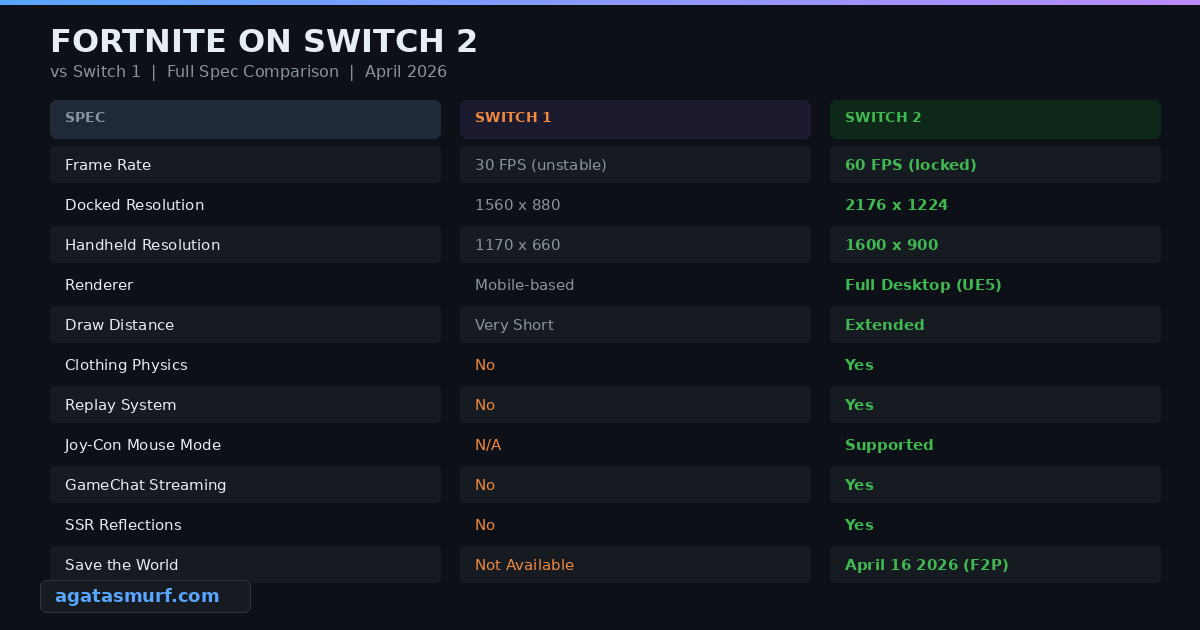
Switch 2 vs Switch 1: What Actually Changed
The original Switch version of Fortnite was rough. 30 FPS that dipped in busy fights, blurry textures, and draw distances so short you could barely see enemies gliding in. Trees looked like green blobs from the Battle Bus. Epic did their best, but the hardware just wasn’t there. The Switch 2 version? Completely different story.
The Switch 2 version runs on a totally different renderer. Epic ditched the mobile-based one from the old Switch and went straight to the full desktop renderer. SSR reflections for water and windows are in now too. The old Switch didn’t have those at all. Epic went with TSR for upscaling. The Switch 2’s Tegra chip can run DLSS natively, so I have no idea why they picked TSR instead. Unreal Engine 5 runs the show, but no Lumen, no Nanite. Nope. Not PS5 or Series X level, but it hangs with PS4 Pro and Xbox Series S pretty well.
| Spec | Switch 1 | Switch 2 |
|---|---|---|
| Frame Rate | 30 FPS (unstable) | 60 FPS (locked) |
| Docked Resolution | 1560×880 | 2176×1224 |
| Handheld Resolution | 1170×660 | 1600×900 |
| Renderer | Mobile-based custom | Full desktop renderer |
| Draw Distance | Short | Significantly extended |
| Clothing Physics | No | Yes |
| Replay System | No | Yes |
| Mouse Controls | No | Joy-Con 2 mouse mode |
| GameChat | No | Yes |
| Save the World | Not available | April 16, 2026 |
Handheld is where you really feel the gap. The old Switch got worse every season. By Chapter 5 and 6, every new effect Epic added just destroyed performance even more. Switch 2 at 900p and 60 FPS? Smooth. You can actually track people in build fights without the screen melting.
Loading on the old Switch was painful. Over a minute just to get into a lobby, and the skin menu lagged so hard you’d think the console was dying. Switch 2 loads matches in about 15-20 seconds and skins pop up instantly.
Gyro aiming also returns from the original Switch version, and it works alongside the new mouse controls. You can actually combine gyro with standard stick aiming for fine-tuning, which a lot of competitive Switch players already prefer over pure analog. And since Fortnite on Switch 2 uses input-based matchmaking when cross-play is active, your lobby composition depends on your input method: controller, mouse mode, or keyboard.
Performance Deep Dive: 60 FPS and the Desktop Renderer
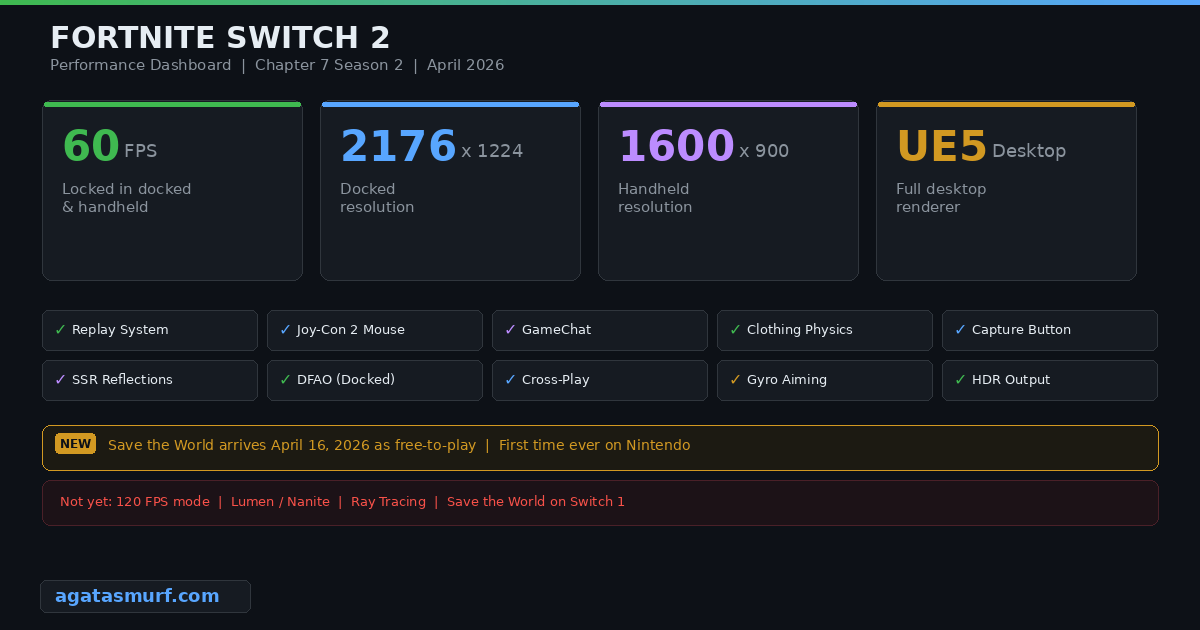
Look, everything else is nice, but 60 FPS is the reason to upgrade. Fortnite on Switch 2 finally runs at a frame rate that doesn’t actively sabotage you. The game is fast. Building, editing, flick shots, box fights… all of that requires responsive input and smooth frames. Doubling the frame rate changes how the game feels in your hands. Flick shots actually land. Edits register when you input them instead of half a second later. I noticed the difference in my first match, especially during build fights where the old Switch would chug and drop inputs.
Epic confirmed the Switch 2 uses their full desktop renderer with high-detail geometry. In docked mode you also get distance field ambient occlusion (DFAO) and shadow casting point lights. These are rendering features the old Switch couldn’t even dream about. No Lumen or Nanite though. The NVIDIA Tegra T239 chip in the Switch 2 can handle a lot, but ray-traced global illumination is still a stretch at 60 FPS. According to Epic’s official blog post, Fortnite on Switch 2 also features high-quality effects and shadow casting point lights that were never possible on the original hardware.
No 120 FPS mode yet. Other Switch 2 games do 120 Hz but Fortnite on Switch 2 stays at 60. Maybe Epic adds a performance mode someday, who knows.
This early gameplay footage shows how Fortnite on Switch 2 looks and runs in a live match:
Joy-Con 2 Mouse Controls: How They Work and Why They Matter
OK so this is the weird one. You can use one or both Joy-Con 2 controllers as a mouse for aiming in Fortnite on Switch 2. Not gyro aim (which the game also supports). Actual mouse mode where you physically move the Joy-Con like a mouse on a surface or in the air, and a cursor tracks your movement.
Setup takes about 10 seconds:
- Open Settings from the lobby or during a match.
- Go to the Mouse tab.
- Under “Mouse Controls,” pick Right, Left, or Both.
- The selected Joy-Con 2 now works as your mouse for aiming.
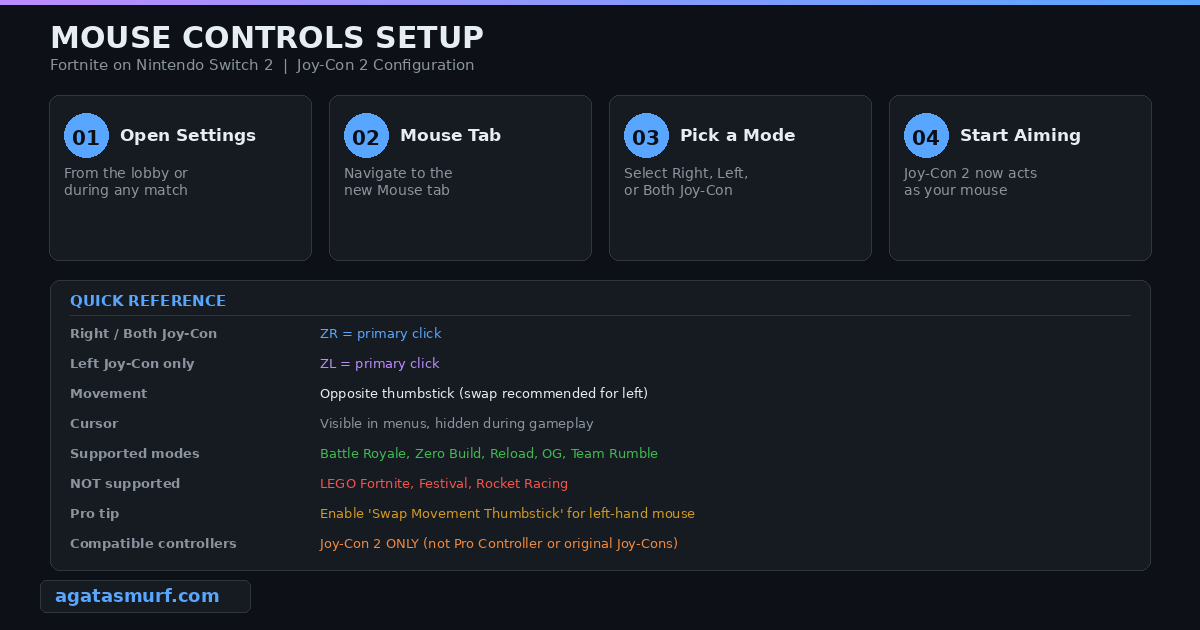
When mouse mode is active, the right analog stick gets disabled. ZR acts as your primary click if you’re using the right Joy-Con (or both). ZL becomes primary click if you’re using just the left one. If you go left-handed, Epic recommends enabling “Swap Movement Thumbstick” so your character moves with the right stick instead.
Mouse controls work in all Battle Royale modes: standard BR, Zero Build, Reload, Team Rumble, and Fortnite OG. LEGO Fortnite, Festival, and Rocket Racing don’t have mouse support though. Also, only the Joy-Con 2 supports mouse mode. Your old Switch 1 Joy-Cons or the Pro Controller won’t activate it.
I tested the mouse mode on Fortnite on Switch 2 sitting at a desk with the Joy-Con flat on the surface, and it felt surprisingly good. It’s not a replacement for a real mouse and keyboard setup on PC, but it gives you way more precision than analog sticks. For Zero Build especially, where flick shots matter more than building speed, it’s a real advantage.
Save the World Goes Free-to-Play on April 16
Save the World used to cost money, and no Nintendo console ever had it. That’s done. April 16, 2026, Epic drops the paywall everywhere, Switch 2 included. The original Switch won’t get it though, too much going on for that hardware to handle.
If you never played Save the World, it’s the OG Fortnite mode. Four-player co-op, you build a fort and defend it from waves of Husks. Separate hero leveling, weapon schematics, the whole grind. Basically a co-op tower defense RPG. This was the entire game before BR blew up in 2017.
Pre-registering before April 16 gets you some free stuff, including a Save the World Hero. Existing Founders who bought Save the World years ago keep their V-Buck earning perks through Daily Quests, Mission Alerts, and Storm Shield Defense Missions. That’s a nice touch from Epic, since Founders paid real money for a mode that’s now free.
Every Game Mode You Can Play Right Now
Once April 16 drops, literally every mode is there. Grab Fortnite on Switch 2 from the eShop, it’s free, about 18-20 GB. Here’s what you can play on Switch 2 right now:
- Battle Royale (solo, duo, trio, squad)
- Zero Build (all squad sizes)
- Fortnite OG (classic Chapter 1 map)
- Reload (smaller, faster BR)
- Team Rumble
- LEGO Fortnite Odyssey (survival crafting)
- LEGO Brick Life (social sim)
- Fortnite Festival (rhythm game)
- Rocket Racing
- Creative / UEFN islands (thousands of community maps)
- Save the World (from April 16, 2026)
Cross-play on Fortnite on Switch 2 works with PC, PlayStation, Xbox, mobile, even the original Switch. Fair warning though: Switch 1 and Switch 2 players share the same matchmaking pool. So if you upgrade to Switch 2, you’re playing against people on the old hardware too. That 60 FPS advantage over their 30 FPS is real, and some players on Reddit have reported winning way more often on Switch 2 just because of the performance gap.
How to Transfer Your Account After Upgrading
Coming from the old Switch? Your skins, V-Bucks, Battle Pass, all that stuff lives on your Epic account. It’s already waiting for you on Fortnite on Switch 2. There’s a catch though.
After a system transfer, the old “Fortnite for Nintendo Switch” app copies over. Delete it. Go to the eShop, search Fortnite, download the Switch 2 version. Different app entirely. Log in with your Epic account and your skins, V-Bucks, everything is right there. Nintendo and Epic accounts already linked? Cool, just log in.
GameChat, Replays, and the Capture Button
Three features that Fortnite on Switch 2 has that the old Switch never did:
GameChat lets you stream your game to three friends right from the Switch 2. Needs Nintendo Switch Online (the free window ended March 31, 2026). You can do voice without any extras, video needs a USB camera.
Replays are in. After a BR match you can rewatch the whole thing from any camera angle you want. PC and console had this forever but the old Switch couldn’t handle it.
Capture Button support means you can record gameplay clips using the Switch 2’s built-in capture function. The original Switch had this for some games, but Fortnite never supported it properly. On Switch 2 it just works.
How Does It Stack Up Against PS5, Xbox, and PC?
Where does Fortnite on Switch 2 sit? Below PC and current-gen consoles, obviously. A PC at 1440p 240 FPS with Lumen on is a different universe. PS5 and Series X run it at higher res with better lighting too.
For portable? Nothing touches it. Steam Deck runs Fortnite at 30 FPS and looks rough doing it. You can force 60 on Deck but the game looks like a PS3 title at that point. Fortnite on Switch 2 was built for this specific hardware and it runs way better than any other handheld option.
Docked, Fortnite on Switch 2 looks roughly like it does on a PS4 Pro or Xbox Series S. Not going to win any screenshot comparisons against a PS5, but honestly? When you’re in a late-game zone with 20 players building on top of each other, nobody is admiring the texture quality. Solid 60 FPS matters way more than extra pixels.
Battery takes a hit though. Fortnite on Switch 2 eats through a full charge in about 2 to 2.5 hours. The GPU is running flat out, Wi-Fi never stops, it just drains fast. Pack a charger. LEGO Fortnite and Rocket Racing are less demanding so you might stretch to 3 hours on those.
Current Season: Chapter 7 Season 2 Showdown
Right now we’re in Chapter 7 Season 2: Showdown. Started March 19, 2026, and should wrap up around June 5. The big new mechanic this season is the faction system where you choose between Team Foundation and Team Ice King. Winning rivalries earns points for your faction and Rival Credits for buying perks and weapons.
The new Arenas mode is worth checking out too. Ranked, builds only, close-quarters fights. Feels completely different from regular BR. Battle Pass this season has a Looney Tunes collab with themed skins. If you want to see how other games handle their ranked systems, we have a full guide on Marvel Rivals ranks for comparison.
For Fortnite on Switch 2 players specifically, everything in Chapter 7 Season 2 runs at the same 60 FPS with all the visual improvements mentioned above. The new season map changes and effects look noticeably better on the upgraded hardware compared to the old Switch.
Tips to Get the Most Out of Your Setup
After grinding ranked on Fortnite on Switch 2 for a while, these helped me the most:
Turn on 120 Hz in System Settings > Display. Fortnite caps at 60 FPS, but 120 Hz output on a good TV makes those 60 frames look a little cleaner.
Try mouse controls in a creative map first. Don’t jump straight into ranked with Joy-Con mouse mode. Load up a creative aim trainer and spend 20 minutes getting used to the sensitivity. You can fine-tune settings in the Mouse tab.
Use wired internet when docked. The Switch 2 dock has an Ethernet port. Plug in. Wi-Fi gets flaky during peak hours and that 200ms spike in a box fight will cost you the game.
Turn off HDR if you notice color banding. Some TVs don’t play nice with the Switch 2’s HDR output. If colors look washed out or you see banding in dark scenes, switch HDR to “Compatible Software Only” in display settings.
If you’re still grinding ranked in other games and need a fresh start, you might want to check out our LoL smurf accounts or Valorant accounts to skip the leveling process. And if you’re curious about how League of Legends ranked system works compared to Fortnite’s system, we have a full breakdown of that too.
Best Competitive Settings to Change From Default
Not a ton of graphics settings like PC, but these ones actually matter:
Brightness: Crank it to 130-150%. Dark corners inside buildings are a death trap if you can’t see the guy camping in them. The Switch 2 screen is better than the old one but still struggles with shadows.
Motion Blur: Off. Always off. You spin the camera fast in a fight and the whole screen turns to soup. Nobody who plays competitively keeps this on.
Visual Sound Effects: Up to you, but I keep it on when playing handheld without headphones. It puts little directional arrows on screen when someone shoots or runs nearby. Audio takes a small hit, but knowing which direction that shotgun came from is worth it.
Controller Dead Zone: Drop it to 5-8% from the default. The default dead zone on Switch controllers is high, which means small stick movements don’t register. A lower dead zone makes your aim feel more responsive. If you notice stick drift at low values, bump it back up.
Build Mode Sensitivity: If you play with builds, set this higher than your normal sensitivity (1.5-2x multiplier). You want fast camera movement when building but slower, precise aim when shooting. Fortnite on Switch 2 lets you set these independently.
HUD Scale: Drop it to 75-80%. Default is huge. Shrink it and you actually get to see what’s happening in handheld.
Common Issues and How to Fix Them
Seen these come up on Reddit and Discord a bunch:
“Old Fortnite app transferred and won’t update.” Super common. The Switch 1 and Switch 2 versions of Fortnite are literally different apps. Nuke the old one, go to the eShop, download the Switch 2 one. Takes two minutes.
“FPS drops during big endgame fights.” The 60 FPS target holds in most situations, but very dense late-game circles with lots of building can cause brief dips. Closing any background apps helps free up RAM. Restarting the console before a long session also prevents thermal throttling.
“Mouse controls feel too sensitive.” The Joy-Con 2 mouse sensitivity needs tuning for most people. Go to Settings > Mouse and adjust the sensitivity slider. Start lower than you think, around 30-40%, and work up. The Joy-Con 2 tracking is quite sensitive, so a little physical movement goes a long way.
“GameChat requires Switch Online now.” The free trial ended March 31, 2026. You need a paid Nintendo Switch Online sub now or GameChat won’t work.
“Textures look blurry docked.” Probably your TV messing it up. Swap to an HDMI 2.0 cable, turn on Game Mode on your TV (kills all that fake sharpening junk), and then inside Fortnite go flip on “High-Resolution Textures” if it’s off.
Will 120 FPS or Ray Tracing Come Later?
No, but maybe eventually.
The chip has 120 Hz output and NVIDIA RT cores. So on paper, both are possible. In practice? Fortnite on Switch 2 at 2176×1224 with the desktop renderer is already squeezing the GPU. If Epic wanted 120 FPS they’d have to cut resolution to 1080p or lower and pull back on shadows and lighting. People on r/FortniteBR want the option. Epic hasn’t responded.
Ray tracing is a bigger ask. Fortnite on PC runs Lumen and Nanite, neither of which made it to Switch 2. The RT cores might manage ray-traced shadows at 30 FPS, but that’s a completely separate rendering setup Epic would need to build from scratch. After spending however long they spent getting the 60 FPS port working, I can’t see them jumping into that project right away. If it happens, probably not before the end of 2026.
So yeah, 60 FPS at near-1440p in a handheld. I’ll take it. Fancy lighting at half the frame rate isn’t a trade I’d make.
Frequently Asked Questions About Fortnite on Switch 2
Does Fortnite run at 60 FPS on Nintendo Switch 2?
Yeah, locked 60 no matter if you’re docked or handheld. Old Switch could barely hold 30.
What resolution does Fortnite run at on Switch 2?
2176×1224 docked, 1600×900 handheld. Roughly double what the old Switch was pushing in both modes.
How do mouse controls work in Fortnite on Switch 2?
Go to Settings, open the Mouse tab, pick Right, Left, or Both. Your Joy-Con 2 turns into a pointer you move like a mouse. Works in BR, Zero Build, Reload, and Fortnite OG. Not in LEGO or Festival.
Is Save the World available on Nintendo Switch 2?
From April 16, 2026 it is. Goes free-to-play on that date. First time a Nintendo console has ever gotten Save the World.
Do I need to redownload Fortnite when upgrading from Switch to Switch 2?
You have to. The old app won’t work. Trash it, get the Switch 2 version from the eShop. Log in and your account is right there.
Does Fortnite on Switch 2 support cross-play?
Yep. PC, PlayStation, Xbox, mobile. Switch 1 players too, they’re in the same lobbies as Switch 2.
Will Fortnite on Switch 2 get 120 FPS?
Nope. 60 FPS cap for now. The Switch 2 does 120 Hz on other games, but Epic hasn’t touched this for Fortnite yet.
Last updated: April 2026
