Valorant crosshairs let you fully customize your reticle, and by 2026 the meta has basically locked in on small, static setups with movement and firing error off. Look at any VCT match and around 9 out of 10 pros are running cyan, green, or white Valorant crosshairs with no center dot and inner lines only. I’ve grabbed the codes you want, plus explain why each one works.
Patch as of writing: V26 Act 1. I update these codes every month or two when pros switch setups.

TL;DR: Run a small cyan classic cross with outlines on, center dot off, inner line length 3-4, thickness 1, gap 1-2, and both Movement Error + Firing Error disabled. Best pro code to start with is TenZ’s:
0;s;1;P;c;5;h;0;m;1;0l;4;0o;2;0a;1;0f;0;1b;0;S;c;4;o;1. Import it via Settings > Crosshair > Import Profile Code.
Top Pro Valorant Crosshair Codes for 2026
Pulled these Valorant crosshairs straight from VCT broadcasts this season. Double-checked against prosettings.net so you’re not getting last year’s setups. Ten seconds from clipboard to in-game.
| Player | Team | Style | Color | Crosshair Code |
|---|---|---|---|---|
| TenZ | Sentinels | Small cross | Cyan | 0;s;1;P;c;5;h;0;m;1;0l;4;0o;2;0a;1;0f;0;1b;0;S;c;4;o;1 |
| Shroud | Streamer | Medium cross | White | 0;P;o;0.506;d;1;z;1;0t;1;0l;4;0o;2;0a;1;0f;0;1b;0 |
| aspas | MIBR | Outlined dot | Cyan | 0;s;1;P;u;D099E2FF;o;1;d;1;0b;0;1b;0;S;c;0;s;0.5;o;1 |
| Demon1 | NRG | Small cross | Cyan | 0;s;1;P;o;1;f;0;0t;1;0l;3;0o;2;0a;1;0f;0;1b;0 |
| ScreaM | Team Falcons | Pure dot | White | 0;P;c;5;o;0.286;d;1;f;0;0t;0;0l;0;0o;0;0a;1;0f;0;1b;0 |
| Cryocells | 100 Thieves | Small cross | White | 0;P;h;0;0l;4;0o;0;0a;1;0f;0;1b;0 |
| yay | Apeks | Small cross | Cyan | 0;s;1;P;h;0;d;1;m;1;0l;4;0o;1;0a;1;0f;0;1b;0 |
| nAts | Team Spirit | Small cross | White | 0;P;c;1;o;1;f;0;0t;1;0l;2;0o;2;0a;1;0f;0;1b;0 |
| Asuna | 100 Thieves | Minimal cross | White | 0;P;o;1;0t;1;0l;2;0a;1;0f;0;1b;0 |
| valyn | NRG | Small cross | White | 0;s;1;P;c;1;o;1;0t;1;0l;3;0a;1;0f;0;1b;0;S;s;0.65 |
Heads up, pros swap their reticles a few times a year. If a code below shows a slightly different look than what you saw on TenZ’s stream yesterday, he probably tweaked it. Normal stuff, I re-check these monthly.
Which Valorant Crosshair Type Should You Actually Use?
Five legit reticle styles for Valorant crosshairs exist. Most players don’t even know that. Pick the wrong one for your aim style and you’re kind of sabotaging yourself from the main menu. Pros pick based on what their mechanics need, not what looks cool on stream.

Classic Cross Valorant Crosshair
The standard four-line Valorant crosshair that most FPS players are used to. Inner lines only, no center dot, static. So this is what roughly 70% of pro players run because it gives enough reference point without cluttering your screen at head level. Overall best for Phantom and Vandal users who mix tapping and spraying.
Dot Crosshair
Just a dot in the center. No lines. Weird at first but it kinda forces you to actually aim with crosshair placement instead of looking for your lines. ScreaM rocked a dot back in CS:GO days and kept it in Valorant. Quick warning though, if you’re not Plat yet, the dot will feel rough. You’ll miss a lot of the passive info the cross gives you basically for free.
T-Shape Reticle
Same as the classic cross but with the top line removed. So less visual noise above the target, which some duelists prefer. Basically, the idea is that you want to see the enemy’s head without a line covering it. For example, Jett and Raze players gravitate toward this because they’re often shooting from strange angles and angles mid-air.
Circle Crosshair (Outer Lines Only)
Built by cranking up the outer line settings instead of inner lines. So this is useful for shotguns or close-range Reyna gameplay where you need a wider reference. However, not really a ranked crosshair for most people. But you’ll see it on Chamber players sometimes because the gap helps track enemies stepping into corners.
Dynamic Crosshair
Expands when you walk or shoot. Fine if you’re brand new and still learning when your shots are actually accurate, but ditch it the moment you hit Gold. Every decent player has Movement Error and Firing Error set to OFF. Static reticles build proper muscle memory. Dynamic ones just teach you to stare at your own crosshair instead of the enemy.
Best Valorant Crosshair Settings: The Full Breakdown
First time opening the menu for Valorant crosshairs you’re hit with like 15 sliders. Most of them don’t actually matter. Here’s what to touch and what to ignore.
| Setting | Recommended Value | What It Does |
|---|---|---|
| Color | Cyan (5) or Green (1) | Visibility against map backgrounds |
| Outlines | ON, opacity 0.5-1 | Black border around lines, helps on bright maps |
| Center Dot | OFF for most players | Adds a dot at the exact center of the crosshair |
| Inner Lines Length | 3-5 | How long the four crosshair lines are |
| Inner Lines Thickness | 1-2 | Width of each line (thinner = more precise feel) |
| Inner Lines Gap | 1-3 | Space between the line ends and the center |
| Movement Error | OFF | Crosshair expanding when you walk/strafe |
| Firing Error | OFF | Crosshair expanding when you shoot |
| Outer Lines | OFF (optional) | Additional lines outside the main cross |
| Override Sniper Sight | Optional | Forces your crosshair on scope weapons |
| Override ADS Sight | OFF recommended | Forces your crosshair when aiming down sights |
The two settings that matter most for Valorant crosshairs are Movement Error and Firing Error. So turn both off. No exceptions. For example, I’ve seen people in Gold and Plat lobbies with dynamic crosshairs and they literally can’t tell when they’re standing still versus running. Basically, that’s the biggest fix right there. After that, everything else is fine-tuning.
Best Colors for Valorant Crosshairs
Color choice for Valorant crosshairs isn’t purely aesthetic. It’s about contrast. Your crosshair needs to pop against every map texture you’ll encounter, from Breeze’s white walls to Bind’s orange sandstone to Lotus’s dark interiors.
Cyan (color code 5) is the #1 pick among VCT pros in 2026 and has been for multiple seasons. Most Valorant crosshairs on the pro scene are cyan. It contrasts well against the warm palettes on Haven, Sunset, and Bind. You’re not finding cyan walls on those maps.
Green (color code 1) still works well, but Abyss and some Haven A-site areas can make green Valorant crosshairs harder to track. Lot of pros switched off green when Haven A got its lighting rework back in Episode 8.
White crosshairs are fine until you hit bright maps. For example, Breeze’s B site, Icebox’s snow sections, and Pearl’s white marble can wash out a white crosshair fast. So if you run white, at least enable outlines.
Also, avoid red and orange. Because they blend into enemy highlights and ability effects, especially when Reyna uses Devour or Phoenix throws a fire wall.
- Cyan (code 5): Best overall visibility, #1 choice for most maps
- Green (code 1): Good but weaker on newer maps
- White (code 4): Solid with outlines enabled
- Yellow (code 8 with hex): High contrast, underused, worth testing
- Pink (custom hex): Popular with certain streamers, works fine for visibility
- Red/Orange: Avoid in ranked
Static vs. Dynamic Valorant Crosshairs: Why Pros Always Go Static
This debate was settled years ago at Immortal and above. Every pro runs static Valorant crosshairs. Here’s why it matters.
When your crosshair is dynamic, you start watching it instead of the game. Basically, you subconsciously wait for it to stop expanding before you shoot, which burns reaction time. So the crosshair becomes another thing to process, and in Valorant, where a headshot takes maybe 0.1 seconds to land or miss, that processing overhead matters.
Static Valorant crosshairs also build better mechanical memory. Your aim trains to be still when you shoot because the crosshair gives no feedback either way. You learn the rhythm of stop-shoot from game sense, not from watching a visual indicator.
The only argument for keeping Movement Error on is when you’re brand new to tactical shooters and genuinely don’t know when you’re walking. Fair. Turn it off once you’ve hit Silver.
Best Valorant Crosshairs for CS2 Players
If you’re a CS2 player jumping into Valorant, you’ll feel most comfortable with a classic cross and no center dot. For example, ScreaM, Shroud, and a bunch of the top EMEA players came from CS and their Valorant crosshairs reflect that. Basically, the Gap setting in Valorant is the offset from CS2, just named differently.
One thing to note: Valorant’s first-bullet accuracy is tighter than CS2’s when you’re standing still. That means you don’t need as large a gap to “trust the dot.” Pros coming from CS2 often start with a slightly bigger gap on their Valorant crosshairs and shrink it over time as they adjust to Valorant’s tighter accuracy model.
For context on how your agent affects your ranked experience once the crosshair feels right, check out the Valorant agent tier list to see which picks are actually worth playing right now.
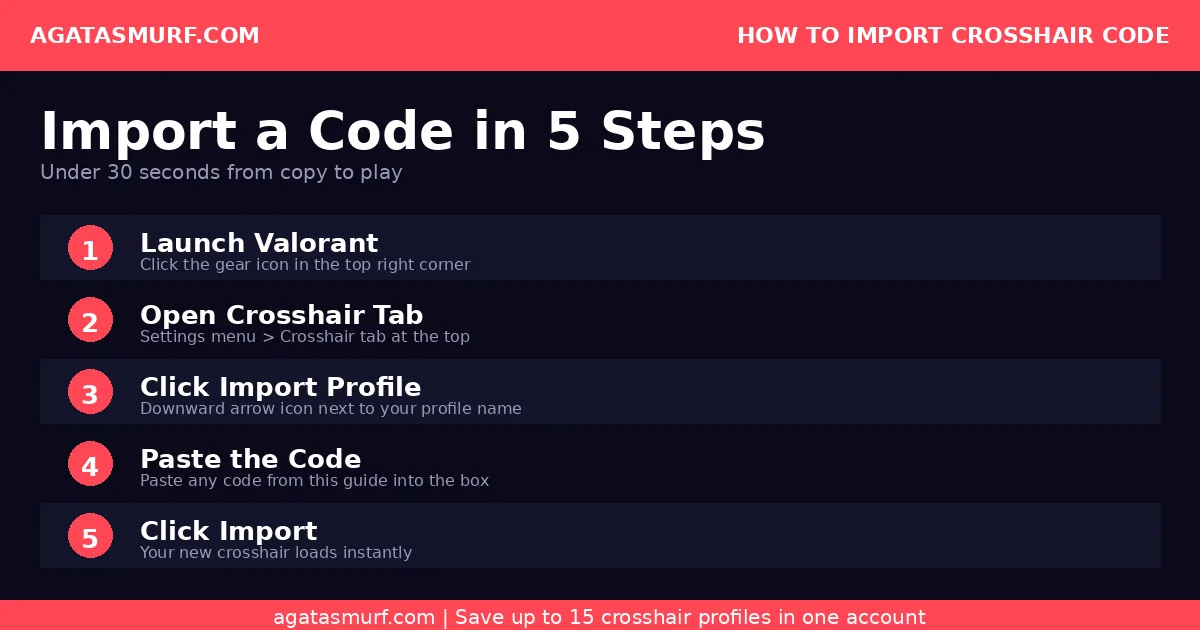
How to Import Valorant Crosshairs via Code

Thirty seconds total. Here:
- In-game, click the gear (top right corner).
- Open the Crosshair tab.
- Next to your profile name there’s a downward arrow icon. That’s import.
- Paste the code, click Import.
- Preview updates instantly. Done.
You get 15 slots. Use them. I always have at least 3 running at once: my main cross, a dot I mess with when I feel like tapping, and whatever pro code I’m testing that week. No reason to wipe your old main when you’re trying something new.
Don’t queue ranked with fresh Valorant crosshairs. Hop into The Range, hit bots at close (5m), mid (15m), and long (30m+) distances. If you’re landing heads at all three, keep it. Long range feels off? Tighten the gap and shrink the lines a bit.
If you want to see 25 different crosshairs in action before picking one, this video walks through a solid chunk of them with the code for each:
Valorant Crosshair Code Decoder: What Every Letter Means
Nobody actually explains what all those random letters mean in a code. Here’s the full thing. Once you know it, you can glance at any pro code and picture the reticle before even importing.
We’ll use TenZ’s code to walk through it: 0;s;1;P;c;5;h;0;m;1;0l;4;0o;2;0a;1;0f;0;1b;0;S;c;4;o;1
Semicolons separate each value. Breakdown below.
| Parameter | What It Controls | Typical Values |
|---|---|---|
0 |
Code version (always 0) | 0 |
P |
Primary crosshair block starts here | Always appears |
c |
Color picker. 0 white, 1 green, 2 yellow-green, 3 green-yellow, 4 yellow, 5 cyan, 6 pink, 7 red, 8 custom hex | 5 = cyan, by far most used |
u |
Custom hex color (only when c=8) | e.g., FF99FFFF (pink) |
h |
Outlines on/off | 0 = off, 1 = on |
t |
Outline thickness | 1-10 |
o |
Outline opacity | 0 to 1 (e.g., 0.5) |
d |
Center dot on/off | 0 = off, 1 = on |
z |
Center dot thickness | 1-6 |
a |
Center dot opacity | 0 to 1 |
m |
Override all primary settings with ADS sight | 0 = off, 1 = on |
f |
Fade crosshair | 0 = off, 1 = on |
s |
Override firing error offset | 0 or 1 |
0t |
Inner lines thickness | 1-10 |
0l |
Inner lines length | 0-20 |
0v |
Inner vertical line length (if different from horizontal) | 0-20 |
0g |
Inner line override vertical | 0 or 1 |
0o |
Inner lines gap (offset from center) | 0-20 |
0a |
Inner lines opacity | 0 to 1 |
0f |
Inner line movement error | 0 = off, 1 = on |
0m |
Inner line firing error | 0 = off, 1 = on |
0b |
Inner line override firing error | 0 or 1 |
1t, 1l, 1v, 1o, 1a, 1f, 1m, 1b |
Same as above but for OUTER lines | Same ranges |
S |
Sniper scope crosshair block starts | Appears when sniper override is on |
A |
ADS crosshair block starts | Appears when ADS override is on |
Using TenZ’s code as an example: c;5 means cyan color, h;0 means outlines off (actually wait, his pros set has h;0 which is outlines toggle, but since outline params t/o aren’t further specified it defaults). m;1 keeps ADS override on. 0l;4 means inner line length 4. 0o;2 is a gap of 2. 0a;1 is full opacity. 0f;0 is movement error off. 1b;0 means no outer line override. S;c;4;o;1 sets the sniper crosshair to yellow full opacity.
Once the format clicks, you can edit codes in notepad without even opening Valorant. Handy for sending teammates quick tweaks or stashing backup reticles before a big patch wipes things.
How to Export Your Crosshair and Share With Friends
Imports go both ways. You can also export the setups you’ve built yourself and share them around. Steps:
- Settings, then Crosshair tab.
- Click the upward arrow icon next to your profile name.
- Code copies to your clipboard automatically.
- Drop it in Discord, X, a note, wherever.
I’ve got a random Apple Notes file with 8 different codes pasted as text. Sounds overkill until a patch nukes your profile, then you’re rebuilding from memory at 2am. Learned that the hard way after Patch 10.04 reset everything on me.
Extended Pro Valorant Crosshair Codes by Region
Crosshair trends actually shift by region. Pacific pros tend toward dots, Americas leans cyan classic crosses, EMEA mixes it up more. Here are active VCT 2026 rosters so you can find someone with a similar role or playstyle to copy from.
VCT Americas Pro Valorant Crosshairs
NA and SA reticles lean cyan classic cross across the board, with the aspas-school of purple dots as the other main variant.
| Player | Team | Crosshair Code |
|---|---|---|
| aspas | MIBR | 0;s;1;P;u;D099E2FF;o;1;d;1;0b;0;1b;0;S;c;0;s;0.5;o;1 |
| Demon1 | NRG | 0;s;1;P;o;1;f;0;0t;1;0l;3;0o;2;0a;1;0f;0;1b;0 |
| Cryocells | 100 Thieves | 0;P;h;0;0l;4;0o;0;0a;1;0f;0;1b;0 |
| Asuna | 100 Thieves | 0;P;o;1;0t;1;0l;2;0a;1;0f;0;1b;0 |
| valyn | NRG | 0;s;1;P;c;1;o;1;0t;1;0l;3;0a;1;0f;0;1b;0;S;s;0.65 |
| JonahP | G2 | 0;P;h;0;0l;3;0o;0;0a;1;0f;0;1b;0 |
| leaf | Cloud9 | 0;P;c;8;u;FF99FFFF;h;0;b;1;0l;4;0o;1;0a;1;0f;0;1t;0;1l;0;1o;0;1a;0;1m;0;1f;0 |
| Boostio | 100 Thieves | 0;P;c;5;h;0;0l;5;0o;1;0a;1;0f;0;1t;0;1l;0;1o;0;1a;0;1m;0;1f;0 |
| trent | Sentinels | 0;P;o;1;0t;1;0o;1;0a;1;0f;0;1l;0;1a;0;1m;0;1f;0 |
| jawgemo | Evil Geniuses | 0;s;1;P;c;7;u;000000FF;o;1;d;1;f;0;0l;2;0v;0;0g;1;0o;0;0a;1;0f;0;1b;0;S;s;0.75;o;1 |
VCT EMEA Pro Valorant Crosshairs
EMEA reticles are the most varied bunch. A lot of the players came from CS:GO so you see more dot crosshairs and heavier outline usage than other regions.
| Player | Team | Crosshair Code |
|---|---|---|
| Derke | Fnatic | 0;s;1;P;u;D099E2FF;o;1;d;1;0b;0;1b;0;S;c;0;s;0.5;o;1 |
| Leo | Fnatic | 0;s;1;P;h;0;0l;3;0v;4;0o;0;0a;1;0f;0;1b;0;S;c;0;s;0.64 |
| Boaster | Fnatic | 0;s;1;P;c;1;o;1;d;1;0l;0;0o;2;0a;1;0f;0;1t;0;1l;0;1o;0;1a;0;S;c;1;o;1 |
| cNed | FUT Esports | 0;P;c;8;u;00008BFF;h;0;b;1;f;0;0l;3;0o;2;0a;1;0f;0;1b;0 |
| nAts | Team Spirit | 0;P;c;1;o;1;f;0;0t;1;0l;2;0o;2;0a;1;0f;0;1b;0 |
| Alfajer | Fnatic | 0;s;1;P;c;5;o;1;d;1;z;3;0b;0;1b;0;S;s;0.628;o;1 |
| crashies | Team Heretics | 0;P;h;0;0l;3;0v;3;0g;1;0o;2;0a;1;1b;0 |
| Chronicle | Team Spirit | 0;s;1;P;c;5;o;1;f;0;0b;0;1b;0;S;c;4;s;0.75 |
| kaajak | Karmine Corp | 0;s;1;P;o;1;d;1;f;0;0b;0;1b;0;S;t;000000FF;s;0.603;o;1 |
VCT Pacific Pro Valorant Crosshairs
Pacific reticles lean small and tight. Most players run cyan crosses with minimal visual footprint, which suits the region’s fast tempo playstyle.
| Player | Team | Crosshair Code |
|---|---|---|
| Jinggg | Paper Rex | 0;P;c;5;h;0;0l;3;0o;2;0a;1;0f;0;1b;0 |
| f0rsakeN | Paper Rex | 0;P;h;0;0t;1;0l;4;0o;1;0a;1;0f;0;1t;3;1o;2;1b;0;S;c;0;s;0.689;o;1 |
| MaKo | DRX | 0;s;1;P;c;1;o;1;f;0;0l;4;0a;1;0f;0;1b;0 |
| stax | T1 | 0;P;c;5;h;0;0l;4;0o;2;0a;1;0f;0;1b;0;S;s;0.75 |
| Life | Gen.G | 0;s;1;P;c;5;h;0;f;0;s;0;0l;4;0o;2;0a;1;0f;0;1b;0;S;s;0.86;o;1 |
| BuZz | DRX | 0;P;c;1;h;0;0l;3;0o;2;0a;1;0f;0;1b;0 |
VCT China and Streamer Valorant Crosshairs
China’s VCT crosshairs are all over the map in terms of style, but the top streamers mostly run variations of the aspas-style purple dot.
| Player | Team / Channel | Crosshair Code |
|---|---|---|
| ZmjjKK | EDward Gaming | 0;p;0;s;1;P;c;7;o;1;f;0;s;0;0t;1;0l;3;0o;2;0a;1;0f;0;1b;0;A;o;1;d;1;0b;0;1t;0;S;c;0;s;0.591;o;1 |
| Smoggy | Bilibili Gaming | 0;s;1;P;c;2;o;1;d;1;f;0;0b;0;1b;0;S;c;0;o;1 |
| CHICHOO | Trace Esports | 0;P;c;1;o;1;f;0;s;0;0t;1;0l;2;0o;2;0a;1;0f;0;1b;0 |
| Kyedae | Streamer | 0;s;1;P;u;D099E2FF;o;1;d;1;0b;0;1b;0;S;c;0;s;0.5;o;1 |
| Tarik | Streamer | 0;s;1;P;u;D099E2FF;o;1;d;1;0b;0;1b;0;S;c;0;s;0.5;o;1 |
| ATA KAPTAN | BBL Esports | 0;s;1;P;o;1;f;0;0l;4;0o;2;0a;1;0f;0;1b;0;S;c;5;s;1.142;o;0.829 |
Quick note: D099E2FF is a pale purple custom hex that aspas, Kyedae, Tarik, and Derke all use. Probably the most copied custom color across all pro Valorant crosshairs. Works weirdly well against most maps because it contrasts both cool and warm tones.
Also note on f0rsakeN’s code: it’s one of the few pro setups with movement indicators still on. However, he plays on stretched resolution and the movement indicator actually aligns with how he reads spacing at those aspect ratios. So don’t copy it unless you also play stretched. Otherwise it’ll feel wrong on native 16:9.
Fun and Aesthetic Valorant Crosshair Codes
Not every game needs to be tryhard mode. These Valorant crosshairs are pure fun, meme codes, aesthetic builds, novelty reticles. Good for Swiftplay, deathmatch, messing around with friends. Probably don’t bring them to Immortal ranked unless you want to lose on purpose.
| Style | Code | Best Mode |
|---|---|---|
| Among Us | 0;c;1;P;c;5;t;3;o;1;f;0;0t;10;0l;1;0v;0;0g;1;0o;4;0a;1;0f;0;1t;9;1o;0;1a;1;1m;0;1f;0 |
Swiftplay / Custom |
| Cat Face | 0;P;u;FC5A8DFF;h;0;d;1;z;3;f;0;m;1;0t;10;0l;0;0v;3;0g;1;0o;1;0a;1;0f;0;1t;9;1v;0;1g;1;1o;3;1a;1;1m;0;1f;0 |
Deathmatch |
| Candy | 0;P;c;8;u;FF7ED1FF;h;0;b;1;0t;5;0l;2;0v;0;0g;1;0a;1;0f;0;1t;3;1l;5;1v;1;1g;1;1o;1;1a;1;1m;0;1f;0 |
Casual |
| Daisy | 0;P;c;6;o;1;d;1;z;4;f;0;m;1;0t;8;0l;3;0o;2;0a;0;0f;0;1l;3;1o;3;1a;0;1m;0;1f;0 |
Any casual mode |
| Flappy Bird | 0;P;c;1;t;3;o;1;f;0;0t;6;0l;20;0o;13;0a;1;0f;0;1t;9;1l;4;1o;9;1a;1;1m;0;1f;0 |
Custom games |
| Googly Eyes | 0;c;1;s;1;P;t;4;o;1;d;1;z;5;a;0.556;0t;10;0l;20;0v;0;0g;1;0o;13;0a;1;0f;0;1t;1;1l;1;1v;0;1g;1;1o;14;1a;1;1s;0.064;1e;0.375;S;c;3;s;0.628;o;1 |
Unrated |
| Invisible (Impossible Mode) | 0;P;c;8;b;1;t;1;o;0;z;2;a;1;0t;2;0l;6;0v;6;0o;3;0a;0.8;0s;1;0e;1;1t;2;1l;2;1v;2;1o;10;1a;0.35;1s;1;1e;1;u;FFFFFF;d;0;h;0;0g;0;1g;0;0f;1;1f;1;0m;0;1m;1;0b;0;1b;0;m;0 |
Don’t actually use this |
Fair warning: some of these completely block your sight lines. The Flappy Bird one is huge. The Cat Face Valorant crosshair is actually not bad for tracking in TDM. Googly Eyes is a visual disaster but hilarious on stream. Use accordingly.
Valorant Crosshairs on PS5 and Xbox (Console)
Valorant hit PS5 and Xbox Series X|S back in 2024. Most PC codes still import just fine on console, but the experience isn’t identical. Couple things to watch for:
- Aim assist: Console Valorant has adjusted aim assist. Tiny dot crosshairs feel weirder because aim assist already pulls your reticle toward enemies. Most console pros run slightly larger setups than their PC counterparts.
- Stick sensitivity interaction: If you’re on controller, a dot-only crosshair can feel floaty during small stick adjustments. A small cross gives you a visual anchor that a dot doesn’t.
- TV vs monitor viewing distance: If you’re gaming on a 55 inch TV 10 feet away, a small 1080p crosshair can literally disappear. Scale up length to 5-6 and thickness to 2 for readability at TV distances.
- Solid starter code for controller players:
0;P;c;5;h;0;f;0;0l;5;0o;2;0a;1;0f;0;1b;0. Slightly bigger than TenZ’s so the aim assist pull doesn’t feel weird.
Riot baked a few console-exclusive crosshair shape presets into that version’s UI, but import works the same. Any PC pro code pastes straight into console through the same menu path.
Common Valorant Crosshair Problems and Fixes
Quick fixes for the stuff that actually breaks when people set up Valorant crosshairs for the first time.
Problem: My crosshair keeps resetting after patches. Happens after big updates. Export your Valorant crosshairs to a notepad file before every major patch. Profile wipes? Paste them back in 10 seconds.
Problem: Imported code looks different from the screenshot I saw. Screenshots get taken at one specific resolution. What’s perfect at 1440p ends up oversized at 1080p or invisible at 4K. Tweak length and thickness after you import, not a bug.
Problem: My Valorant crosshairs disappear during smokes or flashes. Crank outline opacity to 1 and go with a brighter color like cyan or yellow. Pink (FF99FFFF custom hex) actually cuts through most smokes surprisingly well.
Problem: My crosshair feels off on one specific map. That’s normal. Map lighting affects visibility. Either switch to a different colored profile for that map, or enable outlines if they’re off.
Problem: Copied a pro’s code and my aim actually got worse. Happens constantly. Pro reticles are built around their sensitivity, their monitor, their aiming muscle memory, which you don’t have. Use pro Valorant crosshairs as a starting point, give any new Valorant crosshair 15-20 games before dropping it.
Problem: My sniper scope crosshair doesn’t import. Some code strings don’t include a sniper block (the S;c;… section at the end). In that case, Valorant uses the default sniper reticle. If you want the custom one, enable the Sniper Override in settings manually.
Build Your Own Valorant Crosshair From Scratch
Prefer making your own Valorant crosshairs over copying pros? I get it, feels more personal. Start with this template and tweak from there:
| Setting | Starting Value |
|---|---|
| Color | Cyan (5) |
| Outlines | On, Opacity 0.8 |
| Center Dot | Off |
| Inner Line Opacity | 1 |
| Inner Line Length | 4 |
| Inner Line Thickness | 1 |
| Inner Line Gap | 2 |
| Movement Error | Off |
| Firing Error | Off |
| Outer Lines | Off |
Code for that template: 0;P;c;5;h;0;f;0;0l;4;0o;2;0a;1;0f;0;1b;0. Import it and start from there.
After that, adjust whatever annoys you. Hard to spot your crosshair? Bump up length. Covering the target too much? Drop length and gap. Missing long-range heads because lines eat the model? Length 2-3, gap 1.
Bear with me here: this sounds like a lot of micro-adjusting, but in practice you’ll know within about 20 minutes of deathmatch whether a crosshair works for you. Good Valorant crosshairs are something you feel more than analyze.
The One Mistake That Kills Valorant Crosshairs Gains
Constantly swapping Valorant crosshairs. Everyone does it. You try TenZ’s, play 3 games, nothing clicks, jump to Shroud’s. Then back. Then a dot. Your muscle memory never locks in and your aim stays mid forever.
Lock in one crosshair for at least two weeks of ranked. Call it 30-40 games minimum. Your aim starts molding itself around where that reticle sits. Pros almost never touch their setups mid-split unless they bought a new monitor or dropped their sens. TenZ has been running a tiny cyan cross in some form for literally years.
The crosshair is also only one piece of the settings puzzle. For the full picture of what pros run in 2026, the best Valorant pro settings guide covers sensitivity, graphics, and keybinds alongside crosshair choices.
Once your crosshair is dialed in and you want to jump into actual ranked games without grinding the placement match phase, ranked ready Valorant accounts let you skip straight to competitive. Useful if you’re testing a new agent or just want a fresh start on a different server region.
Picking Valorant Crosshairs by Playstyle
No universal best Valorant crosshair exists, the right pick depends on how you play. Quick mapping of role to reticle:
- Entry fraggers (Jett, Raze, Neon): Small classic cross or dot. You’re making fast decisions at close-to-mid range, so precision beats comfort here.
- Riflers / flex players: TenZ’s or Demon1’s style works. A small cyan cross with a gap around 1-2 gives you both precision and spray reference.
- Operators / Chamber mains: Dot crosshair or center dot enabled. Your primary shots are standing-still taps. The dot trains that habit aggressively.
- Support controllers (Astra, Brimstone, Omen): Valorant crosshairs matter less here, utility timing matters more. A medium white cross with slight gap works fine when you do take duels.
- Brand new players: BeYN’s code from the table above. Small cyan cross, nothing fancy. Play 100 games with it before you even think about changing anything.
The Valorant agent tier list can also help you pick what to play based on current patch strength, which affects what crosshair style you’ll actually be using most.
Map-Specific Valorant Crosshair Tips
Most people run one Valorant crosshair across every map, but it’s worth knowing which maps mess with visibility based on color:
Breeze and Icebox: Bright whites and light blues. White crosshairs wash out here. Cyan or green is safer. Enable outlines if you run white.
Bind and Haven: Warm terracotta and stone. Cyan shines here. Avoid orange or red entirely.
Lotus and Sunset: Mixed dark and lit sections. So most colors work, but cyan stays consistent.
Split: After the rework, the lighting is more neutral. Cyan and green Valorant crosshairs both hold up fine.
You can actually save a map-specific profile in Valorant since you get 15 slots. Some players keep a bright yellow or pink crosshair just for Breeze/Icebox where their main gets hard to track. Bit of extra setup time, but genuinely useful if those maps are in your rotation and you want your Valorant crosshairs to stay sharp on every backdrop.
For more on how many people are actually playing Valorant right now and why the server quality has been decent lately, the Valorant player count breakdown has current stats and trends.
And if you need a fresh account to experiment without touching your main’s rank, our Valorant accounts are fully leveled and region-specific, ready for ranked or unrated from day one.
Best Valorant Crosshair Codes by Agent Role
Barely anyone talks about this, but your agent actually changes what crosshair works best for you. A Chamber one-tapping from A long doesn’t need the same reticle as a Raze satcheling into B site. Here’s what fits what.
| Role | Best Style | Starter Code | Reasoning |
|---|---|---|---|
| Duelist (Jett, Raze, Neon, Phoenix) |
Small classic cross, cyan | 0;P;c;5;h;0;f;0;0l;3;0o;2;0a;1;0f;0;1b;0 |
Fast movement, wide flicks, multiple engagements per round. Small reticle keeps sightlines clean. |
| Duelist Tapper (Reyna, Iso, Yoru) |
Outlined dot | 0;s;1;P;u;D099E2FF;o;1;d;1;0b;0;1b;0 |
Rewards deliberate taps and headshot precision. Most popular is the aspas-style purple dot. |
| Initiator (Sova, KAY/O, Gekko, Skye, Fade) |
Medium cross with slight outline | 0;P;c;1;o;1;0t;1;0l;4;0o;3;0a;1;0f;0;1b;0 |
Larger gap helps with utility lineup alignment. Longer lines give reference points for recon arrows. |
| Sentinel (Anchor) (Sage, Killjoy, Cypher, Deadlock) |
Classic cross, slightly larger | 0;P;c;5;h;0;0l;4;0o;2;0a;1;0f;0;1b;0 |
You hold angles from a set position. Slightly bigger crosshair aids with crosshair placement on common chokepoints. |
| Sentinel (Aggressive) (Chamber, Vyse) |
Small dot or tight cross | 0;s;1;P;c;5;o;1;d;1;z;2;0b;0;1b;0 |
Chamber’s entire kit rewards one-taps with the Operator and Headhunter. A dot or tight cross trains that mechanic. |
| Controller (Omen, Brimstone, Astra, Viper, Harbor, Clove) |
Classic cross, cyan or white | 0;P;c;5;h;0;0l;3;0o;2;0a;1;0f;0;1b;0 |
You’re not primary fragger but you do take duels. Balanced cross works for both smokes timing and occasional gunfights. |
Caveat though, this is a starting template, not a rule. Plenty of Radiant Chamber mains run fat crosses and some Jett one-tricks swear by a dot. Role-based Valorant crosshairs just hand you a sensible default matched to what your agent does. Final call always comes down to personal feel. Also worth checking the Valorant agent tier list to see which agents are actually worth picking in the current meta.
How Resolution Affects Your Valorant Crosshair
Pro codes get built on 1080p 24-inch, that’s almost universal across the VCT. Run the same code on a different size or resolution and it will literally look different on your screen. Quick rundown of what changes:
- 1440p on 27 inch monitor: Crosshair appears about 25% smaller visually than at 1080p 24 inch. Bump up Thickness by 1 and Length by 1 to match the visual size pros see.
- 4K on 27 inch monitor: Reticle shrinks a lot. 4K players usually double the Thickness setting. Valorant on 4K still runs like garbage compared to 1080p even on a 5090, so most pros avoid it entirely.
- Stretched 4:3 (1280×960): Enemies look wider, reticle also looks slightly bigger. If you play stretched, start with something smaller than whatever the pro code shows. f0rsakeN is one of the few pros on stretched and his code is built for it, don’t copy his unless you’re also stretched.
- Ultrawide 21:9: Riot officially doesn’t support ultrawide for competitive integrity reasons. Your game will have black bars. Crosshair size stays the same as 16:9 in the playable area.
Moral of the story, every pro code needs adjustment to your own setup. A reticle that looks surgical on TenZ’s 1080p 240Hz panel can feel like a drawn-on marker on your 1440p 27 inch. Test and tune, every time.
Sensitivity and Valorant Crosshair Must Match
Your sens and your reticle have to match. Running a dot on high sens is pure misery, you’ll never land a shot. Rough guide for which crosshair fits which sensitivity range:
| Sensitivity Range (eDPI) | Recommended Crosshair | Why |
|---|---|---|
| Low (200-280) | Small crosshair or dot | Low sens rewards precision. Small reticle supports that habit. |
| Medium (280-350) | Classic small cross | Pro sweet spot. Works for most players. |
| High (350-450) | Slightly larger cross | High sens = faster mouse movement. Bigger reticle easier to track during flicks. |
| Very High (450+) | Medium cross with outlines | Rare among pros but works if you’re wrist-aiming. Outlines prevent reticle from getting lost. |
Most 2026 VCT pros live in the 280-350 eDPI range. TenZ sits at 384 (1600 DPI x 0.24), aspas at 320 (800 x 0.40), Demon1 goes lower at 236 (800 x 0.295). Anything below 240 eDPI is low sens territory by CS2 standards. For sensitivity, graphics, keybinds, the whole deal, my Valorant pro settings guide breaks it down.
Frequently Asked Questions About Valorant Crosshairs
What are the best Valorant crosshairs in 2026?
The best Valorant crosshairs in 2026 are small, static designs with no movement or firing error. TenZ uses a small cyan cross, ScreaM uses a pure dot, and Shroud prefers a slightly larger white cross. Cyan is the most popular color among pro players because it contrasts well against most map textures.
How do you import a crosshair code in Valorant?
To import a crosshair code in Valorant, open Settings, go to the Crosshair tab, click the downward arrow icon next to your profile name, paste your code into the Import Profile Code box, and click Import. Your crosshair updates instantly.
What crosshair color is best in Valorant?
Cyan is the best crosshair color in Valorant for most maps because it contrasts against warm-toned environments like Bind and Haven. Green and white are also popular among pros. Avoid red and orange since they blend into several map color schemes.
What is the difference between a dot crosshair and a classic crosshair in Valorant?
A dot crosshair uses only the center dot with no lines, offering maximum precision for headshots and tapping mechanics. A classic crosshair uses four short lines arranged in a cross shape, giving you more visual reference for tracking enemies and spraying. Most pros use a small classic cross, while tapping specialists like ScreaM prefer a dot.
Should I use a static or dynamic crosshair in Valorant?
You should use a static crosshair in Valorant for ranked play. Dynamic crosshairs expand when you move or shoot, which creates visual noise and builds bad habits. Pros always disable Movement Error and Firing Error so the crosshair stays the same shape in every situation.
What crosshair does TenZ use in Valorant?
TenZ uses a small cyan cross crosshair in Valorant with no center dot, inner lines only, and movement and firing error turned off. His crosshair code is 0;s;1;P;c;5;h;0;m;1;0l;4;0o;2;0a;1;0f;0;1b;0;S;c;4;o;1 as of 2026.
How many crosshair profiles can you save in Valorant?
You can save up to 15 crosshair profiles in Valorant. This lets you maintain separate setups for different agents, weapons, or playstyles and switch between them without losing your saved configurations.
What does each letter in a Valorant crosshair code mean?
A Valorant crosshair code uses semicolon-separated parameters. P marks the primary crosshair block, c is color index (0-8), h toggles outlines, d toggles center dot, 0l is inner line length, 0t is inner line thickness, 0o is the gap, 0f is movement error, and S marks the sniper block. Pro codes typically start with 0;P;c;5 for cyan classic crosshairs.
Do Valorant crosshair codes work on PS5 and Xbox?
Yes, PC Valorant crosshair codes work on PS5 and Xbox Series X|S. The import process uses the same Settings > Crosshair > Import Profile Code menu. Console players should consider slightly larger crosshair sizes since TV viewing distances can make small reticles hard to see.
Last updated: April 2026.
For more on Valorant settings and performance, check out the official Valorant website for patch notes and updates direct from Riot.
through our G2G profile