


 through our G2G profile

 LoL Accounts
 Valorant
 WoW accounts
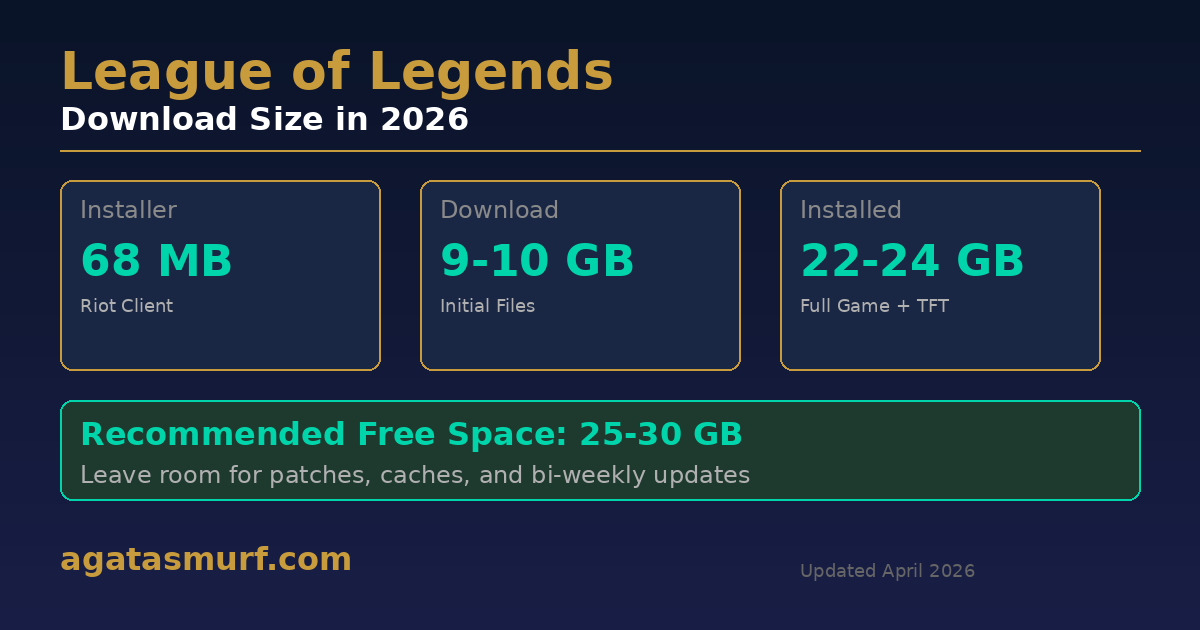
League of Legends download size is 9 to 10 GB at first. The catch is that the installed game balloons to 22 to 24 GB after the Riot Client unpacks and patches everything. This is on Patch 26.7, April 2026. Riot’s support page still says you only need 16 GB free, which was already wrong two years ago. My old laptop had 18 GB free and the install froze at 74%, had to clear more space and redo the whole thing. 25 GB minimum or you risk wasting your time.
And patches drop every two weeks, so the folder only gets bigger from there.
Quick visual walkthrough of the install process if reading isn’t your thing:
League of Legends Download and Install Process
The League of Legends download size confuses people because the install has like three separate stages. Go to Riot’s download page, grab the installer: 68 MB. That’s not the game though. That tiny file is just the Riot Client launcher.
The launcher then pulls the real game data, about 9 to 10 GB. After that, Riot Vanguard (kernel-level anti-cheat, been around since 2024) forces a PC reboot. Only after the reboot does the client finish patching everything up to the current version.
- Grab the Riot Client installer from the official site (68 MB on Windows, 66 MB on Mac)
- Run it. Vanguard installs alongside the client
- Reboot your PC. Vanguard won’t work without this, and League won’t launch without Vanguard
- Log into the Riot Client, let it pull the core files (~9-10 GB download)
- Wait for decompression and patching. Go make coffee or something
- Done. 22 to 24 GB sitting on your drive
Why does a 10 GB download become 22+ GB on disk? Compression. The files you download are packed tight, and they expand when installed. Plus, the Riot Client bundles Teamfight Tactics in the same folder since both games share the launcher. So TFT’s assets are in there whether you play it or not.
League of Legends Download Size: Quick Reference
| What | How Big | Details |
|---|---|---|
| Riot Client installer | 68 MB | Just the launcher, not the game |
| Initial download | 9-10 GB | Compressed game files |
| Installed (Windows) | 22-24 GB | LoL + TFT + Vanguard + current patch |
| Installed (Mac) | 20-22 GB | No kernel Vanguard, slightly lighter |
| After 6+ months of patches | 25-28 GB | Cache, logs, and old patch data pile up |
| Riot’s “official” minimum | 16 GB free | Outdated. 25 GB is the real number |
That 16 GB recommendation on Riot’s support page? It’s been there for years. Way before Vanguard, way before TFT got folded into the client. Nobody updated it. Don’t trust it.
League of Legends File Size Over the Years
League launched in October 2009 with 40 champions and the whole game fit in under 3 GB. I used to carry it around on a USB stick because downloading 3 GB at home took forever on my connection back then. Sixteen years later it’s about 8 times bigger, but if you look at the table above, most of that growth happened between 2015 and 2022. The last few years the size has barely moved.
| Year | Install Size (Approx.) | Why It Grew |
|---|---|---|
| 2009 | ~2-3 GB | 40 champs, original Summoner’s Rift |
| 2012 | ~4-5 GB | 100+ champs, Dominion map added |
| 2015 | ~8-9 GB | Rift visual overhaul, new client beta |
| 2018 | ~12-14 GB | Legacy client killed, VFX updates |
| 2020 | ~15-17 GB | TFT bundled into the launcher |
| 2022 | ~18-20 GB | Arena mode, more VGUs |
| 2024 | ~20-22 GB | Vanguard anti-cheat, Swarm mode |
| 2026 | ~22-24 GB | 170+ champs, Season 2026 content |
8x growth in 16 years sounds like a lot until you compare it to Warzone going from 80 to 150+ GB in about two years. Riot actually does a decent job replacing old assets instead of stacking new ones on top.
What’s Inside the Folder (TFT, Vanguard, Cache)
Poked around my own install directory the other day out of curiosity. The 23 GB isn’t all League.
| Component | Space Used |
|---|---|
| League of Legends (the actual game) | ~16-18 GB |
| Teamfight Tactics (shared assets) | ~3-4 GB |
| Riot Client + Vanguard | ~500 MB |
| Logs, cache, old patches | ~1-3 GB (gets worse over time) |
You can’t remove TFT separately. Riot baked it into the same client, and the two games share champion models and textures. Even if you’ve never played a single round of TFT, those files live on your disk.
Vanguard is tiny storage-wise but it boots with your PC and runs in the background always. On Windows it’s a kernel-level driver. On Mac it’s less aggressive. For disk space purposes though, it barely matters.
League of Legends Patch Download Sizes
The League of Legends download size at install is one thing. Keeping up with patches is another. Riot ships updates on a two-week cycle, and they vary a lot depending on what’s in them.
| Type of Patch | Size | How Often |
|---|---|---|
| Hotfix (emergency bugfix) | 50-100 MB | A couple times per patch cycle |
| Standard balance patch | 100-400 MB | Every 2 weeks |
| New champion drop | 400-700 MB | Every 2-3 months |
| Big event (Worlds, seasonal event) | 500 MB – 1 GB | A few times a year |
| Preseason or midseason overhaul | 1-2 GB | Twice a year |
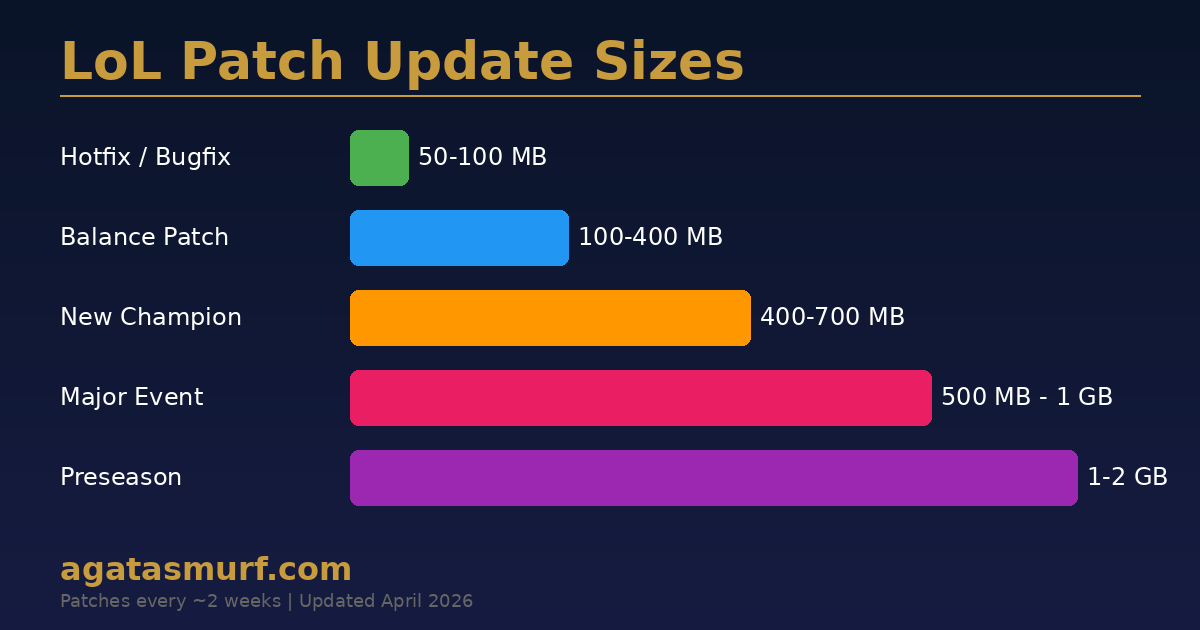
Most patches replace old data rather than adding on top. But the client needs extra temporary space to download, decompress, and verify before applying anything. Had a situation where my drive had 1 GB free and a 400 MB patch dropped. Client just threw an error, something about “insufficient space” but with zero useful detail about how much it actually needed. Cleared 5 GB and it worked.
My folder was 27 GB after 8 months without a reinstall. Cleaned it up (more on that below), got it back to 23. Not bad.
League of Legends Download Size: Windows vs Mac
The League of Legends download size is close on both but not quite the same.
Windows: 22 to 24 GB after a fresh install, with Vanguard running as a kernel-level driver. Minimum OS is Windows 10 Build 19041. Riot dropped Win7 support a while back so if you’re still on that for some reason, it won’t work.
Mac: 20 to 22 GB. Vanguard runs differently on macOS, not at the kernel level, which partly explains the smaller footprint. M1, M2, M3, M4 Macs all handle League fine through Rosetta 2. Patching can be a bit slower on Mac though. I’ve watched the “Scanning Files” bar crawl for 10+ minutes after a bigger update on a friend’s MacBook. On my Windows desktop, same patch took maybe 3 minutes.
One more thing: use an SSD. League on a spinning hard drive loads noticeably slower. You’ll be the last one in the game and everyone else is already fighting over level 1 invades while your screen shows 97%.
League of Legends Size vs Other Games
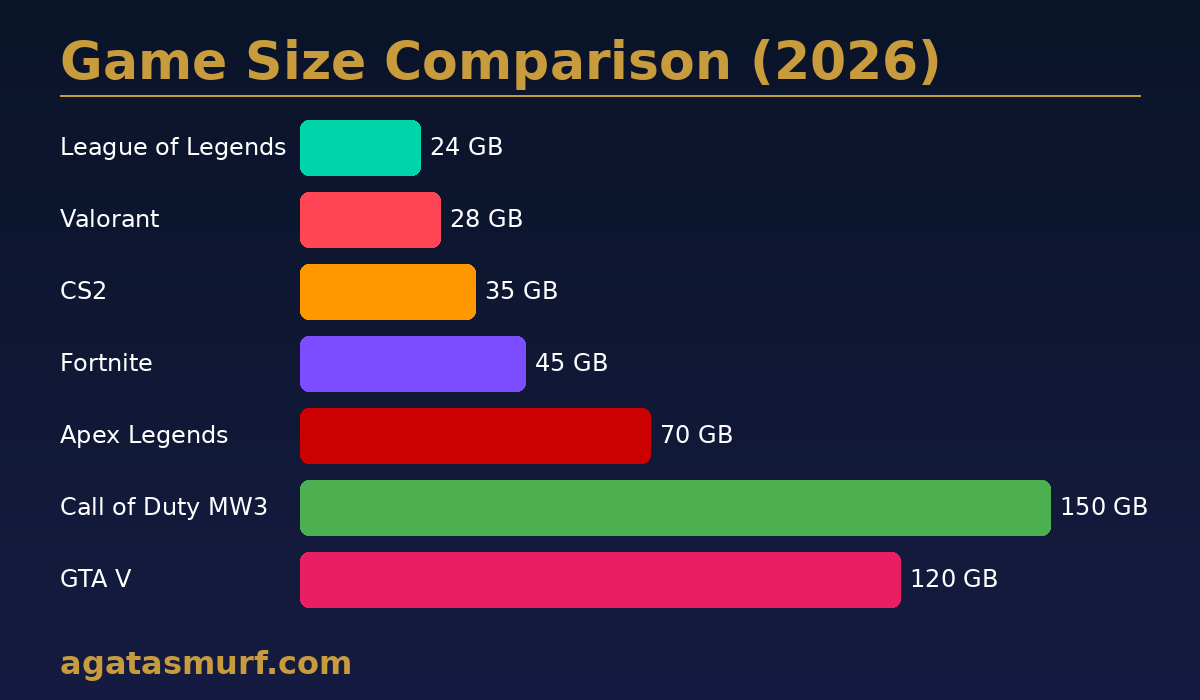
Want some perspective on the League of Legends download size? Look at what else is out there right now.
| Game | Installed Size (2026) |
|---|---|
| League of Legends | 22-24 GB |
| Valorant | ~28 GB |
| Counter-Strike 2 | ~35 GB |
| Fortnite | ~45 GB |
| Apex Legends | ~70 GB |
| GTA V | ~120 GB |
| Call of Duty: MW3 | ~150 GB |
Over 170 champions with thousands of skins and voice packs in dozens of languages, and Riot still keeps it under 25 GB. CoD takes half a budget laptop SSD just by itself. That size difference is why League can run on basically any machine.
System Requirements (What Your PC Actually Needs)
Storage isn’t the only factor when planning your League of Legends download. Here are the specs Riot lists, plus what I’d actually recommend based on running the game on everything from a 2015 ThinkPad to a modern gaming rig.
| Spec | Minimum | What I’d Recommend |
|---|---|---|
| OS | Windows 10 (19041+) | Windows 11 |
| CPU | Intel i3-530 or similar | i5-3300 or better |
| RAM | 4 GB | 8 GB |
| GPU | GeForce 9600GT / HD 6570 | GTX 560 / Radeon HD 6950 |
| Storage | 16 GB (Riot says) | 25+ GB (for real) |
| Internet | Broadband | 15+ Mbps |
Any PC from 2017 or newer handles League without problems. Hardware is almost never the issue with installing LoL. Slow internet is. A 10 GB download on a 10 Mbps connection takes over two hours.
Why Does League of Legends File Size Keep Growing?
Installed League at 22 GB. Checked it three months later: 26 GB. What happened?
The League of Legends download size on disk shifts because stuff accumulates. Old patch files that the client forgot to clean up. Log files from every single game session (yes, every one). Cached shaders and textures that speed up loading but eat space. Replays, if you save them. And language packs, if you ever switched regions or tried Korean voice-over for fun.
Past 28 GB? Time to clean up.
How to Reduce League of Legends Folder Size
I do this roughly every 3-4 months. Pretty painless:
- Open Riot Client, go to League settings (gear icon), click Repair. Takes 10-15 minutes. Gets rid of corrupted files and orphaned patch junk
- Go to
C:\Users\[YourName]\Documents\League of Legends\Replaysand delete old replay files. Each one is small but they stack up fast - Nuke the Logs folder inside your League install directory. Months-old logs are worthless
- If you switched languages at some point and switched back, old voice packs might still be hanging around. The repair step usually catches those but not always
Still bloated after all that? Full uninstall, delete whatever the uninstaller leaves behind (it always leaves stuff), reinstall clean. Our League of Legends uninstall guide covers which folders to nuke manually.
Does Region Affect League of Legends Download Size?
A little bit. Base game files are the same everywhere. But voice packs vary. English is the default; switch to Korean or Japanese and the client grabs an extra 100 to 200 MB of voice data.
Korean servers have had extra verification steps historically too. Total difference between regions is usually under 1 GB. Not a big deal unless you’re on a strict data cap.
My EUW install with English voice: 23 GB after a month. A friend playing on the Korean server with Korean voice-over: about 24 GB. Small gap but it’s there.
Bandwidth During Actual Gameplay
Different question from the League of Legends download size, but people always ask, so here it is. Once the game is installed, playing it barely uses any data at all.
| What You’re Doing | Data Consumed |
|---|---|
| One SR ranked game (30-40 min) | ~40-80 MB |
| One ARAM (15-20 min) | ~20-40 MB |
| One TFT game | ~30-50 MB |
| Chilling in the client | ~5-10 MB per hour |
100 games a month would cost you under 8 GB of data. That’s less than watching Netflix for an evening. The download is where your bandwidth goes. After that, League is super light. Good news if you’re tethering off your phone or stuck on a metered connection.
Checking Your Install Size
To check how big your install is on Windows, go to C:\Riot Games\League of Legends, right-click the folder and open Properties. The “Size on disk” line is what matters. Mac users can do the same through Finder: find the League folder in Applications, right-click, Get Info.
Moving League to a Different Drive
If your C: drive is full, you can move League to a different drive without downloading anything again.
- Close Riot Client fully (check the system tray, it likes to hide there)
- Cut and paste the whole
League of Legendsfolder to wherever you want it - Open Riot Client again, go to Settings, point the install path at the new location
- Let it verify files. Couple minutes at most
The game doesn’t care which drive it lives on. Just make sure there’s at least 30 GB free on the destination so future patches have room to install.
League of Legends Download Time by Speed
Depends on your internet. Here’s a rough guide for the ~10 GB initial pull:
| Your Speed | Time (Roughly) |
|---|---|
| 10 Mbps | About 2 hours |
| 25 Mbps | About 55 min |
| 50 Mbps | About 25-30 min |
| 100 Mbps | About 15 min |
| 300 Mbps | Under 5 min |
In practice you’ll probably get slower speeds. Riot’s servers get hammered on patch days, ISPs throttle during peak hours, and Wi-Fi adds overhead. Ethernet cable helps a lot with the bigger downloads.
Wild Rift (Mobile) vs PC League
Wild Rift has nothing to do with PC League except the name. It’s a mobile-only game, about 1.7 GB on Android (plus 2 GB more loaded in-app) and 3.8 GB on iOS. Skins, champions, rank, none of it transfers from PC. Completely different accounts and servers. If you want the full 170+ champion roster and real Summoner’s Rift ranked, you need the PC version.
Tips I Wish Someone Told Me Before My First Install
I’ve set up League on at least a dozen machines over the years. Smurfs, friends’ PCs, a couple laptops I regret buying. Stuff I’ve learned the hard way:
Only download from leagueoflegends.com. Random third-party sites bundle malware with the installer. Seen it happen. Just go to the official page.
Check the region dropdown before clicking download. Top-right corner of the page. Pick the wrong region and you’ll connect to the wrong server. Fixing that later means a support ticket and sometimes a wait. Annoying.
Restart after Vanguard installs. Vanguard does not work until you reboot. League does not start without Vanguard. Skip the restart and you’ll waste 20 minutes wondering why nothing launches.
Whitelist Riot Games in your antivirus. Windows Defender, Avast, whatever you use. They sometimes flag Vanguard or the Riot Client as suspicious, which blocks the download or corrupts files during install.
And if things go wrong, patches fail, or the client freezes mid-update, we’ve got a guide on LoL maintenance and server issues that covers the most common fixes.
Got League Installed? Now What
Storage problem solved. Time for the fun part. If you want a second account for ranked without grinding 1-30 again, we sell level 30 LoL smurf accounts ready for ranked. Instant delivery, all regions.
New to ranked? Read our guide on how the LoL ranked system works before queuing up. LP gains, MMR, splits, demotion protection, the system has a lot of moving parts and figuring it out mid-climb is not fun.
We also have the full League of Legends champion count with every release date if you’re curious how many champs are in the game right now.
If League refuses to connect on a wired connection after installing, check our LoL ethernet fix guide. Weirdly common issue.
FAQ
How big is the League of Legends download in 2026?
9 to 10 GB download. 22 to 24 GB once it’s fully installed and patched.
How much free space do I need to install LoL?
Riot’s official answer is 16 GB. That number is outdated. You realistically need 25 GB free, maybe 30 if you want to avoid patch failures down the line.
How often does League update and how big are the patches?
Every two weeks. Standard patches run 100-400 MB. New champion releases or big events push it to 500 MB or more. Preseason patches can hit 1-2 GB.
Is LoL smaller than other popular games?
Much smaller. CoD MW3 is about 150 GB. GTA V around 120. Apex 70. League sits at 22-24 GB, which is nothing by comparison.
Does League run on Mac?
Yes, 20-22 GB installed. Apple Silicon Macs handle it through Rosetta 2 without problems. Patching takes longer than on Windows for some reason but actual gameplay runs fine.
Why is my League folder way bigger than 22 GB?
Cached patch data, session logs, replays, old shader files. After a few months it piles up. Run the Repair tool in the Riot Client or reinstall clean.
Can I move League to another drive without reinstalling?
Yeah. Move the folder, update the path in Riot Client settings, let it verify. Takes a couple minutes and you skip the whole download.
Last updated: April 2026
