


 through our G2G profile

 LoL Accounts
 Valorant
 WoW accounts
Wasted on LoL: How Much Time Did You Spend on League?
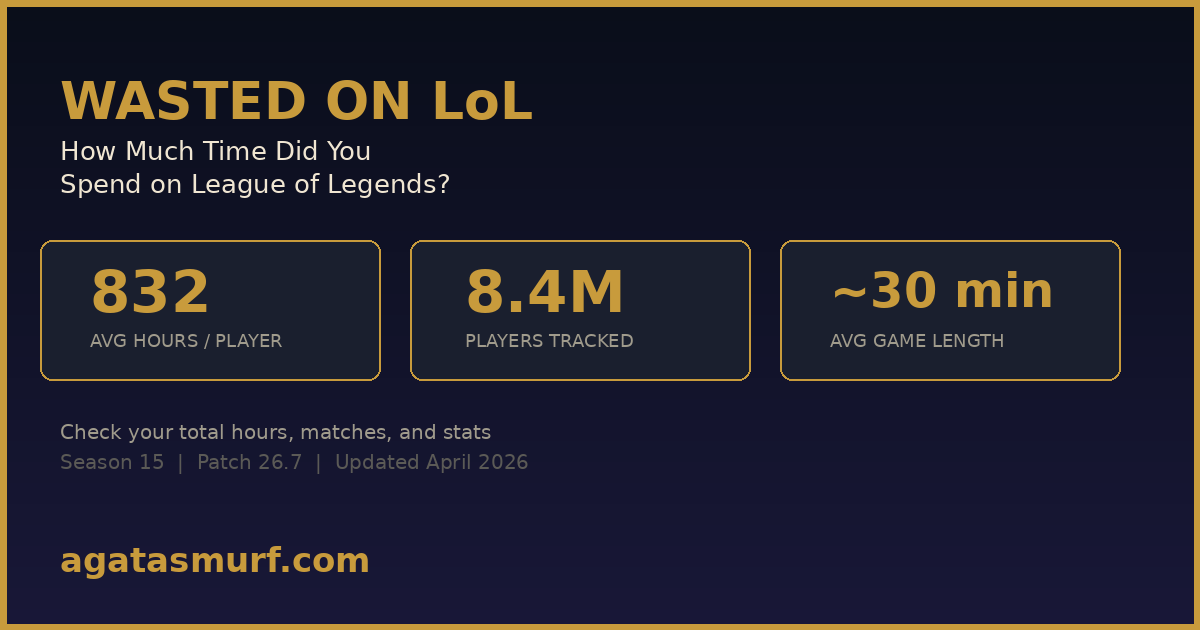
832 hours. That is the average across 8.4 million players who checked their wasted on LoL stats through trackers like wol.gg. Roughly 35 days of your life sitting in Summoner’s Rift. And honestly? Most people I know are way above that number.
I checked mine last month. 2,100 hours. Since Season 6. I sat there staring at the screen like “yeah, that tracks.” Between the ranked grind, the 3 AM ARAM sessions, and all those games where someone locked in Yuumi top and I should have dodged but didn’t, the math adds up fast.
Riot killed their in-client playtime tracker back in 2024. They never brought it back. The client still shows your current season stats under Profile > Stats, but lifetime hours? Gone. So you need a third-party tool. Scroll up and use ours, or keep reading for every method that works in Season 15.
How to Check Your Wasted Time on LoL
Five methods. I ranked them by how much effort each one takes.
1. AgataSmurf Playtime Tracker (Top of This Page)
It is right up there. Punch in your Riot ID, pick your server, done. Works on all 11 regions. You get total hours, games played, and a leaderboard showing where you stand against other players who checked. No account login, nothing gets saved on our end.
3. wol.gg (The OG Tracker)
Wol.gg has been around forever. It is the original wasted on LoL site and still the most recognized one. Over 8 million players have run their summoner names through it. You get your total hours, total games, and a comparison against the rest of the player base. The data comes from Riot’s match-v5 API, so game durations are accurate. Where wol.gg gets shaky is on really old Season 1-3 matches where Riot’s data retention has gaps.
4. LoL Client (Current Season Only)
Open League. Click Profile. Go to Stats tab on the right. You can see games played and time spent per season, going back to around 2022 using the dropdown. But that is it. No lifetime total. No running counter. Just one season at a time. For a quick “how much ranked did I play this split” check, it works fine. For everything else? Useless.
5. Request Your Data from Riot
The nuclear option. Go to Riot’s Privacy Portal, log in, request a data export. Riot sends you a download link by email. The file has your full match history, login records, RP purchases, everything. But it takes up to 30 days. Nobody does this just to check playtime unless they are building a spreadsheet or writing a thesis about their League addiction.
LoL Playtime Trackers: Which One Should You Use?
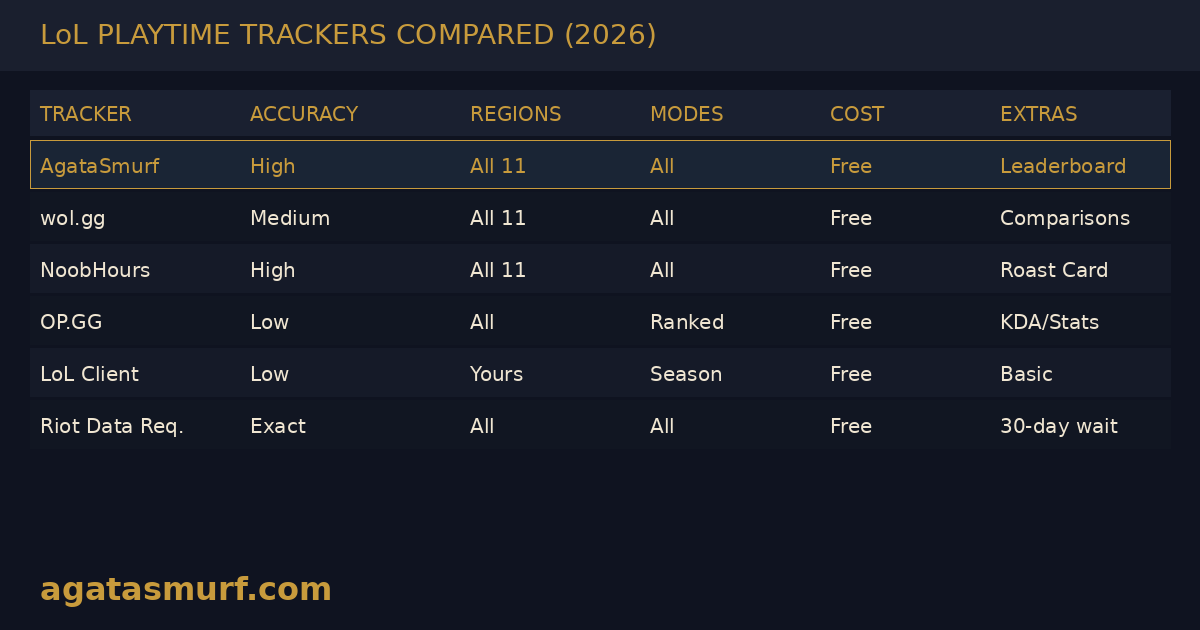
I tested all the major ones side by side. Here is what each one actually does.
| Tracker | Data Source | Modes Covered | Regions | Champion Breakdown | Cost |
|---|---|---|---|---|---|
| AgataSmurf | Riot API | All modes | All 11 | Yes | Free |
| wol.gg | Riot API | All modes | All 11 | No | Free |
| NoobHours | Match history | All modes | All 11 | Yes | Free |
| OP.GG | Riot API | Ranked focus | All | Yes (season) | Free |
| LoL Client | Internal | Current season | Your server | Season only | Free |
| Riot Data Request | Full records | Everything | All | Yes | Free (30 day wait) |
Quick note on OP.GG. It is great for checking your KDA, win rates, and match breakdowns. But it does not spit out a single “total hours” number the way dedicated trackers do. You would have to count your games season by season and multiply by 30 minutes. That is painful.
Why Does Riot Hide Your Playtime?
I see this thread on r/leagueoflegends at least once a month. Riot nuked the web Match History page in 2021. Then in 2024, they quietly removed the lifetime playtime stat from the client too. No announcement. No explanation. Just poof.
My theory? They do not want the bad press. Imagine the headlines: “Average League player has spent 832 hours, study shows.” Every gaming outlet would run that story with a “are you addicted?” angle. Steam gets away with showing playtime because it covers thousands of games. But League is one game. Seeing “4,200 hours” on a single title hits different.
The data still exists though. Riot’s public API (the match-v5 endpoints that every stat site uses) still has your match durations, timestamps, and game modes. They just chose not to put a nice UI on it. So the community built their own.
Are Wasted on LoL Trackers Actually Accurate?
Short answer: yes, for anything recent. Longer answer: there are a few blind spots you should know about before trusting the number blindly.
Every playtime tracker reads game data from Riot’s API. The match durations themselves are precise. If your game lasted 34 minutes and 18 seconds, that is what gets logged. The question is not precision, it is coverage. Some old matches just are not in Riot’s system anymore.
| What Gets Missed | Why | Who It Affects |
|---|---|---|
| Very old games (pre-2014) | Riot rebuilt their backend and some records did not survive | Season 1-3 OGs |
| Custom/private games | Not always indexed by the API | Tournament players, 1v1 enthusiasts |
| Region transfers | Old region data may not carry over | Anyone who switched servers |
| Queue + champ select | Not counted as match time | Literally everyone |
| Practice Tool | Not a real match | Players who drill combos |
So your actual wasted on LoL number is almost certainly higher than what any tool shows. Think about it. Queue times. Loading screens. Champ select where someone hovers Teemo and you sit there sweating for 60 seconds. All the times you dodged and waited 5 minutes. The 20 minutes you spent reading patch notes or browsing skins in the shop at 2 AM. None of that gets counted.
- Queue + matchmaking adds 3-8 minutes per game (way more in high elo)
- Champ select and loading screen eats another 5-7 minutes
- Dodged lobbies that still burned 5-10 minutes of your time
- Practice Tool and custom games with friends
- Just idling in client, checking match history, browsing skins
- Rewatching your own replays at 2x speed going “why did I walk into that bush”
Realistically? Slap a 1.2x or 1.3x multiplier on whatever number a tracker gives you. Tracker says 1,000 hours? You were probably glued to the client for closer to 1,300. The in-game time is just the tip.
How Many Hours Do Players Waste on LoL on Average?
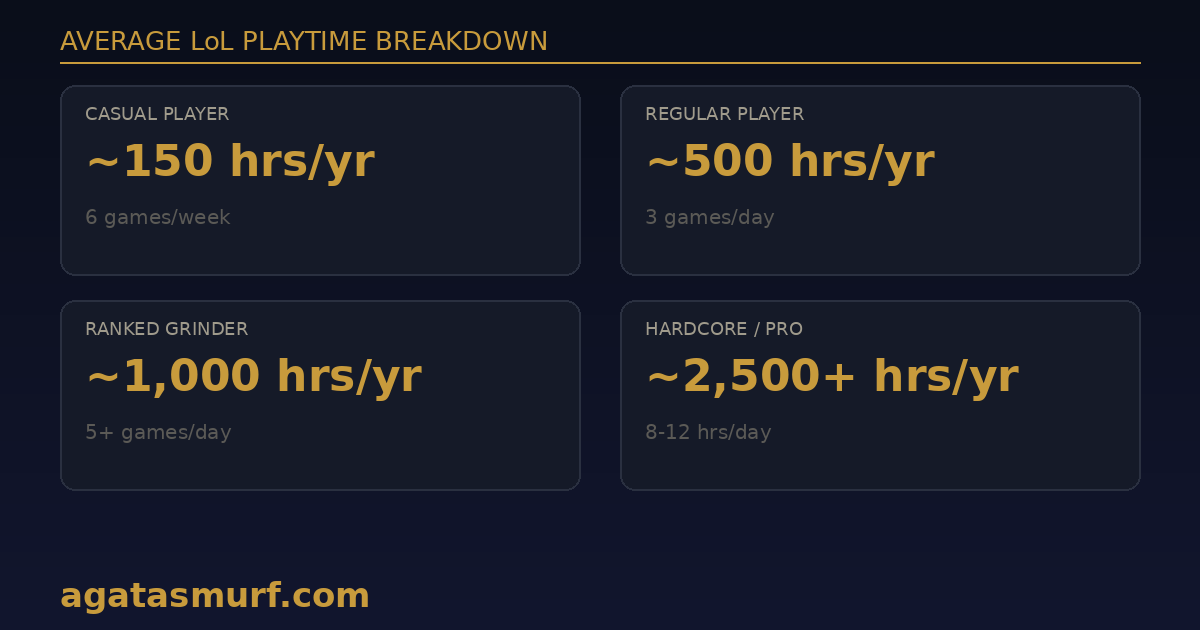
I pulled these from wol.gg’s own stats page and cross-checked with a few Reddit polls. The ranges are loose but they track with what I see in my friend groups.
| Player Type | Games/Week | Hours/Year | 5-Year Total |
|---|---|---|---|
| Casual (after work gamer) | 4-6 | ~150 | ~750 |
| Regular (daily player) | 10-15 | ~400 | ~2,000 |
| Ranked grinder | 20-30 | ~800 | ~4,000 |
| Hardcore (it is basically a job) | 35+ | ~1,500 | ~7,500 |
| Streamers / semi-pro | 50+ | ~2,500+ | ~12,000+ |
Playing since Season 4 or 5 with daily sessions? 3,000-4,000 hours is normal. I know a guy with 8,400 hours who peaked Diamond 3 and dropped back to Plat every split. Hours alone do not make you better. Spamming 20 games a day on autopilot across 3 roles teaches you nothing. Five games on your two mains where you actually think about your trades and back timings? That is where improvement comes from.
And look, 1,000 hours is the time it takes to learn a new language well enough to hold conversations. You could binge every Simpsons episode ever made. Twice. Read 160 books. I am not guilt-tripping you. But the number does make you stop and think for a second.
How to Do the Math Yourself
Dead simple:
Total Hours = (Games Played x Average Match Length in Minutes) / 60
Match length depends on what you play:
| Mode | Average Duration |
|---|---|
| Ranked Solo/Duo | 30-35 min |
| Normal Draft | 28-32 min |
| ARAM | 18-22 min |
| Arena | 15-20 min |
| Flex | 28-33 min |
Quick example. 4,000 ranked games at 32 minutes each? That is 4,000 x 32 / 60 = about 2,133 hours. But if you are an ARAM main, swap in 20 minutes and it drops to 1,333. Huge gap just from the queue you pick. My buddy has the same game count as me but plays 70% ARAM, so his hours are way lower even though we started the same season.
Your RP Spending Is Trackable Too
Riot won’t tell you how many hours you played. But they will happily show you how much cash you dropped. There is an official RP purchase tracker that pulls your total spending since day one. I put together a full guide on how much money you spent on LoL with the exact steps and a breakdown of where your RP actually went (spoiler: skins, mostly skins).
Seeing both numbers side by side hits different. 2,000 hours AND $800? At that point you are either proud or you are closing the browser tab real fast.
Region Transfers Can Break Your Wasted on LoL Stats
This trips up a lot of players. If you transferred your account from EUW to NA (or any other server swap), your old-region data might not follow. Riot logs purchases and matches per region. The tracker starts fresh from the transfer date on the new server. Everything before that? Still in Riot’s database somewhere, but the self-service tools and third-party trackers usually cannot pull it across. You would need to contact Riot Support directly and ask them to combine data from both regions. And even then, there is no guarantee they can stitch it together cleanly because of how they rebuilt their backend infrastructure over the years.
What Does Your Wasted on LoL Number Really Mean?
Every week someone on Reddit posts “I just checked my total hours and I have 3,000, is this normal?” And the comments are always split. Half the people say “those are rookie numbers” and the other half say “go outside.”
My take? 2,000 hours across 5 years works out to about an hour a day. Less than most people spend scrolling TikTok or watching Netflix. And in those hours you were actively doing hard stuff: tracking enemy cooldowns, managing wave states, shotcalling for dragon, adapting builds on the fly. League forces your brain to work harder than almost any other hobby. Calling that “wasted” never sat right with me.
On the flip side, if the number makes your stomach drop a little? Pay attention to that. A few guys in my Discord capped themselves at 8-10 hours per week and actually climbed faster because they stopped autopiloting tired games at 1 AM. Less games, more focus. Review one replay per session instead of queuing “one more” when you are already tilted. One game with purpose beats five losses you do not even remember.
TFT and Valorant Are Separate
Quick clarification because this confuses people. TFT uses your same Riot account but its playtime gets tracked separately. League trackers will not mix in your TFT rounds. If you grind both, you need to check each one individually.
Valorant is completely separate. Different tracking system, different API. If you want Valorant hours, Tracker.gg handles that.
When a Fresh Start Makes More Sense
Checking your wasted on LoL stats sometimes triggers a bigger question: is this account even worth playing on anymore? Maybe your MMR is shot from years of casual games. Maybe you are getting +14 LP per win because your hidden rating tanked in Season 12 and never recovered. I have been there. It feels like swimming uphill.
You can pick up a fresh smurf account that is already level 30 with 40,000+ Blue Essence and clean MMR. Jump straight into placements and actually get LP gains that feel fair. Or if you want to go the official route, we have a guide on creating a new LoL account from scratch.
Track Your Wasted LoL Hours Each Season
If you want to keep a running count of your wasted on LoL hours going forward, just bookmark our tracker. Check it at the start and end of each LoL season. Write the number down somewhere. That gives you per-split data so you can see trends. “Oh I played 200 hours in Split 1 but only 80 in Split 2, that is when I burned out.”
Per-champion tracking is worth doing too. If you have 400 hours on Zed and you are still Gold, maybe it is time to try Annie and actually climb. Tough love, but we have all been there.
One more thing worth mentioning. Some players use their playtime stats as a flex on Discord servers or Reddit flair. Others screenshot their results and send them to friends as a “look what we have done with our lives” meme. Either way, the number always starts a conversation. And if you are a content creator or streamer, your audience probably wants to see it too.
FAQ
How do I check how much time I wasted on LoL?
Use a playtime tracker like the one on AgataSmurf.com. Enter your Riot ID (Name#TAG) and select your region. The tool pulls your match history through Riot’s API and calculates total hours across ranked, normals, and ARAM.
Does Riot Games show total playtime in the LoL client?
No. As of 2026, the League client only shows stats for the current season. Riot removed the lifetime playtime feature in 2024. Third-party trackers are the only way to see your total hours across all seasons.
How accurate are wasted on LoL trackers?
Game durations from Riot’s API are exact, down to the second. The only blind spots are super old matches from before ~2014, custom games, and anything outside of actual gameplay like queue time or champ select. No tracker counts those.
What is the average time spent on League of Legends?
Wol.gg says 832 hours across 8 million+ tested accounts. Casual players land around 150 per year. Ranked grinders blow past 1,000 without even trying.
Do LoL playtime trackers include ARAM and normal games?
Modern trackers pull all modes: ranked, normals, ARAM, Arena, rotating queues. Some older ones only tracked ranked, so double-check what your tool covers.
Can I check someone else’s wasted time on LoL?
Absolutely. Just type their Riot ID and pick the server. No login, no password, nothing. Perfect for settling arguments about who plays more. Or for roasting that friend who swears he “barely plays anymore.”
Last updated: April 2026