


 through our G2G profile

 LoL Accounts
 Valorant
 WoW accounts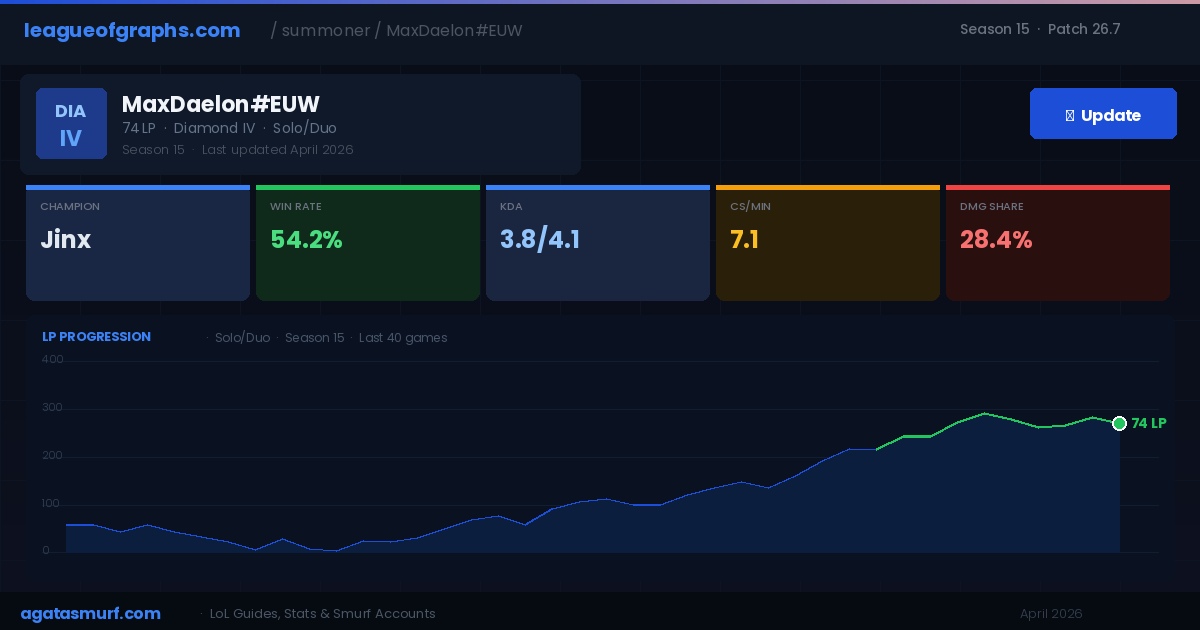
League of Graphs has been tracking LoL stats since 2013. You get your champion win rates, rank history, per-game KDA, CS per minute, damage share, and a live lobby view that loads before the first wave spawns. All of it comes straight from the Riot API. I have been using it across multiple ranked climbs and the data it gives you is genuinely useful. Most players check their win rate, shrug, and close the tab. That is about 20 percent of what the site can actually do.
This guide covers every major section of League of Graphs, what the numbers mean in context, and how to translate them into fewer lost LP. All data reflects Patch 26.7 and Season 15 (2026).
Quick Reference: What League of Graphs Tracks
| Section | What it shows | Most useful for |
|---|---|---|
| Champion win rate | Your win percentage per pick, filterable by last 20, 50, or full season | Champion pool decisions |
| KDA breakdown | Kills, deaths, assists split by pick and role | Spotting feed-heavy games patterns |
| CS per minute | Farm rate per game, individually logged | Diagnosing macro and lane problems |
| Damage share | Your percentage of your team’s total output per game | Checking carry impact on carry champions |
| LP progression graph | Visual chart of every LP gain and loss in sequence | Spotting tilt streaks and climbing windows |
| Mastery scores | Total mastery broken down by champ and class | Finding your natural role from actual hours |
| Live game checker | All 10 players stats loaded during champion select | Pre-game scouting in ranked |
| Global champion stats | Win rate, pick rate, ban rate, KDA per champion across all servers | Identifying meta picks vs. one-trick stats |
How to Search and Refresh Your Profile
This short from Naayil shows League of Graphs in action during a real ranked game session.
Go to leagueofgraphs.com, type your Riot ID in the search bar (Name#Tag format, like YourName#EUW), and hit Enter. NA, EUW, EUNE, KR, BR, and all Southeast Asian servers work. Stats do not refresh on their own. After a game, open your profile and click the blue Update button at the top. Five-minute cooldown between refreshes.
Searching League of Graphs with Riot ID
Since Riot retired summoner names, searching without the tag pulls up the wrong profile or nothing. Your Riot ID is shown in the client under your icon in the top-left corner. It is the part before the hashtag that other players see, and the tag after it is the three-to-five character identifier that makes it globally unique. Both parts are required on League of Graphs now.
The Power Circle: Combat, Income, and Map Control Explained
This is the section of League of Graphs most players skip completely. Every summoner profile has a Power Circle tab that breaks your performance into three categories: Combat, Income, and Map Control. Each category shows your personal stats in bright yellow against the pale gray line of your current rank’s average. The gap between those two lines is where your real problems are hiding.
Combat tab
The Combat tab tracks five metrics: SV ratio (survival value, basically your death rate weighted for game length), kill participation, damage share, support score, and damage per death. For carries, SV ratio and damage per death are the two that matter most. A high damage share but low SV ratio usually means you are outputting but dying every fight at bad value. Low kill participation on a jungle main across 30 games means you are farming but not converting it into map pressure.
Income tab
Income shows damage per gold, early game gold differential at 15 minutes, early game minion differential, and minions per minute. Damage per gold is the most honest carry metric because it normalizes for gold lead. If you have a 500 gold advantage at 15 and your damage per gold is still below average, you are not converting items into impact. Minion differential at 15 minutes tells you whether your laning is winning or just surviving. I checked my own Income tab in Plat last split and found my minion differential was negative on my best win rate champion. Turned out I was winning games through team play, not lane performance. That told me exactly what to practice in custom games.
Map Control tab
Map Control tracks vision score per minute, wards placed, wards cleared, and objective participation. Vision score per minute is the only one you can directly improve without needing better mechanics. If your vision score per minute is below 0.9 as a support and below 0.5 as a carry, you are giving the enemy information for free every game. Objective participation shows whether you are around for dragons and Barons or farming a side lane while your team fights five-on-four. Both of these numbers will look different after the Season 15 Atakhan changes because objective priority shifted around the 20-minute mark.
The Power Circle compares you to the average for your specific rank bracket, not global. So if your rank distribution on League of Graphs shows you in Platinum, you are being measured against Platinum averages. That context makes the numbers way more useful than a raw stat.
Reading Win Rate Without Fooling Yourself
Raw win rate with a small sample is mostly noise. I have been at 80 percent on Garen after five games and watched it crash to 44 percent by game 35. The number only becomes useful around 50 games. Before that, variance swings it too hard to mean anything.
| Games Played | Signal Strength | What to Do With It |
|---|---|---|
| Under 10 | Ignore | Way too small. Any number here is basically a coin flip. |
| 10 to 30 | Rough estimate | Gives a directional hint. Cross-reference with KDA before acting. |
| 30 to 50 | Developing signal | Starting to mean something. Watch for the trend direction. |
| 50 to 100 | Reliable | This is a real number. Use it to make champion pool decisions. |
| 100+ | Very strong | Compare against the global average for that champion on the current patch. |
The benchmark I use: if your personal rate on a pick beats the global average for that same pick by 3 or more percentage points over 50 games, the champion fits you. If you are sitting below the global average over that sample, it probably does not, no matter how comfortable it feels.
Global win rates per champion are under the Champions tab and update daily from live patch data. Check them after major patches, especially when Riot hotfixes a champion mid-cycle. The global number shifts fast after buffs or nerfs and League of Graphs picks it up within 24 hours.
LoL Rank Distribution in Season 15 via League of Graphs
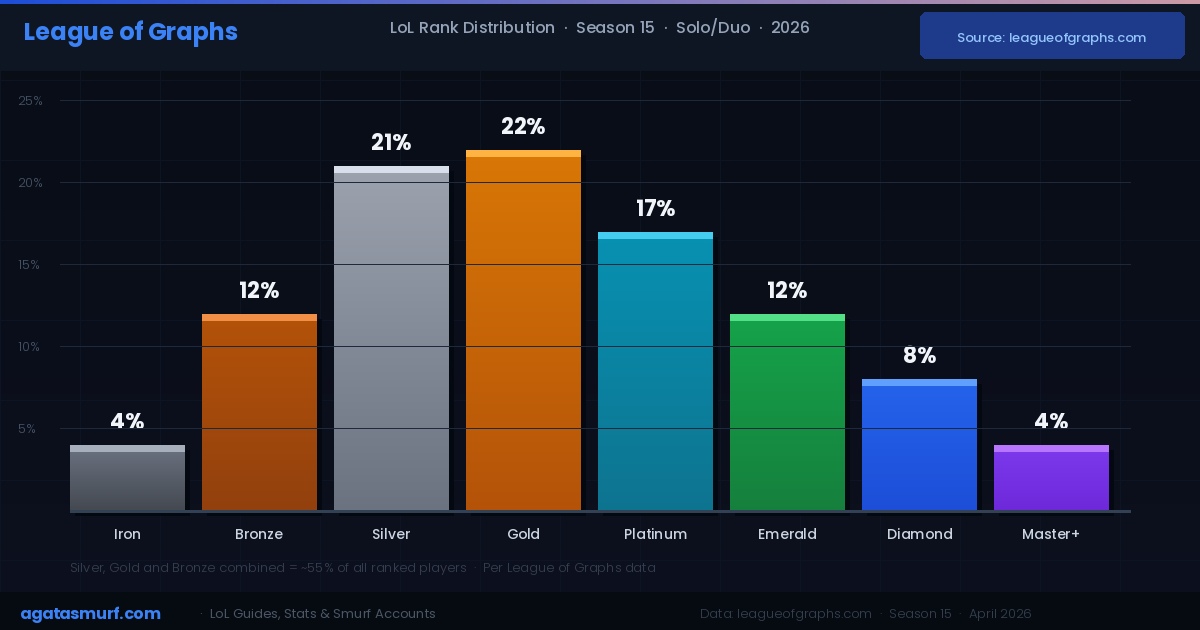
The rank distribution page on League of Graphs shows the percentage of active ranked players in each tier from Iron to Challenger. It is one of the most underused sections of the site. Most players know their rank name. What they rarely check is their exact percentile.
| Tier | Approx. Player % | What it means |
|---|---|---|
| Iron | ~4% | Smaller than most expect. Mostly inactivity decay and brand new accounts. |
| Bronze | ~12% | Heavy mechanics learning phase. Fundamentals are the difference here. |
| Silver | ~21% | Most populated single tier. Map awareness and trading start mattering. |
| Gold | ~22% | Another dense bracket. Many players plateau here for multiple seasons. |
| Platinum | ~17% | Game sense and objective timing become the real separator. |
| Emerald | ~12% | Added in 2023. Now more populated than Diamond as players settle in. |
| Diamond | ~8% | Top bracket most grinders target. Mechanical ceiling starts showing. |
| Master+ | ~0.3% | Master, Grandmaster, and Challenger combined. Very small population. |
Per League of Graphs, Silver, Gold, and Bronze are still the three most populated tiers as of early 2026, in that order. So if you are at Platinum 2 feeling frustrated, you are already well above the median player. That context does not make climbing less annoying, but it does explain why the competition feels stiffer than expected at that bracket.
For a full regional breakdown and how the distribution shifts between Season 15 splits, see our LoL rank distribution guide.
How to Use the League of Graphs Leaderboards
Beyond your own profile, League of Graphs has full leaderboard pages for every region. You can pull up the top 200 players on EUW, NA, KR, or any other supported server and filter by champion. This is not just a vanity feature. It is one of the most practical ways to find out what a Challenger-level one-trick is building and playing, without relying on op.gg’s pro tracking section.
The workflow: go to the Leaderboards tab, pick your region, then filter by the champion you want to study. You get a ranked list of the highest-LP players on that specific pick right now in Season 15. Click any profile and you see their full match history on that champion, including which builds they run, their CS numbers per game, and their win rate across recent patches. In my experience this is faster than hunting for pro player VODs when you want to understand how a high-mastery player approaches a specific champion’s lane phase.
It is also useful for benchmarking yourself against your region’s best. If the rank 1 Darius on EUW averages 8.4 CS/min and you are at 6.1, that is your target number. Not abstract “improve your farm” advice, but a real number pulled from a real player in the same patch.
For how your rank compares to the broader player base this season, see our Season 15 rank distribution breakdown which covers every tier from Iron to Challenger with current percentages.
How the Live Game Checker Works in Ranked
Search any Riot ID while they are in a live match or still in champion select and League of Graphs loads the full lobby. You get all ten players, their current rank, win rates on hovered or locked champions, most played picks, and their current form (winning or losing streak). All of this is public data from the Riot API.
In champion select, the workflow takes about 45 seconds:
- Search your own Riot ID on League of Graphs.
- Click the Current Game tab on your profile.
- Check each opponent’s win rate on the champion they just locked in.
- If someone shows 64 percent win rate on Viktor over 90 games, respect that. Do not trade with them early and push for side objectives instead.
I caught this in a Plat 1 game last split. Enemy mid hovered Azir. He had 71 percent win rate on him over 55 games. That is a one-trick. Banning Azir instead of their top laner won the draft. Without League of Graphs open in champion select, I never would have seen it.
If you are laning against Ahri, our Ahri build guide covers item pathing that holds up against high-mastery players in ARAM and in ranked mid.
Five Stat Habits That Actually Move Your LP
Looking at your profile and not changing anything is data tourism. The numbers only help when you act on them. From my own ranked experience and from what I see when I check other players’ profiles on League of Graphs, these five habits are what separates players who use the tool from players who look at it.
Drop champions with negative win rates over a real sample
Forty or more games below 48 percent on a pick is not variance anymore. That is a real pattern in your data. Bench it. Pull up your full champion list sorted by win rate and build your pool around the two or three picks where you consistently sit at 51 percent or above over 40 games. Most hardstuck players cycle through 8 different champs every 20 games.
Track CS per minute game by game, not just your average
League of Graphs logs CS per minute per individual game, not just a seasonal number. If you are mid lane at Gold 2 and your last ten games show 5.4 CS per minute but your overall season average is 6.3, something changed recently. New champion? Playing tired? Different matchup pool? The individual game log makes that pattern visible in minutes. And for the record, anything below 6.5 CS per minute in mid lane at Plat or above is costing you more LP than your deaths are. Fix the farm window first.
Cross-reference your LP graph with your MMR
Your visible rank on League of Graphs is the badge. Your hidden matchmaking rating (MMR) controls how much LP you earn and lose per game. Gaining 13 LP on a win and losing 21 on a loss means your MMR is below your current tier and the system is trying to pull you down to where it thinks you belong. Use our LoL MMR checker to see your hidden rating alongside your League of Graphs LP data. Together, those two numbers explain your progress way better than win rate alone.
Use the LP graph to find your personal tilt window
The LP history chart shows every gain and loss in the sequence they happened. Scroll back two or three weeks. Look for any cluster of 4 or 5 losses appearing at regular intervals. In my own history I found I was consistently dropping 4 games in a row every few days between games 3 and 5 of a session. That is fatigue, not bad matchups. Setting a two-loss daily stop limit changed my weekly LP trend within two weeks. The graph makes it impossible to deny.
How League of Graphs win rate compares to global averages
Say the global win rate on your champion this patch is 51.3 percent and you are sitting at 55 percent over 65 games. That gap means the champion fits you. Keep it. At 49.1 percent on a champion with a 52 percent global average over the same sample? Drop it. Habit does not change what the numbers say.
Top lane players grinding Darius should check their matchup-specific numbers on League of Graphs rather than just the overall win rate. His numbers swing hard depending on which opponents you draw. Our Darius counters guide covers exactly which picks you want to ban or dodge in champ select.
op.gg vs u.gg vs League of Graphs: Pick the Right Tool
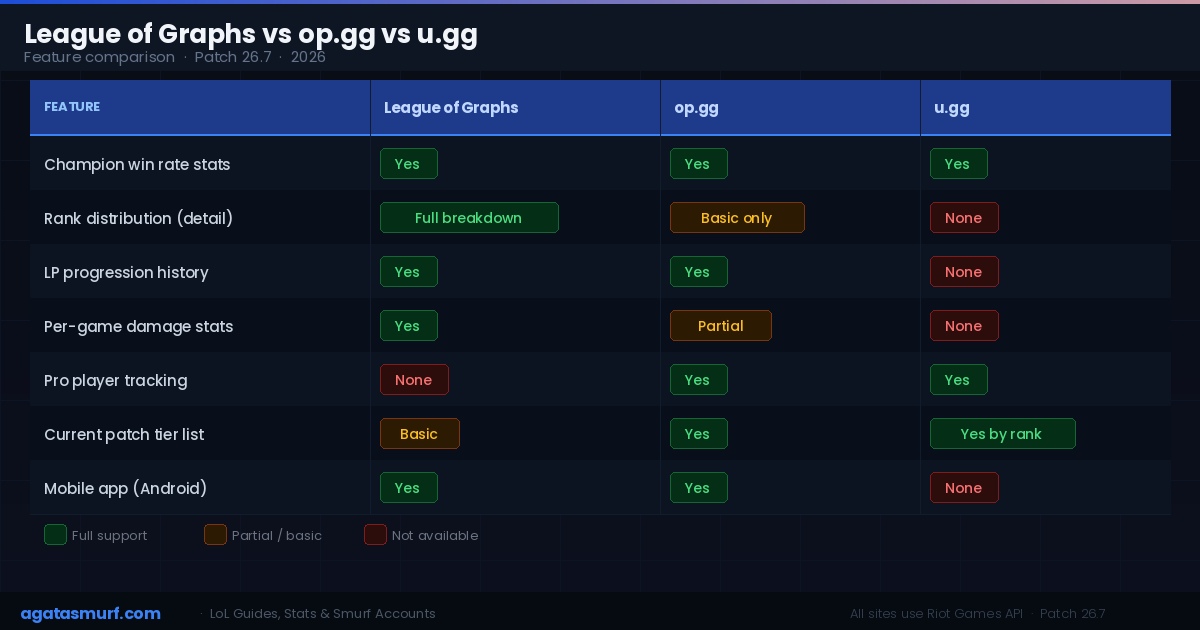
All three sites run on the same Riot API. The data is identical at the source. The difference is what each one does with that data.
| Feature | League of Graphs | op.gg | u.gg |
|---|---|---|---|
| Champion global stats (daily) | Yes | Yes | Yes |
| Rank distribution (detailed) | Yes, full breakdown | Basic only | No |
| LP history graph | Yes | Yes | No |
| Per-game damage stats | Yes | Partial | No |
| Pro player tracking | No | Yes | Yes |
| Current patch tier list | Basic | Yes | Yes, by rank bracket |
| Mobile app (Android) | Yes | Yes | No |
| Best used for | Personal ranked history, rank distribution depth | Pro builds, tier lists, pro player scouting | Rune and item optimization per rank bracket |
Honestly, I use all three for different things. League of Graphs for my own history and the rank distribution page. Op.gg when I want to check what a high-elo one-trick is building on a champion I just picked up. U.gg for finding the optimal rune page at my specific rank bracket on a new champion. None of them replace each other completely.
Reading Global Champion Stats: What Each Number Means
The Champions tab on League of Graphs updates daily across all servers for Patch 26.7. Win rate, pick rate, ban rate, and average KDA are listed for every champ. But the numbers mislead people who do not know how to read them together.
- Win rate above 52 percent with high pick rate: the champ is legit strong this patch, not just played by specialists. Good short-term pick.
- Win rate above 54 percent with low pick rate (under 3 percent): mostly one-tricks. The global win rate is inflated by mastery. Not free elo for everyone.
- High ban rate, moderate win rate: annoying to play against even when it loses most games. Yasuo and Zed live here permanently. High frustration floor, not always OP.
- Low pick rate, high win rate: real learning curve that pays off. Azir, Gangplank, and Aphelios historically sit here. Good long-term pool additions if you are willing to put in 50 plus games before expecting results.
- High pick rate, average win rate (49 to 51 percent): popular but not strong this patch. Lots of players, lots of counter-play knowledge baked into the community. No free LP here this patch.
The Season 15 meta changed after the Atakhan objective was added in the preseason overhaul. Jungle win rates shifted hard on League of Graphs as early objective timing changed across most jungle champions. If you play jungle, check your specific champion’s win rate trend over the last three patches, not just the current snapshot.
Riot’s official LP and MMR explainer is worth reading if your LP gains on League of Graphs look confusing. The gap between your hidden MMR and visible rank is usually the whole story.
If you want to skip the 30-game placement grind on a new account and go straight into ranked, our ready-to-play LoL accounts come level 30 with instant delivery and clean match history.
League of Graphs Not Updating: How to Fix It
This is the most searched problem people have with the site. If your stats on League of Graphs are not refreshing after a game, here is what is happening and how to fix it.
The most common cause is simply the five-minute cooldown. The site enforces a limit between refreshes and the button greys out during that window. Wait five minutes and try again. If the button is still grey after that, try a hard browser refresh with Ctrl+Shift+R (or Cmd+Shift+R on Mac) to clear the cached version of the page.
The second common cause is a Riot API delay. After major patches or during high server load periods (usually Tuesday patch days), the Riot API itself slows down. League of Graphs pulls from that API, so if Riot’s backend is slow, the stats will be delayed by 15-30 minutes regardless of how many times you hit Update. Nothing to do but wait.
Third issue people run into: searching the wrong profile. Since the Riot ID change, a lot of players are still typing their old summoner name without the tag. If League of Graphs shows “Player not found” or pulls up someone else’s profile, make sure you are using the full Name#Tag format. If you are unsure of your exact tag, open the League client, click your summoner icon in the top left, and the full Riot ID including the tag is shown there.
| Problem | Likely Cause | Fix |
|---|---|---|
| Update button is greyed out | Five-minute cooldown active | Wait five minutes, then try again |
| Stats not showing after a game | Riot API delay on patch day | Wait 15-30 minutes, refresh once |
| Wrong profile appears in search | Searching display name without tag | Use full Riot ID format: Name#Tag |
| Win rate shows 0% or no games | New season reset, no ranked games yet | Play ranked games in Season 15 to populate data |
| Last game missing from match history | Browser cache serving old page | Ctrl+Shift+R hard refresh, then hit Update |
| LP graph not loading | Ad blocker blocking Riot API calls | Whitelist leagueofgraphs.com in your ad blocker |
One thing worth knowing: remade games do not appear on League of Graphs at all. They are excluded from the Riot API match history feed, so if your last game was a remake, the match history will look like it skipped a game. That is normal.
FAQ: Your Questions Answered
- What is League of Graphs?
- A free stat tracker for League of Legends, running since 2013. It pulls data from the Riot Games API and shows champion win rates, rank history, KDA, CS per minute, damage share, and a live game checker that loads all ten players’ stats during champion select.
- Is League of Graphs accurate?
- Yes. It uses the official Riot Games API, the same source as op.gg and u.gg. Stats update after each ranked game once you manually refresh the profile page.
- How do I update my profile on League of Graphs?
- Search your Riot ID on leagueofgraphs.com and hit the blue Update button at the top of your profile. You can only refresh once every five minutes.
- What is a good win rate on League of Graphs?
- A win rate above 52 percent on a champion with 50 or more ranked games is a solid signal. At 55 percent or higher across 50 plus games you are consistently climbing on that pick. Under 50 percent over a large sample usually means the champion does not fit your playstyle.
- Can League of Graphs show the rank distribution for Season 15?
- Yes. There is a dedicated rank distribution page showing what percentage of active ranked players sit in each tier from Iron to Challenger. The data updates regularly using current Riot API statistics and reflects Season 15 split data.
- Why is League of Graphs not updating my stats?
- Usually it is the five-minute refresh cooldown. If the Update button is greyed out, wait five minutes and try again. On Riot patch days (typically Tuesdays) the API itself runs slow, so delays of 15-30 minutes are normal. Also make sure you are searching your full Riot ID (Name#Tag) and not the old summoner name format.
- Does League of Graphs work with Riot ID?
- Yes. Use the Name#Tag format, for example PlayerName#EUW. Searching only the display name without the tag returns no results or the wrong account.
Last updated: April 2026. Stats reflect Patch 26.7, Season 15.
