


 through our G2G profile

 LoL Accounts
 Valorant
 WoW accounts
DevEx Calculator: Convert Earned Robux to USD at the 2026 Rate
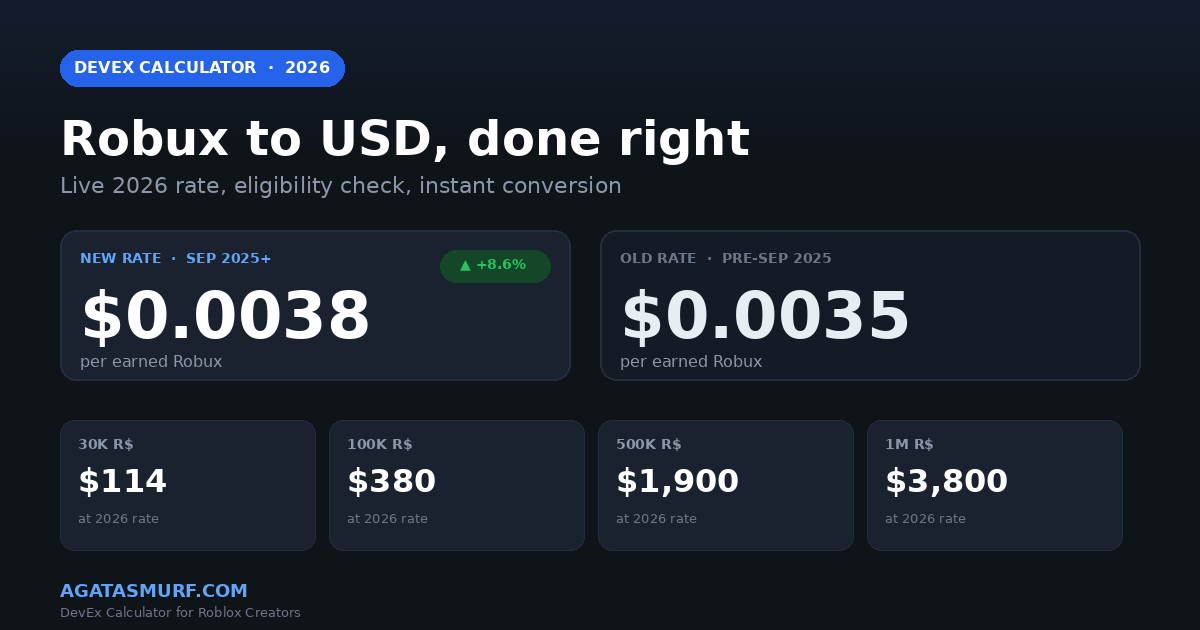
A devex calculator converts earned Robux into real USD using the official Roblox Developer Exchange rate. Current rate? $0.0038 per earned Robux. Punch in 100K, you get $380 back. The 30K Robux cashout floor pays out $114. Rates shifted September 5, 2025, and they have sat there since. Calculator below handles the math, flips into goal-planning mode, covers 10 currencies, and shows what the taxman leaves on the table.
What This DevEx Calculator Does
At its core it is one line of math: Robux × 0.0038 = USD. You could do this on a napkin.
So why bother with a dedicated devex calculator? Honestly, five reasons. One, there are two rates in play right now and half the devs I talk to do not know which one applies to their balance. Two, the 30% marketplace fee trips up anyone who types in their game pass listing price instead of earned Robux. Three, you need to eyeball whether you even hit the 30K cashout floor. Four, tax. Always tax. Five, international devs deserve to see numbers in their own currency without manually converting.
This tool covers all of that. Three tabs (cash out calculation, goal planning, buy-side for players). Ten currencies in the dropdown. A tax slider that spits out your real after-tax take. Toggles for the marketplace fee and the 10% Premium purchase bonus. And a live progress bar that tells you exactly how far you are from the 30K minimum if you aren’t there yet.
I built it because every other option I found either still had the pre-September 2025 rate, was plastered with ads, or was missing the tax/currency combo. This one runs entirely in your browser, stores zero data, and loads in under a second.
The 2026 DevEx Rate Is $0.0038 per Earned Robux
September 5, 2025, 10 AM Pacific. That is when Roblox flipped the Developer Exchange rate for the first time in eight years. Went from $0.0035 to $0.0038. An 8.6% bump, announced at RDC 2025. My DevForum feed lit up that night, lot of longtime devs posting screenshots of their next pending cashout.
Practical math. Every 1,000 Robux you earn now = $3.80. 100K Robux = $380. A million Robux, $3,800. The 30K Robux floor that gates DevEx? It used to pay $105. Now $114. Not life-changing but compounding if you cash out monthly.
Quirk that tripped me up at first: Roblox did not upgrade old balances to the new rate. Robux you earned on September 4? Still $0.0035. Robux you earned on September 6? $0.0038. The system drains the old-rate pile first when you request a cashout, which sounds like it should be fair but feels bad when you have 50K sitting on the old rate.
DevEx Calculator: Old Rate vs New Rate Math
Quick reference:
- Earned before the cutoff (September 5, 2025, 10 AM PT): $0.0035 rate, no exceptions
- Earned after the cutoff: $0.0038, the good rate
- Group funds get weird. If a Group earned the Robux before September 2025 and pays you out after, those still redeem at the old rate
- Cashout order is locked. Old rate drains first, then new rate. You cannot pick
Mixed balance example since people keep asking me this. Say you have 20K old and 80K new sitting in your account. You hit Cash Out. Roblox takes the 20K at $0.0035 first ($70), then the 80K at $0.0038 ($304). Total $374. If the whole 100K had been new-rate Robux it would have been $380. Ten bucks lost to timing. The devex calculator above lets you model this by toggling the rate dropdown between the two tiers.
DevEx Calculator Conversion Table: Common Robux Amounts
Here is the math laid out for the most common DevEx cashout tiers. The devex calculator shows this live with currency conversion, but the table below is handy for quick reference.
| Earned Robux | New Rate ($0.0038) | Old Rate ($0.0035) | Eligible? |
|---|---|---|---|
| 10,000 R$ | $38.00 | $35.00 | No, below minimum |
| 30,000 R$ | $114.00 | $105.00 | Yes (minimum) |
| 50,000 R$ | $190.00 | $175.00 | Yes |
| 100,000 R$ | $380.00 | $350.00 | Yes |
| 250,000 R$ | $950.00 | $875.00 | Yes |
| 500,000 R$ | $1,900.00 | $1,750.00 | Yes |
| 1,000,000 R$ | $3,800.00 | $3,500.00 | Yes |
| 5,000,000 R$ | $19,000.00 | $17,500.00 | Yes |

DevEx Eligibility: Six Boxes You Must Tick
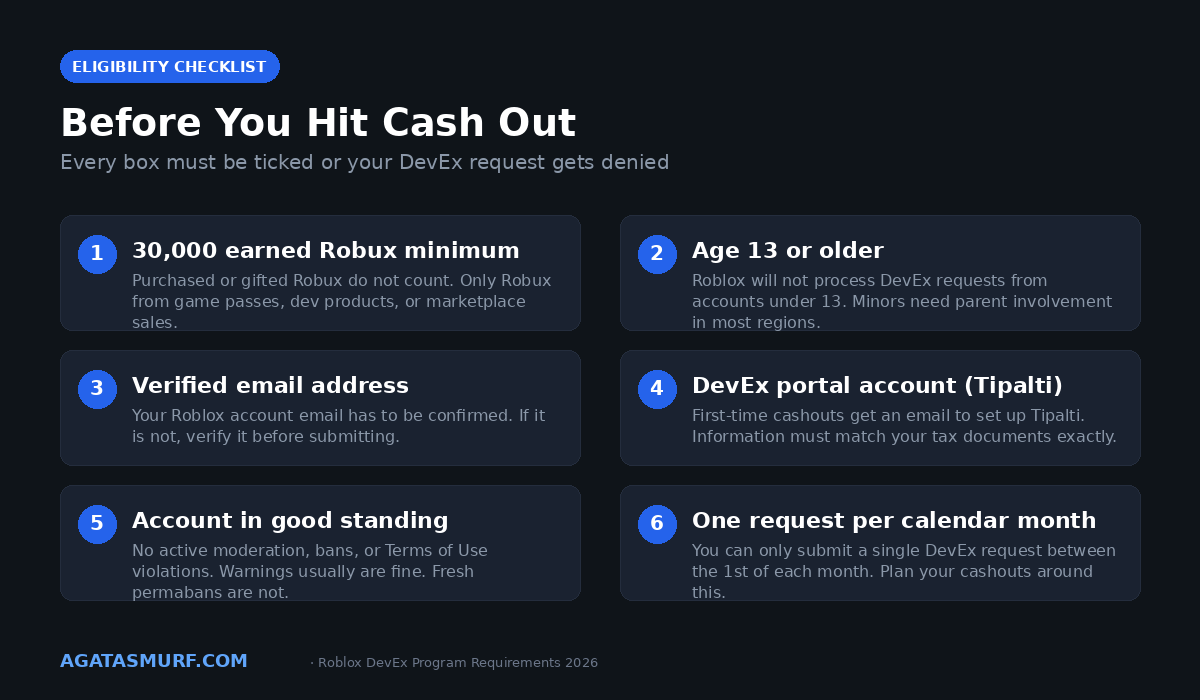
Running the numbers through a devex calculator is step one. Qualifying is step two, and Roblox is not forgiving here. Miss any of these and your request gets bounced without much explanation.
- At least 30,000 earned Robux. Keyword being earned. Game pass sales, dev product sales, Premium Payouts, marketplace fees, that kind of thing. Robux you bought yourself? Useless for DevEx. Premium monthly stipend Robux? Also useless. Limiteds you traded? Same deal. I have seen devs with 80K in their balance get rejected because 70K of it was bought, not earned.
- 13 years old minimum. Under 13 you cannot touch DevEx at all. Some countries push this to 18, and if you are a minor basically anywhere, a parent has to show up for the Tipalti paperwork. Roblox actually checks.
- Verified email. Go to account settings. Look at your email row. If there is no green checkmark, fix that before you waste a month waiting for a denied request.
- DevEx portal account (Tipalti). First time cashouts trigger an invite email from Tipalti. You fill in your legal name, address, tax form (W-9 for US, W-8BEN for non US), and payment method. Payment options depend on your country.
- Account in good standing. Active bans, recent moderation actions, or Terms of Use violations kill your DevEx eligibility. Minor chat warnings are usually fine. Fresh permabans or ongoing appeals are not.
- One request per calendar month. You can submit exactly one DevEx request between the 1st and the last day of each month. If you cash out on March 2nd, you cannot cash out again until April 1st.
For the full legal text, the official Roblox DevEx help page is the source of truth. Rates and rules update there first.
The 30% Marketplace Fee Changes Your Real Payout
This is where half the forum posts about “DevEx scammed me” come from. People do the devex calculator math on the listed price instead of earned Robux, and reality hits when they check their dashboard.
Here is the deal. A player buys your 1,000 Robux game pass. You don’t see 1,000. You see 700. Roblox keeps 30% off the top on every single transaction. Game passes, dev products, avatar items, UGC. All of it. The seller walks with 70%.
Concrete example. List a game pass at 1,000 Robux. Someone buys. Pending sales shows 700 Robux. That 700 eventually lands in earned Robux, and that is what DevEx cares about. The formula for actual USD per sale:
Game pass price × 0.7 × 0.0038 = USD payout
So a 1,000 R$ game pass = $2.66 per sale. A 100 R$ item = $0.266 per sale (yeah, twenty-seven cents). Now you see why scale matters more than markup on Roblox. A decent simulator pulling 5K sales a day at 99 R$ still beats a “premium” pass at 2,000 R$ getting 50 sales.
The fee toggle on the devex calculator handles this for you. Flip it ON if you’re pasting in gross sale price. Leave it OFF if the number came straight from your earned Robux balance on the creator dashboard.
Using the DevEx Calculator to Price Game Passes
Smart pricing is where the devex calculator earns its keep. Most Roblox devs default to round numbers (100 R$, 500 R$, 1,000 R$) without doing the USD math. Here is what a few common game pass prices actually pay out:
- 99 R$ game pass: $0.26 per sale after fee
- 199 R$ game pass: $0.53 per sale after fee
- 499 R$ game pass: $1.33 per sale after fee
- 999 R$ game pass: $2.66 per sale after fee
Run those through the calculator with the 30% fee toggle ON before pricing anything. Underpricing is the most common mistake. A lot of devs list 50 R$ game passes thinking cheap equals more sales, but 50 R$ × 0.7 × 0.0038 = $0.13 per sale. You need 858 of those to hit the DevEx minimum. At 499 R$ instead, you need 85.
Goal mode on the calculator is underrated. Hit the Goal tab, type $500 as your target, and it tells you the Robux you need: about 132K at the new rate. From there do the sales-needed math: 132K / 700 = roughly 188 game pass sales at 1,000 R$ each. You just turned a vague “I want to make $500 a month” into a concrete sales target. That mental shift changes how you build.
Premium Payouts: The Other DevEx Income Stream
Most people hitting a devex calculator are thinking about direct sales. Game passes, dev products, the usual. Premium Payouts are the sneaky second income stream that a lot of newer devs overlook until their friend’s idle game starts printing passive Robux.
How it works, in plain English. Every Roblox Premium sub comes with a monthly Robux allowance (450, 1,000, or 2,200 depending on plan). Roblox carves out a chunk of each subscription fee and tosses it in a shared pool. That pool gets split weekly based on how many Premium-player-minutes happened in each game. Your game hosts a lot of Premium subs for long sessions? You get a slice. Short sessions, small slice. No Premium players, no slice.
Key point for the calculator: Premium Payouts land in your earned Robux balance and cash out through DevEx at the exact same $0.0038 rate. For high-dwell-time genres (simulators, roleplay, social hangouts), Premium Payouts can beat direct item sales. For PvP stuff or anything with short sessions, barely a blip.
Real numbers from a public DevForum thread I bookmarked: a mid-size simulator doing 50K DAU and ~20 min avg session for Premium users was pulling ~120K Robux/month from Premium Payouts alone. That is around $456/month at the new rate, completely passive, on top of whatever direct sales were doing.
DevEx Tax: What Roblox Devs Actually Owe
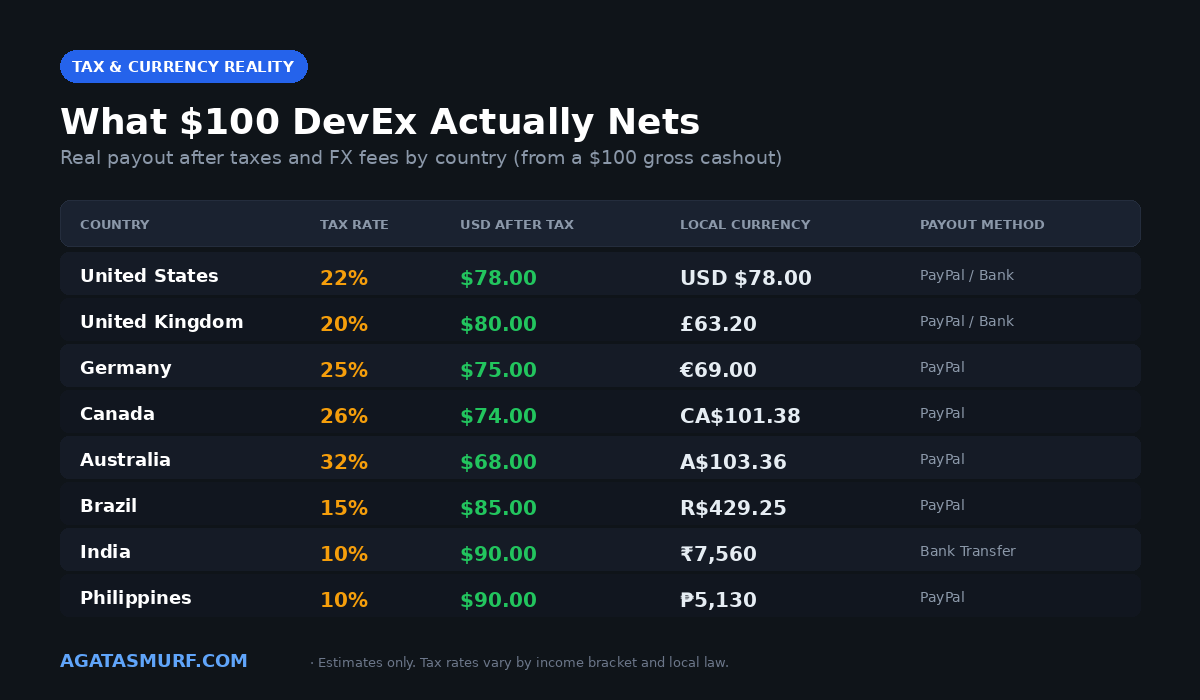
The devex calculator gives you gross. Then the taxman shows up. If you’re in the US, DevEx income is self-employment and gets reported on Schedule C. Federal income tax runs 10% to 37% depending on your bracket, self-employment tax tacks on another 15.3% (Social Security and Medicare combined), and state takes its cut on top. Roblox mails you a 1099-NEC if you clear $600 in a calendar year, which a lot of teen devs don’t expect.
Let me just walk through $1,000 in DevEx for a US dev making roughly middle-bracket income:
- Fed tax at 22%: $220
- SE tax (15.3%, half of it is deductible so real bite is ~$115 net)
- State tax, anywhere from $0 (Texas, Florida) to ~$130 (California)
- What actually lands in your bank: roughly $530 to $665 depending on your state
Painful when you spelled it out like that. That “$1,000 cashout” is closer to $600 after Uncle Sam gets done with it.
Outside the US it varies a lot. EU countries often withhold tax at the Tipalti layer (you see it come out before the payment even hits), UK folks settle it through Self Assessment, Brazil and India work through their own tax IDs. The W-8BEN you filed with Tipalti may already have a treaty reduction baked in if your country has one with the US.
The tax slider on the devex calculator lets you model your own hit. Default is 22% but you can drag it from 0 to 50 percent. Figure out your real effective rate and leave it there. The devex calculator is a planning tool though, not tax advice. Talk to an actual accountant before you make a decision with a comma in it.
Buying Robux vs Earning Robux: Two Sides of the Calculator
Flip to the third tab on the devex calculator and the whole thing inverts. Instead of “how much am I getting as a dev,” it asks “how much Robux does $X actually buy me as a player?”
And the answer is kinda wild when you compare. Player spends $10, Roblox hands over 800 Robux. Work it backward: $0.0125 per Robux. The DevEx side? $0.0038. That is a 3.3x spread. Roblox sells Robux to players at 3.3x what they buy it back for from creators. Which, fine, fair enough, platforms need a margin. But the gap catches people by surprise every time I explain it.
Roblox Premium bumps the buy side. Pay $10 as a Premium sub, get 880 Robux instead of 800 (that is the +10% bonus toggle in the calculator’s buy tab). Premium also kicks back a monthly Robux stipend on top of that, which is how Roblox keeps Premium subs sticky.
Why this matters for developers: the economics of your pricing. A 1,000 R$ game pass costs the buyer $12.50 retail. After the 30% marketplace fee and DevEx conversion, you walk with $2.66 per sale. So of the $12.50 a player handed Roblox for your pass, you see about 21%. The other 79% goes to Robux retail margin, payment processing, platform costs, Roblox. That is the Roblox economy in one number.
DevEx Calculator History: Rate Changes Since 2013
Three rates in thirteen years. DevEx launched back in 2013 at $0.0025 per Robux, which was… okay for the time. 2017 came along and Roblox upped it to $0.0035. Eight years of radio silence after that. Then RDC 2025 dropped the announcement that the rate was moving to $0.0038 on September 5. Fans applauded on stream. Plenty of the DevForum was less enthusiastic.
Why less enthusiastic? Inflation math. The 2017 rate of $0.0035, adjusted for US inflation to 2025, should be closer to $0.0044 to have the same real purchasing power. The bump to $0.0038 helps but does not fully close the gap. Meanwhile Roblox has quietly nudged up retail Robux pricing over the same stretch, widening the dev-to-retail spread. A few big creator accounts on Twitter posted the math, and it stuck around.
Roblox said the rate will be reviewed annually now. Next scheduled window is September 2026. If anything changes, the calculator constants and the conversion tables above get updated the same week. Watch the help.roblox.com DevEx page and the RDC keynote each year.
How to Submit a DevEx Cash Out on Roblox
This SimpliConvert video from January 2026 walks through the actual cashout process, including the tax side most guides skip.
Once the devex calculator says you are eligible, here is the short version of the cashout flow:
- Go to your Roblox account settings and find the Cash Out button. If you do not see it, you are not eligible.
- Enter the Robux amount you want to exchange (minimum 30,000, no upper limit beyond your balance).
- Roblox converts the Robux to USD at whatever rate your balance qualifies for.
- If this is your first cashout, check your email for a Tipalti invite. Set up the portal account with your tax forms.
- Tipalti processes the payment, usually 8 to 12 business days after approval. PayPal or direct deposit depending on your country.
Standard approval takes around 7 to 14 days in my experience, sometimes faster for accounts with cashout history. The Tipalti side adds another week or so before the money actually lands in your bank.
Why Your DevEx Calculator Result Might Not Match Your Payout
The devex calculator gives you gross USD at the exchange rate. It does not account for every last piece of the real world payout:
- Income tax. Covered above. 22% to 37% federal in the US, plus state. International rates vary from 10% to 45%+.
- Payment provider fees. Tipalti and PayPal both charge small fees, usually 1% to 3% depending on your payout method and country.
- Currency conversion. If your payout is in USD but you live in a country using EUR, GBP, BRL, or PHP, the bank applies its own FX rate on top of the DevEx rate. Spreads are usually 1% to 4%.
- Rate split on mixed balances. If you have both old rate and new rate Robux, the devex calculator shows both numbers but your actual cashout blends them in redemption order.
Rough rule: subtract 25% to 35% from the gross calculator result to estimate what actually hits your bank account. So $1,000 gross DevEx lands at around $650 to $750 in hand for most US devs, and roughly the same range for international creators after their own tax and FX hit.
When the DevEx Numbers Do Not Add Up
Real talk, DevEx isn’t easy money, and most devs never hit the minimum. To clear 30K earned Robux you need roughly 43K in gross sales (thank the 30% fee for that). Doable if you have a real game with real traffic. Not doable if you’re shipping your third unfinished obby.
Quick context. $114, which is what that 30K Robux pays at the new rate, lines up weirdly close to what a mid tier smurf costs in League of Legends. If your Roblox side project’s hitting 3 CCU and you have been grinding it for four months, the time math just doesn’t work out. Lot of devs I know run their Roblox builds on the side and pick up a LoL smurf account when they want a clean ranked climb without the grind.
Not saying throw it in the trash. Just saying: run the numbers on the calculator honestly before you tell yourself this is your income plan for the year. For folks who already spent a stack on other games and want to figure out where the money went, these reads help:
- How Much Money Have You Spent on League of Legends?
- Valorant Points Price Guide
- Richest Esports Players of All Time
- How To Get Riot Points in League of Legends
Frequently Asked Questions
What is the current DevEx calculator rate in 2026?
The official Roblox Developer Exchange rate is $0.0038 per earned Robux as of September 5, 2025, up from the old $0.0035 rate. That means 100,000 Robux equals $380.
How much is 100,000 Robux in USD on the devex calculator?
At the 2026 DevEx rate, 100,000 earned Robux is worth $380 USD. At the old rate of $0.0035, the same amount pays out $350. Our devex calculator shows both side by side.
How much is 10,000 Robux in dollars?
10,000 earned Robux converts to $38 at the 2026 DevEx rate or $35 at the old rate. Note that 10,000 Robux is below the 30,000 Robux DevEx minimum, so you cannot actually cash it out yet.
How much is 1 million Robux in USD?
One million earned Robux cashes out at $3,800 using the 2026 DevEx rate of $0.0038 per Robux. At the legacy $0.0035 rate, 1 million Robux pays $3,500.
How many Robux do you get for $10?
$10 buys 800 Robux through the official Roblox store for standard users, or 880 Robux for Roblox Premium members who get a 10% bonus on all purchases.
What is the minimum Robux to cash out with DevEx?
You need 30,000 earned Robux to submit a DevEx request. That is $114 at the new rate or $105 at the old rate. Below that threshold, Roblox will not let you cash out.
Can you cash out purchased Robux with DevEx?
No. DevEx only accepts earned Robux from game pass sales, developer products, Premium payouts, and marketplace item sales. Purchased Robux from the store, Premium stipend Robux, and Robux from limited trades are all excluded.
Is DevEx income taxable?
Yes. DevEx earnings are self-employment income in most countries. US developers owe federal income tax (10 to 37 percent), self-employment tax (15.3%), and state tax. International creators handle it through their local tax authority. Roblox issues a 1099-NEC to US devs earning over $600 per year.
How long does DevEx take to pay out?
Standard approval takes 7 to 14 business days. After approval, Tipalti processes the payment in another 8 to 12 business days. So from click to bank, figure 2 to 4 weeks total for most cashouts.
Is the DevEx calculator accurate for my country?
The devex calculator converts Robux to USD at the official rate. If you live outside the US, your bank or Tipalti applies its own currency conversion on top, so your local currency payout will be slightly lower than the pure USD figure.
Can I cash out DevEx more than once per month?
No. Roblox limits you to one DevEx request per calendar month. The cap resets on the 1st of each month, so timing matters if you are stacking cashouts.
Are Premium Payouts eligible for DevEx?
Yes. Premium Payouts count as earned Robux and go through DevEx at the standard rate. They are one of the main passive income streams for Roblox games that keep Premium players engaged for long sessions.
Last updated: April 2026
