


 through our G2G profile

 LoL Accounts
 Valorant
 WoW accounts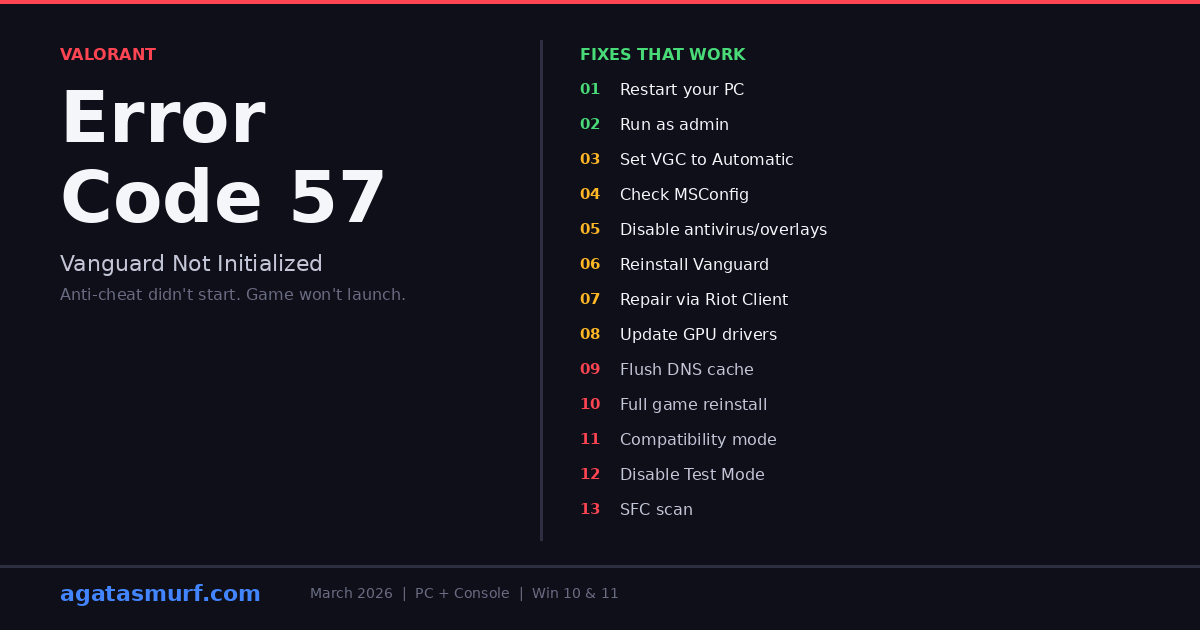
So you’re trying to launch Valorant and boom, Error Code 57. “Vanguard Not Initialized.” Client closes. Back to desktop. Cool. This happened to me after a random Windows update nuked my VGC settings (more on what VGC is in a sec). Took about 3 minutes to fix once I figured out the cause. I put together 13 fixes here, PC and console. All checked on Win 10 and 11, March 2026.
Why Valorant Error Code 57 Happens
Every single Error 57 boils down to one thing: Vanguard wasn’t running when you hit Play. Riot calls it “PlayerAffinityInitFailure” on their support page, which is useless info. Before you start messing with settings, spend 10 seconds checking the Riot Games error codes page to make sure servers aren’t just down for maintenance.
These are the real causes, sorted by how much they come up on Reddit and the Val Discord:
| Cause | How common | Fix time |
|---|---|---|
| VGC service set to Manual or Disabled | Very common | 2 min |
| Low RAM (4 GB or less) | Common on budget PCs | 1 min (close apps) |
| Antivirus blocking Vanguard | Common | 3 min |
| Corrupted Vanguard files | Occasional | 5 min |
| Outdated GPU drivers or Windows | Occasional | 5-10 min |
| DNS cache issues | Rare | 3 min |
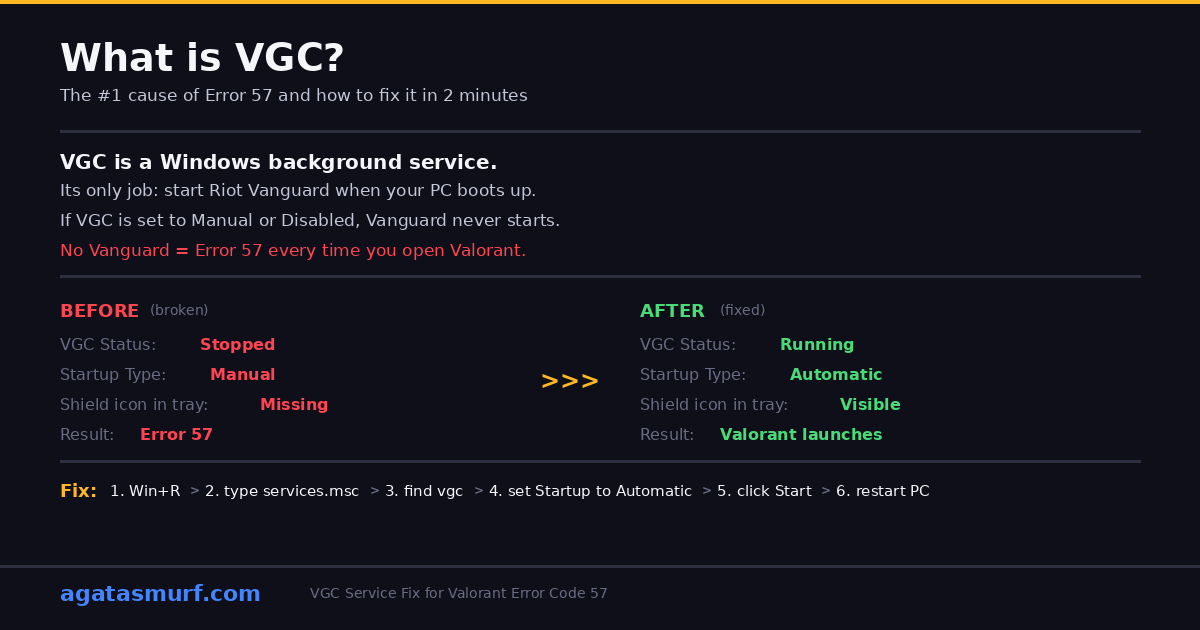
The VGC service thing is the #1 culprit behind Error 57. If you’ve never heard of VGC: it’s a background process in Windows that wakes up Vanguard when your PC boots. Like an alarm clock for the anti-cheat. VGC off = Vanguard sleeps through launch = error screen.
Valorant Error Code 57 Fix 1: Restart Your PC
Yeah yeah, the classic IT advice. But seriously, about half the Error 57 posts on r/VALORANT end with “nvm, restarted and it works now.” Vanguard boots with Windows, and sometimes random junk blocks it on that particular boot.
Don’t just close Val and reopen though:
- Task Manager (Ctrl + Shift + Esc).
- Scroll through the list. Riot Client, VALORANT, Vanguard tray, anything Riot. Kill them all.
- Actual full restart. Not sleep. Not closing your laptop lid. Restart.
- Once you’re back on desktop, wait like 30 seconds. Vanguard needs a moment.
- Check the bottom right of your screen near the clock. See a small shield icon? That’s Vanguard. Means it’s running.
No shield icon after restart? Vanguard isn’t starting on its own. Move to Fix 2.
Run Valorant as Administrator (Fix 2)
Shared PC? Family laptop? Work machine? Your Windows account might not have admin access, and Vanguard needs admin to run at kernel level. No admin = Vanguard can’t start = Valorant Error Code 57.
- Find where Valorant lives on your PC. Desktop shortcut, Start menu, wherever.
- Right-click it. Properties.
- Compatibility tab.
- There’s a checkbox: “Run this program as an administrator.” Check it.
- Apply. Open the game.
30 seconds, done. You’d be surprised how many people on family computers or school laptops have restricted accounts without knowing it.
Fix Valorant Error Code 57: Set VGC to Automatic
This is THE fix if Error 57 keeps coming back after every reboot. VGC, the thing I explained above. If it’s set to Manual or Disabled in your Windows services, Vanguard can’t start on its own. Ever.
To change it:
- Win + R. Type
services.msc. Enter. - Scroll way down. Find vgc.
- Right-click. Properties.
- Startup type: change it to Automatic.
- If it says Stopped, click Start.
- Apply. Restart your whole PC.
Heads up: CCleaner, Advanced SystemCare, and apps like that? They love to “optimize” your services by setting VGC back to Manual. Seen a bunch of posts on Reddit where people fix VGC, run their optimizer, and boom, Error 57 again next day. Check VGC after every scan.
Enable VGC in MSConfig
VGC set to Automatic in services.msc but still not starting? Windows has a second place that controls this. MSConfig. It runs before services.msc does, so it wins if there’s a conflict.
- Win + R. Type
msconfig. Enter. - Services tab.
- Scroll to vgc. Is the checkbox ticked? If not, tick it.
- Apply. Restart.
I had this happen once on my secondary PC. Services.msc showed VGC as Automatic, but MSConfig had it unchecked. Vanguard still wouldn’t start until I fixed it in both places.
Kill Software That Fights Vanguard
Vanguard runs deep in your system. Like, same depth as your GPU driver and Windows kernel. It hates sharing that space with other apps. If something else is also running at that level, Vanguard just goes “nope” and doesn’t load.
Programs known to cause problems:
- Antivirus: Avast, AVG, Bitdefender, Kaspersky, some Norton builds
- Optimizers: CCleaner, Razer Cortex, Advanced SystemCare, IObit
- Overlays: Overwolf, Outplayed, Medal.tv, some MSI Afterburner versions
Shut down whatever apps you’re running from that list. Try Valorant. Did it launch? Then add these two folders to your antivirus so it stops blocking them:
C:\Program Files\Riot VanguardC:\Riot Games\VALORANT
Reinstall Vanguard to Fix Error Code 57
Corrupt Vanguard files? Toggling services won’t help if the actual files are broken. Good news though, you can rip out just Vanguard without touching the game itself.
Quick method:
- Win + R. Type
appwiz.cpl. Enter. - Find Riot Vanguard. Right-click. Uninstall.
- Restart.
- Open Valorant. It’ll notice Vanguard is missing and download it again.
Thorough method (use this if the quick way didn’t help):
- Open cmd as admin. (Search “cmd” in Start, right-click, Run as administrator.)
- Type
sc delete vgc. Enter. - Type
sc delete vgk. Enter. - Now open Add or Remove Programs (Settings > Apps) and uninstall Riot Vanguard from there too.
- Open File Explorer. If
C:\Program Files\Riot Vanguardstill exists, delete it. - Restart. Open Valorant. Fresh Vanguard install starts automatically.
Once Vanguard is reinstalled, double-check VGC in services.msc. Fresh installs sometimes set it to Manual by default, which is annoying.
Repair Game Files Through the Riot Client
Before you go through the whole reinstall process, try this first. Riot stuck a repair button in the client that scans your files and grabs fresh copies of anything corrupted. If Valorant Error Code 57 showed up right after a patch, this alone could fix it.
- Open the Riot Client. Not Valorant, the client itself.
- Profile icon, top right.
- Settings.
- Valorant section. Hit Repair.
- Let it run. It’ll re-download anything sketchy.
- Restart PC. Open Valorant.
Give it a few. Speed depends on your internet. Way quicker than nuking everything and reinstalling from scratch though.
Update GPU Drivers and Windows
People skip this one but it matters more than you’d think. Vanguard talks to your hardware at a low level, and stale drivers cause problems that are hard to trace. A buddy of mine had Valorant Error Code 57 for weeks. Updated his NVIDIA driver from some 2024 version to the 2026 release and it was gone. Nothing else changed.
To update:
- Device Manager from Start menu.
- Open Display Adapters.
- Right-click your GPU. Update Driver. Search automatically.
Real talk though, the Windows auto-search for drivers is garbage. Half the time it says “best driver already installed” when it’s 2 years old. Go to NVIDIA or AMD directly and grab the latest one for your card.
Settings > Windows Update > Check for updates too. Install everything, optional stuff included. Restart.
Flush Your DNS Cache
OK this one sounds random. Error 57 fixed by flushing DNS? But Vanguard does a network check with Riot servers when it boots. Old DNS entries in your cache can mess that up. Couple threads on r/VALORANT confirmed this was their fix after literally everything else failed.
Open cmd as admin and type these one by one:
ipconfig /flushdns
ipconfig /registerdns
ipconfig /release
ipconfig /renew
netsh winsock reset
Restart. Try Val. Got Pi-hole or custom DNS at home? Temporarily swap to 8.8.8.8 (Google) or 1.1.1.1 (Cloudflare) and test again. Some custom DNS setups trip Vanguard up.
Full Game Reinstall (Last Resort)
Tried everything? Still getting Valorant Error Code 57? Time to burn it all down. Uninstall the game, the anti-cheat, the client, delete the folders, start completely fresh.
- Settings > Apps. Uninstall Riot Vanguard, Valorant, and Riot Client. All three, in that order.
- Open File Explorer. Manually delete these folders if they’re still there:
C:\Program Files\Riot VanguardC:\Riot Games%LocalAppData%\Riot Games%AppData%\Riot Games
- Restart.
- Go to playvalorant.com. Download. Install from zero.
Let it fully finish installing. Restart when it tells you to. Before you queue up, check bottom right of your screen for the Vanguard shield. No shield = still broken.
Try Compatibility Mode
Weird fix, but it works for some people. Mostly on older PCs or machines with unusual Windows setups. You basically tell Valorant to pretend it’s running on Windows 8.
- Right-click Valorant shortcut. Properties. Compatibility tab.
- Tick “Run this program in compatibility mode for:”
- Pick Windows 8. Some people have luck with Windows 7.
- Apply. Launch.
No change? Untick that box. Don’t leave it on or it could cause other weirdness later.
Disable Windows Test Mode
Most guides skip this. Found it buried in a MiniTool article and a couple Reddit posts. Windows has this thing called Test Mode that lets unsigned drivers run. Vanguard hates unsigned drivers. If Test Mode is on, Vanguard won’t start. Simple as that.
cmd as admin, then type:
bcdedit /set testsigning offRestart. If that killed the error, Test Mode was your problem. Not sure if Test Mode is even on? Look at the very bottom right of your desktop. There’s a faint watermark that says “Test Mode” if it’s active. No watermark = it’s already off.
Run System File Checker (SFC Scan)
Sometimes it’s not even a Valorant problem. It’s Windows being broken underneath. Corrupt system files can make Vanguard fail for no obvious reason. SFC scans Windows itself and patches whatever it finds.
cmd as admin:
sfc /scannowSit tight, 5-15 minutes. If it finds and repairs stuff, restart and try Val. Might not directly fix Error 57 on its own, but it cleans up the junk that could be causing Vanguard to choke.
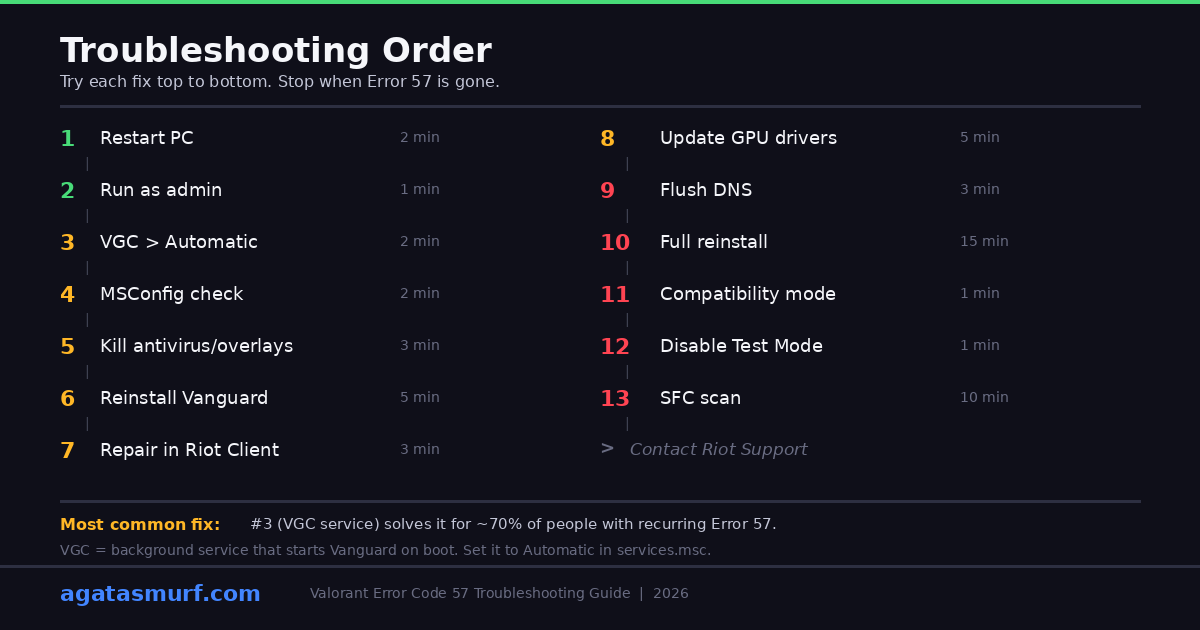
Error Code 57: Quick Fix Reference
| Fix | When to try it | Time |
|---|---|---|
| 1. Restart PC | First time seeing the error | 2 min |
| 2. Run as Administrator | Restricted user account or shared PC | 1 min |
| 3. VGC to Automatic | Error returns every reboot | 2 min |
| 4. MSConfig check | VGC setting keeps reverting | 2 min |
| 5. Disable conflicting apps | You run antivirus or overlays | 3 min |
| 6. Reinstall Vanguard | Suspected file corruption | 5 min |
| 7. Repair via Riot Client | Failed patch, missing files | 3-5 min |
| 8. Update drivers + Windows | Haven’t updated in months | 5-10 min |
| 9. Flush DNS | Login issues or slow loads too | 3 min |
| 9. Full reinstall | Nothing else fixed it | 15-20 min |
| 11. Compatibility Mode | Older hardware, weird Windows config | 1 min |
| 12. Disable Test Mode | Running unsigned drivers, Test Mode watermark | 1 min |
| 13. SFC Scan | Suspected Windows system file corruption | 5-15 min |
Still Getting Valorant Error Code 57 After All 13 Fixes?
OK if you tried all 13 and nothing worked, this is a you-specific problem. Something about your exact hardware or network config is messing with Vanguard in a way no guide can predict. Time to send Riot a ticket with:
- Your specs: CPU, GPU, how much RAM, Windows version (type
winverif you’re not sure) - Which fixes you already tried (all 13? say so)
- Does it happen every single time or randomly?
- Screenshots of the error screen
- Can you play League or TFT on this same PC? (Helps them narrow it down)
Riot support can pull logs from their end and see exactly why Vanguard failed on your machine. Stuff you’d never catch yourself. If you play other Riot games and get Vanguard errors there too, check our LoL Vanguard errors guide for a full list.
Other Valorant Errors That Look Similar
Error 57 is one of several Vanguard-related codes you might see. These pop up for similar reasons and sometimes show up together with VAL 57:
| Error | What it means | Typical fix |
|---|---|---|
| VAL 19 | Connection to Riot servers dropped | Restart game + client; check server status |
| VAN 9001 / 9002 | Secure Boot or TPM 2.0 disabled | Enable both in BIOS |
| VAL 45 | Vanguard is asking for a reboot | Restart PC (not just the game) |
| VAL 46 | Connection timeout | Check internet, restart router |
| VAL 59 | Login credentials failed | Restart client, reset password |
We have a page that covers every single Valorant error code if you need it: Valorant error codes guide.
System Requirements to Prevent Valorant Error Code 57
Running Valorant on a potato PC makes Error 57 way more likely. The game itself might load fine, but Vanguard is also eating RAM and CPU in the background. On a 4 GB machine, Windows just starts killing stuff to survive, and Vanguard is first on the chopping block.
| Component | Minimum | Recommended |
|---|---|---|
| OS | Windows 10 64-bit, build 1909+ | Windows 11 64-bit |
| CPU | Intel i3-4150 / AMD equivalent | Intel i5-9400F or better |
| RAM | 4 GB | 8 GB+ |
| GPU | Intel HD 4000 / Radeon R5 200 | GTX 1050 Ti / RX 570+ |
| Storage | 23 GB free | SSD with 30+ GB free |
4 GB RAM is technically enough to run Valorant, but it’s the #1 reason people keep seeing Error 57 on loop. Close Chrome (seriously, Chrome eats RAM like crazy), close Discord, close Spotify. Or just slap in another 4 GB stick. They cost like $10 and the difference is night and day.
Error Code 57 on Console (PS5 and Xbox)
Yeah, Valorant is on PS5 and Xbox Series X|S now, and console players get Error 57 too. Different reason though. There’s no Vanguard on console. Error 57 on console is almost always a server thing or a bad install file.
What to do on console:
- Check if Riot servers are even up. Console gets hit harder by outages than PC.
- Force close the game. PS5: PS button, highlight Valorant, Options, Close Game. Xbox: Guide button, quit.
- Power cycle. Not rest mode. Actually hold the power button down, wait for it to fully die, then turn it on again.
- Check your game library for a Valorant update. Sometimes it’s just sitting there waiting.
- Still nothing? Delete the game and redownload from the store. Your rank, skins, everything is on your Riot account. Nothing gets wiped.
Console Error 57 doesn’t show up nearly as often as on PC. Most of the time a restart fixes it. If not, sit tight for a bit. Riot usually patches server-side issues within a few hours.
Valorant Error Code 57 FAQ
What does Valorant Error Code 57 mean?
Vanguard didn’t start. That’s it. Vanguard is the anti-cheat, and Valorant flat out refuses to load without it. You’ll see “Vanguard Anti-Cheat has not been initialized” on screen.
Why does Error 57 keep coming back after I restart?
VGC (Vanguard’s background service) is probably on Manual or Disabled. Win + R, services.msc, find vgc, set it to Automatic. And if CCleaner or something keeps resetting it, open MSConfig too because it runs before services.msc and can override your changes.
Can low RAM cause VAL 57?
100%. On 4 GB machines, Windows starts killing background stuff when RAM gets tight. Vanguard is one of the first things to go. Close what you can before launching, or honestly just throw in another RAM stick.
Is VAL 57 and VAN 57 the same thing?
Same thing, different prefix. VAL = client side. VAN = Vanguard side. Error 57 is always Vanguard failing to start. Doesn’t matter which prefix shows on your screen, fixes are identical.
Do I really need to reinstall the whole game?
Nah, not usually. Just reinstalling Vanguard alone (Fix 6) sorts it out most of the time. Full game reinstall is for when you’ve tried literally everything else and nothing worked.
Which antivirus apps block Vanguard?
Avast, AVG, Bitdefender, Kaspersky, and certain Norton builds come up the most on Reddit. Just add the Riot Vanguard folder to your antivirus exclusion list and you’re good. No need to uninstall the antivirus.
Does Error 57 happen on PS5 and Xbox too?
Yeah, but different cause. No Vanguard on console. It’s usually a server problem or a bad game file. Restart the console, check for updates, or just delete and reinstall from the store. Your Riot account saves everything so you won’t lose progress.
Is Error 57 a ban?
Nope. Not a ban. Not a suspension. Not a penalty. Your account is completely fine. Error 57 is just Vanguard failing to boot. If you were actually banned you’d get VAL 61, which is a totally different screen.
This video walks through the main fixes visually if you prefer watching over reading:
Want a fresh Valorant account? We sell Valorant accounts with instant delivery, including ranked ready accounts if you want to skip the grind. More troubleshooting stuff on the AgataSmurf blog.
Last updated: March 2026
