


 through our G2G profile

 LoL Accounts
 Valorant
 WoW accounts
Quick cast in League of Legends fires your ability the second you press a key, aimed at wherever your cursor sits. No extra click, no confirmation step. One press and the spell goes. Riot renamed it from “smart cast” back in patch V3.12. People on Reddit still say smart cast half the time. Doesn’t matter, same feature. As of Patch 26.7 and Season 1, the casting system works exactly the same way it has for years, so nothing here has changed with the new Role Quests or item overhauls.
I switched to quick cast somewhere around my second season of playing ranked, and it was one of those things where you wonder how you ever played without it. If your combos feel slow compared to what you see in pro play or in coaching VODs, this is probably the reason. I’m going to cover how to turn it on, what each mode actually does, which champs need it most, and a couple drills that worked for me when I was switching over.
TL;DR
| What is it | Abilities fire on key press, aimed at your cursor. No extra click. |
| Old name | Smart cast (renamed patch V3.12) |
| Where to enable | ESC > Hotkeys > Quickbind UI > click arrows under ability keys |
| Time saved | ~50-100ms per ability (~200-400ms in a full combo) |
| Who uses it | Most Diamond+ and all pro players |
| Adjustment period | 1-2 weeks of regular play |
| Best starting point | Quick Cast with Indicator (shows range while holding key) |
Quick Cast League of Legends: How It Works
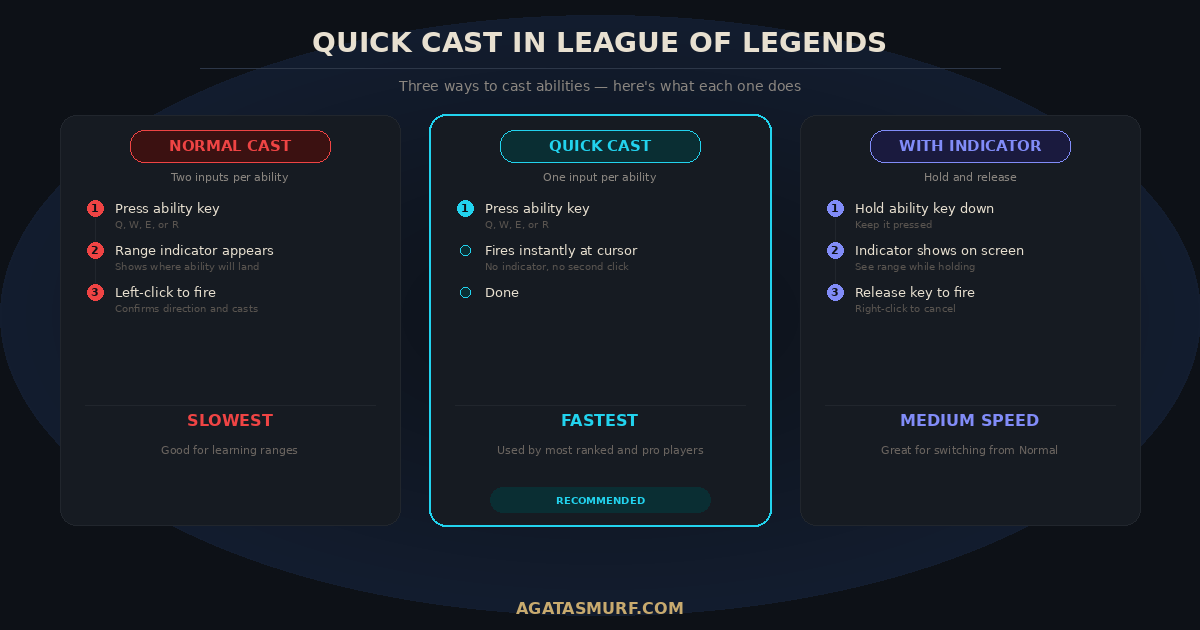
Normal cast is two steps. Press Q, a range indicator appears showing where the ability will go, then left-click to fire. Two separate inputs. Quick cast in League of Legends removes step two. Press Q, ability flies toward your cursor. Done.
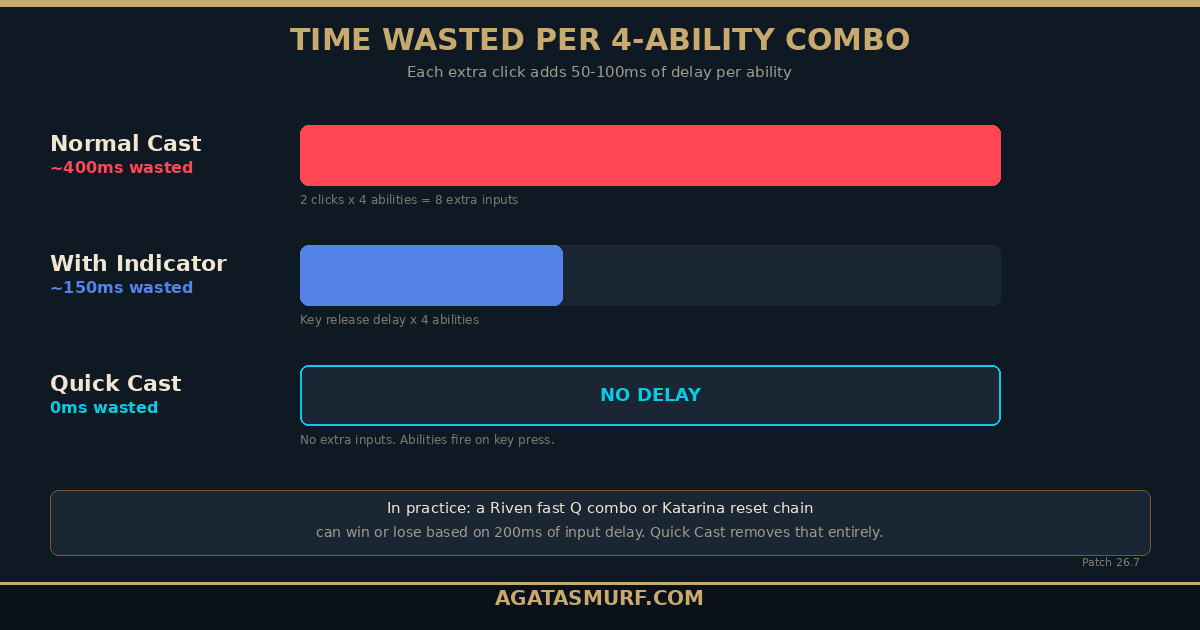
That extra click eats around 50 to 100 milliseconds per spell. Sounds small, right? But a standard four-ability combo adds up to maybe 200-400ms of dead time just from those confirmation clicks. I’ve died to Zed combos that lasted less than that. A Riven fast Q, a Lee Sin ward hop into R, a Katarina reset chain. All of those get noticeably faster when you drop the extra inputs.
It works on everything. Point-and-click abilities like Annie Q, ground-targeted stuff like Ziggs bombs, linear skillshots like Morgana Q, self-buffs like Janna E. Active items too (Stopwatch, Rocketbelt), and summoner spells. Flash and Ignite both get faster.
The tradeoff? You lose the visual indicator. If you know your champion’s ranges because you’ve played them 200 games, no big deal. If you just picked up a new champ, you’ll miss more at first. That’s normal.
This video covers quick cast setup and when to use each mode:
Quick Cast League of Legends: How to Turn It On
Pretty straightforward once you know where to look.
- Hit ESC mid-game. Opens the Settings panel.
- Click the Hotkeys tab at the top.
- Look at the top section. Riot calls it the Quickbind UI. You’ll see your Q, W, E, R keys, summoner spell slots, and item slots. Each has a small arrow icon underneath.
- Click the arrow below each key to toggle between normal cast (grayed out) and quick cast (highlighted). Or just click “Quick Cast All” to flip everything.
- Want range indicators while holding a key? Tick “Replace Quick Cast with Quick Cast with Indicator.”
Settings save to your account, not your machine. Do it once and it persists across games.
The Three Cast Modes
League has three distinct ways to cast. Quick cast League of Legends players use most often is the one that fires on key press, but indicator mode and normal cast both have their place. And honestly, the right choice isn’t always the same for every ability or every champion.
Normal Cast
Press key, see indicator, left-click to fire. Two inputs per ability. You get to preview exactly where the spell lands before you commit. Good when you’re learning a champion’s kit. Bad when you need something to come out fast, like a reactive Flash or a clutch shield on your ADC who’s about to eat a hook.
Quick Cast (the One Most Players Use)
Press key, ability fires at cursor. One input. No indicator, no confirmation, no take-backs. What most players above Gold run on their main abilities. The downside: press the wrong key by accident and you’ve burned a cooldown. But once you get comfortable with it, going back to normal cast feels like typing with gloves on.
Quick Cast with Indicator
Hold down the key and the range indicator shows up. Release the key and the ability fires. Right-click while holding to cancel without casting. Fires on key release instead of key press, so it’s a touch slower than pure quick cast. Still skips the extra left-click that normal cast needs though.
A lot of players use indicator mode as a stepping stone. Start there, get your ranges down, then move to full quick cast later. Nothing wrong with keeping it permanently either. I know Diamond and Master players who still run indicators on their R key for certain picks.
Quick Cast or Normal Cast? Depends on the Ability
It’s not all or nothing. Most good players run a mix, and that’s the move.
Quick cast makes sense for abilities with short cooldowns you spam often, point-and-click targeted spells, dashes and mobility abilities, self-buffs and shields, and summoner spells like Flash or Ignite where a fraction of a second can mean living or dying.
Normal cast still has a place for vector-targeted abilities like Viktor E and Rumble R where you drag to set direction, abilities with weird hitboxes you haven’t memorized, and spells with long cooldowns where missing hurts more than casting late (think Thresh Q, Blitzcrank Q).
Here’s what I do and what I’ve seen from a lot of Diamond+ players: quick cast on Q, W, E, R, Flash, Ignite, and items by default. Normal cast bound to Shift+Q, Shift+W, Shift+E, Shift+R for those rare moments when you actually need to check a range before firing.
Cast Mode Comparison
| Normal Cast | Quick Cast | Quick Cast w/ Indicator | |
|---|---|---|---|
| Speed | Slowest | Fastest | Middle |
| Shows range | Yes, before click | No | Yes, while holding key |
| Fires on | Left-click | Key press | Key release |
| Cancelable | Yes (right-click) | No | Yes (right-click while holding) |
| Best for | Learning ranges, long-CD skillshots | Combos, fast reactions | Transition from normal cast |
Quick Cast League of Legends: Champions That Need It Most
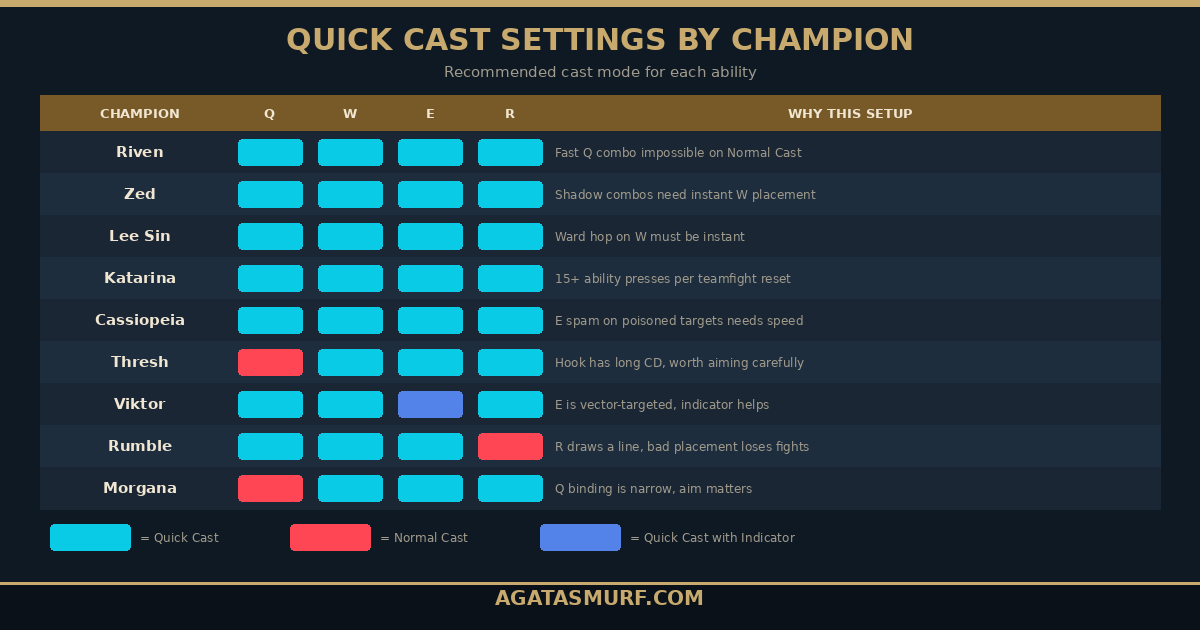
Some champions feel like a completely different pick with quick cast in League of Legends compared to normal cast. The gap is biggest on combo-heavy, high-APM picks.
Riven
The poster child for quick cast. Her fast Q combo relies on animation canceling between each Q press. Normal cast adds an extra click per Q, and you literally cannot execute the full fast combo at proper speed with it. Every Riven player in high elo has at least Q on quick cast. Most have everything.
Zed
Shadow combos need W placement, W swap, and ability landing all in a tight window. Extra clicks from normal cast give your target enough time to react and Flash out. I’ve tested this in Practice Tool. The difference in full combo speed is around 300ms, which is huge on an assassin.
Lee Sin
Ward hopping is hard enough as is. Doing it on normal cast? Good luck. Quick cast on W is non-negotiable if you want clean Insec kicks. Most Lee Sin players run it on everything, including their ward trinket.
Katarina
She resets her abilities on kills and assists. In a big teamfight she might press 15+ abilities in a few seconds. Each extra click from normal cast multiplies across all those casts. It’s the difference between getting the reset chain and dying mid-combo because your E didn’t come out 100ms sooner.
Cassiopeia
She spams E every time it comes off cooldown on poisoned targets. On quick cast, Cass can squeeze out more casts per second. On normal cast, the extra click bottlenecks her DPS. With the Patch 26.7 buffs to her base mana and E scaling, this matters even more now.
Champions Where Mixing Modes Works
Thresh: Most Thresh players quick cast E (Flay) and W (Lantern) for speed, but some keep Q on normal cast. The hook has a long cooldown, and missing it feels terrible. Personal call.
Viktor: His E is vector-targeted. You hold to mark the start, drag, release to set the end. Quick cast handles it fine once you’re practiced, but the input is different from regular abilities. Many Viktor mains keep E on indicator mode.
Rumble: R works the same as Viktor E. You draw a line. A bad ult placement hurts your team more than a slightly late ult, so keeping R on normal cast is reasonable.
Quick Cast League of Legends: Setup by Role
Nobody really talks about this, but your role changes what the right quick cast League of Legends setup looks like. What works for a mid lane assassin doesn’t always make sense for a support player.
ADC / Marksman
Full quick cast on Q, W, E, R, Flash, and Heal/Barrier. ADCs need every millisecond for kiting, and most marksman abilities are either skillshots you spam (Ezreal Q, Jinx W) or self-buffs (Tristana Q, Kog’Maw W). Pair this with Attack Move on Cursor for smooth orb-walking. The one exception: if you play Jhin, some players keep W on indicator mode because the range is deceptively long and the hitbox is narrow.
Mid Lane
Same thing on everything for assassins (Zed, Katarina, Akali, LeBlanc). No exceptions. For control mages, keep Q and E on it, but consider indicator mode on R for champions like Orianna, Viktor, or Syndra where ult placement decides teamfights. I play a lot of mid and honestly full quick cast works for 90% of the champion pool. The only time I switch anything is on Viktor E.
Top Lane
Same deal across the board for most bruisers and fighters. Riven, Camille, Fiora, Jax, Aatrox. They all combo fast and benefit from reduced input time. For tanks like Ornn or Sion, it still works fine. Sion Q (the charge) uses hold-and-release, which feels natural.
Jungle
Everything on quick cast plus your Smite button. Jungle fights happen in river and tight spaces where reaction speed matters more than aim precision. Lee Sin and Nidalee basically require it. Even tank junglers like Amumu or Sejuani benefit because you’re often flash-ulting reactively.
Support
This is the one role where mixing modes is most common. Quick cast on shields and heals (Lulu E, Nami W, Janna E) because you need them out fast when your ADC takes a hook. But hook champions specifically get debated. Some Thresh and Blitzcrank players keep Q on normal cast because the ability has a 15-20 second cooldown and missing it is a big deal. If you’re a Nautilus or Leona player though? Full quick cast. Your engage is point-and-click or close to it.
Self-Cast: A Setting Most Players Ignore
ALT + ability key casts a buff or shield on yourself regardless of cursor position. Champions like Lulu, Karma, and Orianna get a lot of value from this because in a chaotic teamfight, your cursor is usually on an enemy or a minion, not on yourself.
There’s a related quirk with quick cast. If you press a self-buff ability and your cursor is over an invalid target, the game auto-self-casts. But don’t count on that. Build the ALT+key habit. It works every time, no matter where your cursor is sitting.
Other LoL Settings That Pair Well
While you’re in the Hotkeys menu, check these:
“Cast the pressed spell upon pressing another spell” buffers one ability into another. Useful on combo champions like Syndra or LeBlanc where you want to queue Q into E without pausing between inputs.
“Clamp cast target location within max range” stops your champion from walking toward the enemy when you aim outside ability range. Instead, the spell fires at max range. Keeps you from facechecking into trouble because you clicked too far.
Attack Move on Cursor pairs with quick cast for smooth kiting on ADCs and auto-attack champions. If you play Jinx or Vayne, you want this. More details in our settings guide.
Quick Cast League of Legends: Active Items People Forget
Everyone talks about quick cast League of Legends abilities, but items with active effects benefit from it just as much. And a lot of players leave their item slots on normal cast without realizing it.
Stopwatch / Zhonya’s Hourglass is the big one. When a Zed ults you or a Syndra throws six balls at your face, you have maybe 200ms to react. If your Zhonya’s is on normal cast, you press the item key, then click, and by then you’re dead. On quick cast, one press and you’re golden. I’ve saved my life with quick cast Zhonya’s more times than I can count.
Hextech Rocketbelt on this setting lets you dash toward your cursor instantly. Normal cast adds the click delay, which can mean the difference between getting in range for your combo or watching the enemy walk away.
Redemption and Locket for support players. Redemption on quick cast drops the heal zone at your cursor without the targeting step. Locket just pops the shield. Both benefit from faster activation in messy teamfights where every second counts.
Ward trinket is another one people overlook. Lee Sin ward hopping absolutely needs the trinket set this way. But even on non-Lee champions, dropping wards faster during objective setup or during an invade feels smoother.
To set this up: same Hotkeys menu, scroll to the item slots section. The Quickbind UI covers item keys 1 through 6 and the trinket slot. Toggle them the same way you toggle ability keys.
Quick Cast League of Legends: Keybind Cheat Sheet
If you want the quick cast League of Legends setup most high-elo players run without figuring it out yourself, here it is. Go into Hotkeys and match this:
| Key | Primary binding | Secondary binding |
|---|---|---|
| Q, W, E, R | Quick Cast | Shift+Q/W/E/R = Normal Cast |
| D, F (summoners) | Quick Cast | — |
| 1-6 (items) | Quick Cast | — |
| 4 (trinket) | Quick Cast | — |
| ALT + Q/W/E/R | Self-Cast | — |
One checkbox to also consider: “Replace Quick Cast with Quick Cast with Indicator”. If you turn this on, everything you set gets indicator mode instead. Good starting point. After a couple weeks, turn it off and go full speed.
This setup works for every role. The only thing you’d customize per champion is maybe keeping one specific ability on normal cast via the per-key toggle (like Viktor E or Rumble R).
Quick Cast League of Legends: Practice Drills
Switching to quick cast in League of Legends feels weird. Every player who’s done it says the same thing. Here’s how to get through the awkward phase faster.
Days 1-3: Practice Tool. Pick a champion you know well. Spawn target dummies. Just cast abilities on quick cast 50+ times. Focus on cursor placement, not accuracy. Get your fingers used to “press key = spell goes.” Spend about 10-15 minutes on this before you queue up.
Days 3-7: ARAM. ARAM is nonstop fighting, so you’re pressing abilities way more per game than on Summoner’s Rift. And nobody tilts over an ARAM loss, so you can mess up without anyone flaming you. I built most of my quick cast muscle memory here.
Week 2: Normals. Take it into normal games on your main. Don’t switch back when you miss. That’s the key. Every time you swap back to normal cast, you reset the muscle memory you’ve been building.
Self-cast drill (5 min). In Practice Tool, move your cursor across the screen away from your champion. Hit ALT+shield/buff ability 20 times. Make sure it self-casts each time. Build this reflex now so it’s there when a Zed jumps you in ranked.
The adjustment period is usually one to two weeks. After that, normal cast feels sluggish. Like, painfully so. If you’re grinding ranked, this is probably the fastest free improvement you’ll ever get from a settings change.
Quick Cast League of Legends: Common Mistakes
Ran into all of these myself. See them in every Reddit thread about switching to quick cast League of Legends too.
Burning cooldowns by accident. Your finger twitches, you press R, your ult goes into a wall. Happens a lot the first week. Keep your fingers lighter on the keys. Your brain adjusts to “one press = one cast” after a few days.
Playing unfamiliar champions on full quick cast. Don’t. Use indicator mode for the first few games on any champion you’re picking up. Switch to full quick cast once you have the ranges down. No shame in that.
Forgetting ALT+key for self-cast. On normal cast you could click yourself to shield. Quick cast sends the shield wherever your cursor sits. If that’s on a minion, congrats, that minion just got a nice Janna E. Use ALT+key.
Not binding normal cast as backup. Put normal cast on Shift+Q/W/E/R. You’ll rarely use it, but when you need to double-check a range on the fly, you’ll be glad.
Quick Cast League of Legends: Vector and Charged Abilities
Two ability types that behave a bit differently and confuse people.
Charged abilities (Varus Q, Xerath Q, Vi Q): hold the key to charge, release to fire. On normal cast you tap once to start charging, then click to release. Quick cast feels more natural here because the hold-and-release maps cleanly to how charging “should” work.
Vector-targeted abilities (Viktor E, Rumble R): you set a start point and a direction. On quick cast, hold the key to mark the start, drag mouse, release to cast. If you just tap the key instead of holding, the ability fires in a straight line from your champion, which usually isn’t what you want. This trips up a lot of players who are new to quick cast on these spells.
These are the main reason some players keep specific keys on normal cast or indicator mode. If Rumble R on quick cast drives you nuts, keep that one ability on normal cast. The 50ms you lose isn’t worth whiffing the ult entirely.
Quick Cast League of Legends: Abilities That Auto-Cast
Something most quick cast League of Legends guides skip: a bunch of abilities force quick cast regardless of what you have set in your Hotkeys. If you have everything on normal cast, these spells still fire instantly on key press with no indicator.
Toggle abilities always quick cast. Stuff like Jinx Q (Switcheroo), Aatrox E (Umbral Dash when not combined with another ability), Singed Q (Poison Trail), Dr. Mundo Q (in some interactions). You press the key, the ability toggles on. There’s no targeting involved.
Transformation abilities work the same way. Nidalee R, Elise R, Jayce R. Press the key, you transform. No cursor targeting needed, so the game treats it as an instant cast no matter your settings. The reworked Shyvana from Patch 26.6 also falls into this category with her R transformation, though her new Emberstrike (Q) combo works great on full quick cast since you’re already in melee range when you use it in Dragon Form.
Certain passives with activatable components also bypass your cast settings. Karthus passive (Requiem during Death Defied) and Sion passive auto-attacks are handled by the game engine, not your hotkey config.
Why this matters: if you’re on normal cast and wondering why some abilities “feel” instant already, it’s because the game overrides your settings for abilities where a targeting step wouldn’t make sense. Knowing this can actually help your transition. If you already use these abilities without thinking about it, you’re already comfortable with instant-fire inputs on some of your keys. The jump to full quick cast is smaller than you think.
Quick Cast League of Legends FAQ
What is quick cast League of Legends?
Quick cast fires your ability when you press the key, aimed at your cursor position. Riot renamed it from “smart cast” in 2013 but both terms still get used. It removes the confirmation click that normal cast needs, making combos faster.
Is quick cast better than normal cast in LoL?
For speed, yes. It cuts about 50-100ms per ability, which stacks in combos. Most ranked and pro players use it for most spells. But some abilities are genuinely easier to hit on normal cast. Mixing modes is standard.
What is Quick Cast with Indicator?
Hold the key, see range indicator, release to fire. Right-click while holding to cancel. Fires on key release, so slightly slower than pure quick cast. Good middle ground if you’re not ready to go full quick cast on everything.
Do pro players use quick cast?
Pretty much all of them. Faker runs quick cast on every ability. Most LCK, LEC, and LCS pros do the same. You’ll occasionally see a support player keep one hook ability on normal cast, but that’s rare. During the First Stand tournament in early 2026, I didn’t spot a single player on the broadcast cam running normal cast defaults. It’s the standard at competitive level, period.
Can I use quick cast on some abilities and normal cast on others?
Yes. The Quickbind UI in the Hotkeys tab lets you toggle each key separately. Most players who mix modes put Q, W, E on quick cast and sometimes R on normal cast for champs with vector ults.
Does quick cast League of Legends work on items and summoner spells?
Yes. Flash, Ignite, Exhaust, active items, and your trinket can all run on quick cast. Same Hotkeys menu, same toggle.
How long does it take to get used to quick cast?
One to two weeks for most people. Use Practice Tool and ARAM first. The adjustment feels rough at the start but almost every player who sticks with it says they can’t go back.
Need a fresh LoL account to practice quick cast League of Legends settings on without risking your main’s MMR? Or want to skip the level 30 grind entirely? Check out our LoL smurf accounts with instant delivery.
Last updated: April 2026 (Patch 26.7, Season 1). Quick cast League of Legends mechanics have been stable across seasons. If Riot changes the system, we’ll update this page.
