


 through our G2G profile

 LoL Accounts
 Valorant
 WoW accounts
LoL Server Status: How to Check If League Is Down Right Now
Can’t log in? Client spinning? The LoL server status page at status.riotgames.com is where you go first. Pick League of Legends (LoL), pick your region, done. That page tells you if login, matchmaking, or the store have issues on Riot’s end. Takes ten seconds.
But here’s the thing about the LoL server status that trips people up: each region is independent. Riot has 16 of them running on Patch 26.7 right now (April 2026). EUW can be completely dead while KR is fine. NA can be on fire while OCE has zero problems. My duo told me “servers are up” once while I couldn’t even open the client. He was on a different region. Cost me an evening of troubleshooting for nothing.
Pick your region below and I’ll point you to the right pages.
LoL Server Status: Quick Reference
| What You Need | Where to Check |
|---|---|
| Official status (all regions) | status.riotgames.com |
| Crowdsourced outage reports | Downdetector LoL page |
| Riot’s own updates | @RiotSupport on X |
| Community chatter | r/leagueoflegends |
| Current patch | 26.7 (26.8 coming April 15) |
| How long maintenance takes | 1 to 3h normally, up to 7h for big ones |
| When NA goes down | Around 3 AM Pacific, Wednesdays |
| When EUW goes down | Around 5 AM GMT, Wednesdays |
| Total regions | 16 live + 29 Chinese sub-servers (Tencent) |
Is the LoL Server Down Right Now?
Depends on your region. That’s the annoying answer, but it’s true. Client frozen on “Authenticating”? Play button doing absolutely nothing? First thing you do is check the status page. Not restart your PC. Not reinstall. Check the page.
Riot gives a heads up about planned maintenance through the launcher, usually a day before. Unplanned outages though? You get zero notice. January 4th, 2026 was a disaster. Riot’s whole client just stopped working. NA, EUW, EUNE, and more went down at once. Over 7,000 people reported on Downdetector within a couple hours. And the community found the fix before Riot did. Turns out changing your system date to January 3rd let the client boot. That’s the kind of band-aid that tells you the code is held together with duct tape.
How to Check LoL Server Status (4 Ways)
Here’s my routine. I do these in order and it takes me about a minute to figure out if it’s Riot or my own setup being dumb.
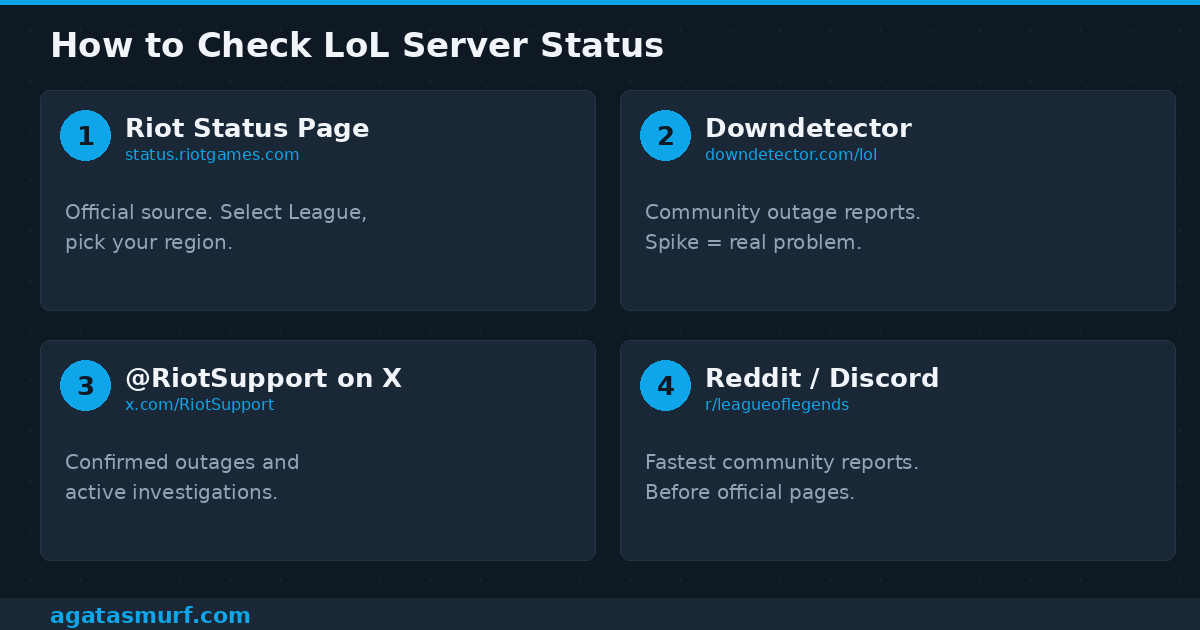
1. Riot’s Status Page
Head to status.riotgames.com. Click League of Legends. Select your region. Done. If something is genuinely broken, you’ll see a notice about login problems, matchmaking issues, or the store being offline. Just make sure you’re looking at League and not Valorant or TFT (they all share the same page).
Now here’s the caveat. Riot is sometimes 20+ minutes behind on updating this page. I’ve watched r/leagueoflegends lose its mind over login failures while the official page showed everything as green. If the page looks clean but you’re still stuck, move on to the next step.
2. LoL Status on Downdetector
This site pulls in reports from players and plots them on a graph. Flat line = probably just you. Sudden spike from 50 to 4,000 reports = yeah, it’s Riot. There’s also a map that breaks it down by country. Really helpful when you want to know if it’s your whole region or just your area.
3. Riot Support on X
The @RiotSupport account on X is where Riot confirms outages. They usually drop a post within 15 to 30 minutes of a big problem going live. Standard template is “We’re aware of login issues and working on a fix.” Not very detailed, but at least you know they’re on it. The main @LeagueOfLegends account picks up larger stuff too.
4. LoL Server Reports on Reddit and Discord
r/leagueoflegends picks up on LoL server status issues before anybody else. Login queues break and there’s a post within three minutes. By minute ten there’s 300 comments from people in your region confirming the same thing. Big Discord servers react just as quick. When you see a flood of “anyone else can’t login?” messages, you know.
This video from 2026 walks through the whole process of checking Riot’s status tools step by step:
Recent LoL Server Outages (2026)
Riot has no public outage log. But Downdetector keeps data, Reddit keeps receipts, and people don’t forget. Here’s what broke this year.
| Date | Type | Regions | Duration | Details |
|---|---|---|---|---|
| Jan 4 | Crash | NA, EUW, EUNE+ | ~4h | Client wouldn’t launch. 7k+ Downdetector reports. Clock workaround found by players. |
| Jan 8 | Patch | All | ~5h | 26.1 deployment. Season 1 “For Demacia” + Role Quests. Extended window. |
| Jan 22 | Crash | Several | ~30m | Login hiccup. Gone fast. |
| Mar 11 | Crash | Several | ~1h 15m | Login and in-game connectivity drops. |
| Mar 19 | Patch | All | ~3h | 26.6 deployment. Shyvana rework. |
| Apr 2 | Patch | All | ~3h | 26.7. April Fools skins + balance. |
Pattern is obvious: planned stuff lands on Wednesdays. Unplanned crashes tend to pop up around major content drops when the servers get hammered. Wednesday + League not working = check the patch schedule first.
Why the LoL Server Goes Down
LoL Server Maintenance on Patch Days
New patch every two weeks. 24 total in 2026. Server goes offline for 1 to 3 hours for most of them. Season starts and preseason overhauls? Those can stretch to 5 or 7 hours. Ranked gets disabled 30 to 60 minutes before the actual shutdown so nobody gets caught in a game.
Each region goes down at different times:
| Region | Goes Down | Timezone |
|---|---|---|
| NA | 3 AM | Pacific |
| EUW | 5 AM | GMT |
| EUNE | 3 AM | CET |
| KR | 8 AM | KST |
| OCE | 5 AM | AEDT |
| BR | 4 AM | BRT |
Late-night NA grinder? You’ve hit this at least once. I check the LoL maintenance page before starting ranked past midnight. Not doing that cost me a promo series once.
Unplanned Server Crashes
Hardware fails, a hot-fix introduces a new bug, something on Riot’s backend stops talking to something else. No warning. Can hit one region and leave the rest alone. Most of the time these get cleaned up in an hour or two. Occasionally they drag on if the root cause runs deep.
January 4th was the ugly version. Riot’s client itself was the problem, not the game servers. So League, Valorant, TFT, everything sharing the Riot Client went dark. Community found the date-change hack before Riot even confirmed what was going on.
Your ISP, Not the Server
Sometimes you check the LoL server status and everything looks green, but you still can’t get past the loading screen. That usually means the problem is between you and Riot. ISP routing issue, undersea cable hiccup, regional network instability. Happens more in OCE, SEA, and parts of Latin America because the path to Riot’s data centers is physically longer. Your neighbor on a different ISP might be playing ranked right now while you’re stuck.
Next Patches and Server Downtime (2026)
Each one means downtime. Don’t queue ranked on patch day.
| Patch | Date | What to Expect |
|---|---|---|
| 26.8 | Apr 15 | PROJECT skins, balance changes |
| 26.9 | Apr 29 | Standard cycle |
| 26.10 | May 13 | Probably Season 2. Expect longer downtime. |
| 26.11 | May 27 | Standard cycle |
| 26.12 | Jun 10 | Summer event probably |
Dates shift sometimes. LoL season dates has the confirmed schedule.
All 16 LoL Server Regions
Once you make an account on a region, that’s where it stays. Moving costs 2600 RP. Korea requires a Korean national ID. China isn’t even on the same system.
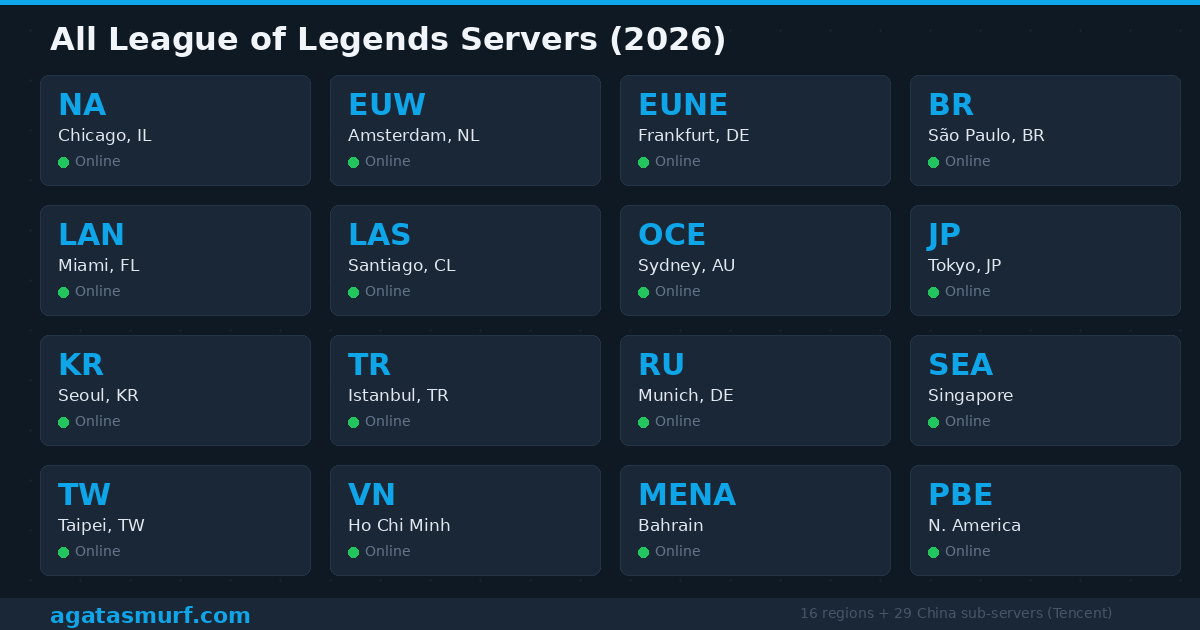
| Code | Region | Location | Transfer? |
|---|---|---|---|
| NA | North America | Chicago | Yes |
| EUW | Europe West | Amsterdam | Yes |
| EUNE | EU Nordic & East | Frankfurt | Yes |
| BR | Brazil | São Paulo | Limited |
| LAN | Latin America North | Miami | Yes |
| LAS | Latin America South | Santiago | Yes |
| OCE | Oceania | Sydney | Yes |
| KR | Korea | Seoul | No |
| JP | Japan | Tokyo | Yes |
| TR | Turkey | Istanbul | Limited |
| RU | Russia | Munich | Limited |
| SEA | Southeast Asia | Singapore | Yes |
| TW | Taiwan/HK/Macau | Taipei | Limited |
| VN | Vietnam | Ho Chi Minh City | Limited |
| MENA | Middle East | Bahrain | Yes |
| PBE | Public Beta | N. America | N/A |
China is totally separate. Tencent runs 29 sub-servers there with their own patch calendar. Not on Riot’s status page. SEA used to be Garena’s territory until 2023 when Riot pulled the plug on that deal and took everything in-house. Philippines, Singapore, Malaysia, Indonesia, Thailand all got merged under Riot. MENA went live in 2024, hosted in Bahrain, which finally gave Middle Eastern players decent ping instead of the old 100ms+ on EUW.
PBE Server Status
PBE is a separate server. Its own hardware. Located in North America. Goes offline way more than live because Riot uses it to test patches before they hit your server. PBE usually patches a full cycle ahead.
Same status page though: status.riotgames.com, just flip the dropdown to PBE. If PBE is down, your live server is unaffected. And vice versa. You need honor level 3+ on your main to get a free PBE account. But be warned, PBE queue times are brutal during off-hours. Tiny player pool.
LoL Server Status Is Green But You Still Can’t Play?
Checked everything. Riot’s page is green. Downdetector is flat. Reddit is quiet. So the problem is on your side. Here’s what actually fixes things. I’ve been through all of this.
Router Reset
Pull the power cable from your modem and router. Count to 30. Plug it back in. I know. Everyone says this. It still works more than anything else on this list because it clears out stale DNS and forces a fresh IP assignment. Also: if you’re on WiFi, plug in an Ethernet cable. WiFi packet loss causes random disconnects that look like server problems but aren’t.
DNS Flush
Hit Windows key, type “cmd”, right-click Command Prompt, run as admin. Type ipconfig /flushdns and press Enter. What this does: your PC stores addresses for websites and game servers. If one of those saved addresses goes stale (Riot moved something), your client tries connecting to a dead end. Flushing it forces a fresh lookup. Mac users: sudo dscacheutil -flushcache in Terminal.
Firewall
Windows Defender (or whatever you’re running) might be blocking Riot without any warning popup. Both LeagueClient.exe and RiotClientServices.exe need to be whitelisted. And here’s the annoying part: Windows updates can silently reset your firewall rules. So even if you fixed this last month, a recent update might have undone it.
Where to check: Settings > Update & Security > Windows Security > Firewall & network protection > Allow an app through firewall. Find League and Riot Client. Both need checkmarks for Private and Public.
Vanguard
League has required Riot Vanguard (their anti-cheat) since 2024. If Vanguard isn’t active, the game won’t even try to connect. Look in your system tray for the little shield icon. Missing? That’s your problem. Some antivirus programs (looking at you, Bitdefender) disable Vanguard’s kernel driver on startup because they think it’s suspicious. Fix: uninstall Vanguard, reinstall from Riot’s website, full PC restart. Not just closing the client. Full reboot. Vanguard loads at the kernel level and needs a clean boot.
More Vanguard troubleshooting on the LoL not opening page.
VPN
Running a VPN? Disconnect it. Try League again. If it works now, your VPN was routing you through a path that Riot’s servers reject. You can try whitelisting Riot’s IP ranges in your VPN config, but honestly the easiest fix is just turning it off before you play.
Hextech Repair Tool
Riot built this tool for exactly this situation: corrupted game files. Grab it from their support site. It scans everything, fixes broken configs, clears out old cache data. Run it, reboot, launch League. Handles most of the weird client-won’t-connect corruption.
LoL Server Error Codes
If your screen actually shows a specific error message, here’s a cheat sheet.
| What You See | What’s Happening | How to Fix It |
|---|---|---|
| “Unexpected error with the login session” | Session token is stuck | Alt+F4 the client. Click “Sign Out” not “Exit.” Open Task Manager, kill every RiotClientServices.exe. Relaunch. |
| “Unable to connect to authentication service” | Firewall or DNS block | Disable firewall for a quick test. Flush DNS. Switch to Google DNS (8.8.8.8) or Cloudflare (1.1.1.1). |
| “Did not receive a response from the server” | Timeout | Router reset. Wired connection. Check if your ISP is having issues. |
| VAN 1, VAN 68, etc. | Vanguard broken | Full PC restart. If it keeps happening, reinstall Vanguard from scratch. |
| Connection failure after champ select | Game server can’t reach you | Make sure both the client .exe and game .exe have firewall access. |
LP Loss When Servers Crash Mid-Game
You’re winning. Everyone’s ahead. Teamfight breaks out and then… everyone teleports. Reconnect screen. Lovely.
Riot has a system called loss prevention that kicks in when they detect a big outage during active games. It cuts your LP loss or wipes it entirely. The match might even vanish from your history. But I need to be real with you: it doesn’t trigger every single time. Small outages? Regional blips? You might still eat the full loss. I’ve had a game where four people disconnected and it still counted as a regular L. Riot says the automation isn’t perfect. No kidding.
If you’re mid-game and things go sideways, keep the client open. Hit reconnect for 5 to 10 minutes. If the whole game died server-side, it’ll eventually disappear from your history like it never happened.
2026 Patch Schedule and LoL Server Downtime
Patch format is YY.XX. We’re on 26.7. Next one (26.8) drops April 15th. Each patch brings downtime for the LoL server status across all regions. Season 1 is called “For Demacia” with Role Quests being the big change. Season 2 should land around 26.10 in mid-May, which means a longer maintenance window than usual.
Don’t queue ranked an hour before a scheduled patch. Just don’t.
What to Do While the Server Is Down
Look, refreshing the client won’t make it come back faster.
Go to op.gg or u.gg and review your last few games. Where did you die? Why? What was your CS at 10 minutes? Watch a replay where you hard lost and try to pinpoint the exact play where the game turned. Pull up the notes for whatever patch is dropping next. If your main is getting changed, you want to know before it happens, not after going 0/5 wondering why your damage is different.
Or just play on a different region. Some people keep a smurf on another server for exactly this reason. EUW is dead? Load up NA. Ping won’t be ideal but it beats staring at a reconnect loop. You could also create a fresh account on a second region if you’ve been putting it off.
One more thing. Server instability sometimes causes false positives in Riot’s behavioral systems. If you suddenly got a restriction right when servers were acting up, check your ban status before assuming it’s a server issue.
LoL Server Status FAQ
How do I check LoL server status?
status.riotgames.com. Select League, pick your region. That page shows outages, maintenance windows, and which services (login, matchmaking, store) are affected.
Why can’t I log into LoL servers?
Three likely reasons: Riot is doing maintenance, there’s an unplanned crash, or something on your PC is blocking the connection (firewall, Vanguard, DNS issue). Check the status page first. If it’s clean, try a router restart and DNS flush.
How long is LoL server maintenance?
Usually 1 to 3 hours for a normal patch. Big seasonal updates go up to 5 or 7 hours. Crashes vary, but most get resolved in under 3 hours.
When does LoL server maintenance start?
Wednesdays. NA around 3 AM Pacific. EUW around 5 AM GMT. KR around 8 AM KST. Ranked shuts off 30 to 60 minutes early.
Can I play LoL with servers down?
No. Nothing works offline. Not custom games, not practice tool, not ARAM. Server connection is required for everything.
How many server regions exist?
16 under Riot: NA, EUW, EUNE, BR, LAN, LAS, OCE, KR, JP, TR, RU, SEA, TW, VN, MENA, PBE. China has 29 more through Tencent.
Do I get LP back after LoL server crashes?
Maybe. Loss prevention kicks in for major outages. Smaller ones? You might eat the loss. It’s not consistent.
How to check PBE status?
Same page. status.riotgames.com, switch region to PBE. PBE is separate from live servers.
Is Downdetector reliable for LoL server status?
A big spike = something is almost certainly wrong. A flat line just means nobody is reporting. Could still be an issue. Always cross-check with Riot’s page.
LoL servers down but Valorant works?
They run on different servers. One going down doesn’t affect the other. Unless it’s a client-level issue (like January 2026), in which case everything using the Riot Client dies together.
Last updated: April 2026