


 through our G2G profile

 LoL Accounts
 Valorant
 WoW accounts
What Is the VAN 57 Error in LoL?
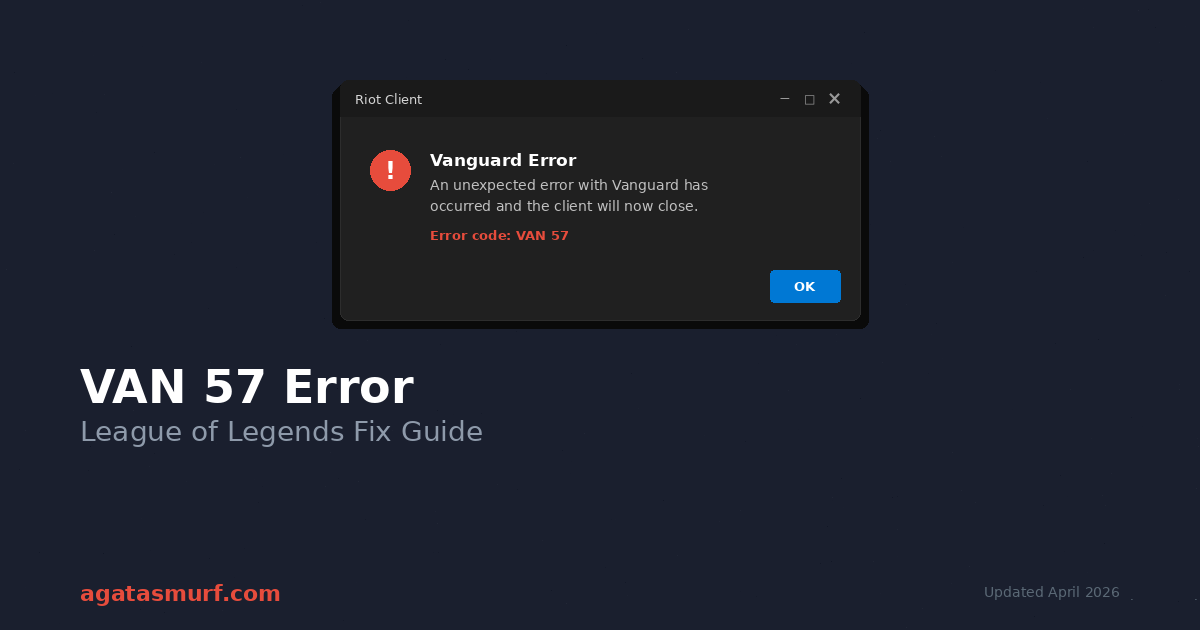
OK so you queued up, clicked Play, and got slapped with the VAN 57 error in League of Legends. “An unexpected error with Vanguard has occurred and the client will now close.” So cool. Very helpful message Riot. Love that for us.
But the short version: the VAN 57 error in League of Legends means Vanguard didn’t start. And if Vanguard doesn’t start, League won’t open. That’s the whole deal. Vanguard has been required for LoL since mid-2024, it’s the same anti-cheat that Valorant uses, and it runs at the kernel level which means it has deep hooks into Windows. Deep hooks = sensitive. Sensitive = breaks easy.
If you want the 30-second fix for the VAN 57 error League of Legends for most people, here it is: press Windows + R, type services.msc, scroll down to vgc (it’s near the bottom), right-click, Properties. Startup type to Automatic. Hit Start. Apply. Reboot. Done. Seven out of ten times, that clears it.
So didn’t work for you? Yeah, same, my luck is also bad. Just keep scrolling. I’ve got the whole list.
| Detail | Info |
|---|---|
| Error Code | VAN 57 |
| Error Message | “An unexpected error with Vanguard has occurred and the client will now close.” |
| Root Cause | Vanguard anti-cheat didn’t start, or something’s blocking it |
| Games Affected | LoL and Valorant (they share Vanguard) |
| Fix That Usually Works | Switch VGC service to Automatic |
| How Long to Fix | Anywhere from 2 minutes to half an hour, depending |
| Full Game Reinstall? | Very rarely. Reinstalling Vanguard alone does the job. |
| Related Codes | VAN 128, VAN 1067, VAN -81, VAN -102 |
Video version below if you’d rather watch than read. Decent walkthrough of the VGC service fix:
Why Does VAN 57 Error League of Legends Happen?
Then the VAN 57 error League of Legends throws at players seems annoying, but here’s the real answer: Vanguard is fragile. It sits way down at the kernel level, and pretty much anything that touches your system deeply can knock it offline. Windows Update is the worst offender by a mile. I’ve had this error hit me three separate times in 2025 and every single time the VAN 57 error League of Legends showed me was right after a Patch Tuesday. Every time.
Now here’s the actual list of things that trigger the VAN 57 error in League of Legends, roughly ranked by how often they’re the culprit:
- The VGC service got flipped off. Windows updates do this constantly. If you only read one thing on this page, read this.
- Your antivirus is being paranoid. Avast, AVG, Kaspersky, Bitdefender, Norton. All of them have quarantined Vanguard at some point. Windows Defender gets paranoid sometimes too.
- Vanguard’s install files got mangled. Usually after a forced shutdown during an update, or a crash mid-patch.
- Your GPU or network drivers are from like 2023. Vanguard changed a bunch of stuff in early 2025 and old drivers can’t keep up.
- Secure Boot is off in BIOS, or TPM 2.0 isn’t enabled. DIY PC builders get hit by this one a lot because a lot of motherboards ship with Secure Boot disabled by default.
- You’re on a VPN. Some VPNs block the handshake Vanguard does with Riot’s servers.
- You’re in Windows Test Signing mode (rare, but a deal-breaker if you’re in it).
- Some random background app is picking a fight with Vanguard. Common troublemakers: CCleaner, Razer Cortex, iCUE, Armoury Crate, anything that advertises itself as a “game booster.”
So alright, onto the actual fixes.
The Restart Fix for VAN 57 Error League of Legends
Yeah I know, “have you tried turning it off and on again” meme etc. But Vanguard loads at boot, and if it got stuck during the last boot sequence (which happens more than you’d think), a clean restart will unstick it. And free to try, zero risk, 2 minutes.
Couple of things that matter here though. Don’t just close the League client and reopen it. That won’t reset Vanguard. And don’t use Sleep or Hibernate either, those don’t fully reload services. What you want is a proper restart.
So before you click Restart, pop open Task Manager with Ctrl + Shift + Esc and kill anything Riot-related you see running. RiotClientServices.exe, LeagueClient.exe, vgtray.exe, vgc.exe. Then end task on all of them. Then Start menu > Restart.
One thing a lot of guides don’t mention: modern SSDs boot so fast that Vanguard sometimes isn’t fully loaded when your desktop appears. If you open League the second your wallpaper shows up, you might still get VAN 57 even though Vanguard would’ve been fine 30 seconds later. So wait for the little Vanguard shield icon to show up in your system tray (bottom right, near the clock) before launching the game.
The VGC Service Fix for VAN 57 Error in League (The Real MVP)
If the VGC service is off or set to Manual, Vanguard won’t load. Period. This is the fix that actually works for the majority of people getting the VAN 57 error in League of Legends. I’ll walk you through it.
Press Windows + R, that opens the Run dialog. Type services.msc and hit Enter. But a big scrollable list opens up. You want to scroll pretty far down (services are alphabetical, so V is near the end) until you find vgc. Then right-click it, hit Properties.
So two things to check here. One: Startup type. If it says anything other than Automatic, change it to Automatic. Two: Service status. If it’s not running, click Start. Then Apply, then OK. Then reboot your PC.
That’s it. And that’s the whole thing.
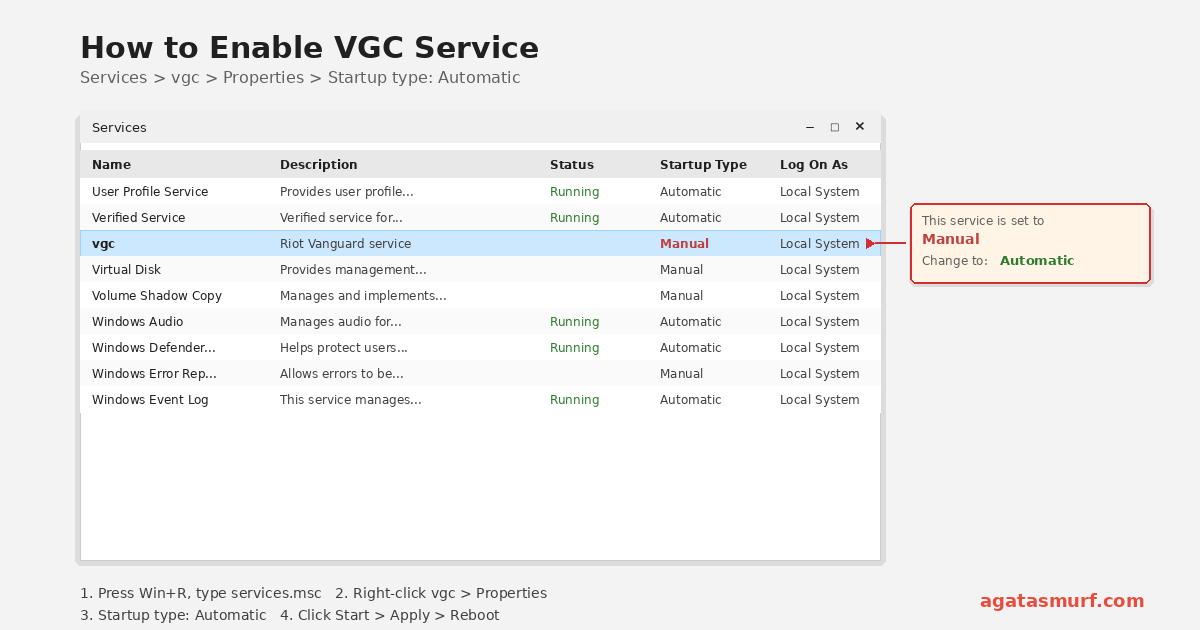
Now, why does this keep breaking? Because Windows 11 updates keep resetting service startup types. I literally have it on my calendar to check this setting the day after every Patch Tuesday. Because it saves me the headache of getting hit with VAN 57 mid-queue.
Bonus VAN 57 Error League msconfig Check
Sometimes services.msc isn’t the whole story. Run msconfig through the Run dialog too. Services tab. Check “Hide all Microsoft services” at the bottom so the list doesn’t drown you in noise. Then scroll to find VGC. Make sure its checkbox is ticked. If it’s unchecked, even with Automatic startup in services.msc, Vanguard won’t boot. So tick it, Apply, restart. I’ve lost count of how many Reddit threads I’ve seen where someone thought they fixed the service but forgot this step.
Reinstalling Vanguard to Fix VAN 57 Error in League
But service is set correctly, you rebooted, and VAN 57 is still staring at you. So Vanguard’s install files are probably corrupted then. You don’t need to nuke League, just Vanguard.
Run dialog again, type appwiz.cpl, Enter. Find Riot Vanguard, right-click, Uninstall. Then confirm. After that, reboot the PC. Then open the Riot Client. It’ll notice Vanguard is missing and reinstall it automatically during the login process. After that finishes, reboot one more time. This is literally Riot’s official suggested fix, straight from their Vanguard error codes support page.
But sometimes the uninstall just… fails. Nothing happens when you click Uninstall, or it throws some cryptic error. Also happened to me in November, I was pissed. But what fixed it was running Command Prompt as admin and forcefully deleting the services:
sc delete vgc
sc delete vgk
Then after those run, manually delete the C:\Program Files\Riot Vanguard folder from File Explorer. Reboot. Open Riot Client. Fresh Vanguard downloads and installs. Done.
Antivirus Causes VAN 57 Error in League: The Silent Killer
Because this one makes me irrationally angry because antivirus software will block Vanguard without telling you. No popup. No notification. It just quietly quarantines vgk.sys and you’re left wondering why League won’t launch.
So story time. My buddy spent four hours on Discord with me in January trying to figure out why he kept hitting the VAN 57 error in League. We checked VGC, reinstalled Vanguard twice, updated his drivers, ran SFC, the whole deal. Then finally he remembered he’d installed a free version of Kaspersky two weeks earlier. So he opened Kaspersky’s quarantine log and there it was: vgk.sys, quarantined, no notification sent. Because four hours for a 30-second fix. I was mad. He was mad. Riot should really post a warning about this somewhere.
But here’s every program I’ve seen cause this at some point:
| Program | What It Does to Vanguard |
|---|---|
| Avast / AVG | Quarantines vgc.exe and vgk.sys. No warning by default. |
| Kaspersky | Application Control eats the kernel driver. |
| Bitdefender | Active Threat Control flags Vanguard as suspicious. |
| Norton | SONAR stops Vanguard from starting. |
| Malwarebytes | Rare, but real-time protection can cause issues. |
| Windows Defender | Controlled Folder Access blocks Vanguard file writes. |
| Razer Cortex | Game Booster mode actively kills kernel processes. Great. |
| CCleaner | Wipes Vanguard registry entries during “cleanup.” |
So fastest way to diagnose: disable your antivirus completely for a minute, launch League. If VAN 57 is gone, There’s your culprit. then you need to whitelist two specific files in whatever AV you’re running:
C:\Riot Games\Riot Client\RiotClientServices.exeC:\Program Files\Riot Vanguard\vgc.exe
Also, do the whitelist in the firewall section AND the real-time scan section, because a lot of AV suites treat those as separate exception lists. And also add them to your Windows firewall for both private and public networks while you’re at it. Belt and suspenders.
Run as Admin
So quick one. Right-click Riot Client shortcut, “Run as administrator.” If that clears the VAN 57 error, it was a permissions issue. But you can force it to always run as admin by right-clicking the shortcut, Properties, Compatibility tab, ticking “Run this program as an administrator.”
Though Riot doesn’t love this as a permanent fix (and honestly running stuff as admin forever isn’t great from a security angle), but it works.
Update Drivers to Fix VAN 57 Error in League
Old NVIDIA drivers from late 2024 clashed with a Vanguard update Riot pushed in February 2025. Whole wave of VAN 57 error in League reports on Reddit, nobody officially acknowledged the cause, but r/leagueoflegends figured it out in like a day. The pattern was obvious once people started comparing driver versions.
So easy fix: update everything. Windows + X, Device Manager. Expand Display adapters, right-click GPU, Update driver. Then do Network adapters while you’re in there. Then Windows Update in Settings for anything pending.
But hot take: don’t bother with Windows’ built-in driver search, it’s usually months behind. Go straight to NVIDIA, AMD, or Intel’s website and grab the current release. Takes like 5 minutes.
SFC and DISM for VAN 57 Error in League
Because corrupted Windows files cause weird anti-cheat issues. Two commands worth running. Open Command Prompt as admin and run sfc /scannow first. It’ll scan and auto-repair. If it finds stuff it can’t fix, follow up with DISM /Online /Cleanup-Image /RestoreHealth which pulls fresh system files from Microsoft’s servers. And both take a few minutes each. Reboot when they’re done.
DNS Flush (Yes, Really)
So honestly I was skeptical about this one. It sounded like placebo fix territory, like “clear your cache” for every problem ever. Still, I’ve seen too many confirmed reports where flushing DNS cleared VAN 57 to dismiss it. Theory is that stale DNS entries prevent Vanguard from reaching Riot’s verification servers during startup.
Open cmd and run these three, one at a time:
ipconfig /flushdns
ipconfig /release
ipconfig /renew
Then reboot. Try League.
Also, while we’re on networking stuff, kill your VPN before launching LoL. Vanguard wants a clean connection to Riot and some VPN clients mess with that handshake. If you need a VPN running for other reasons, most apps support split tunneling where you can exclude specific programs from the VPN. Throw League and Riot Client in there.
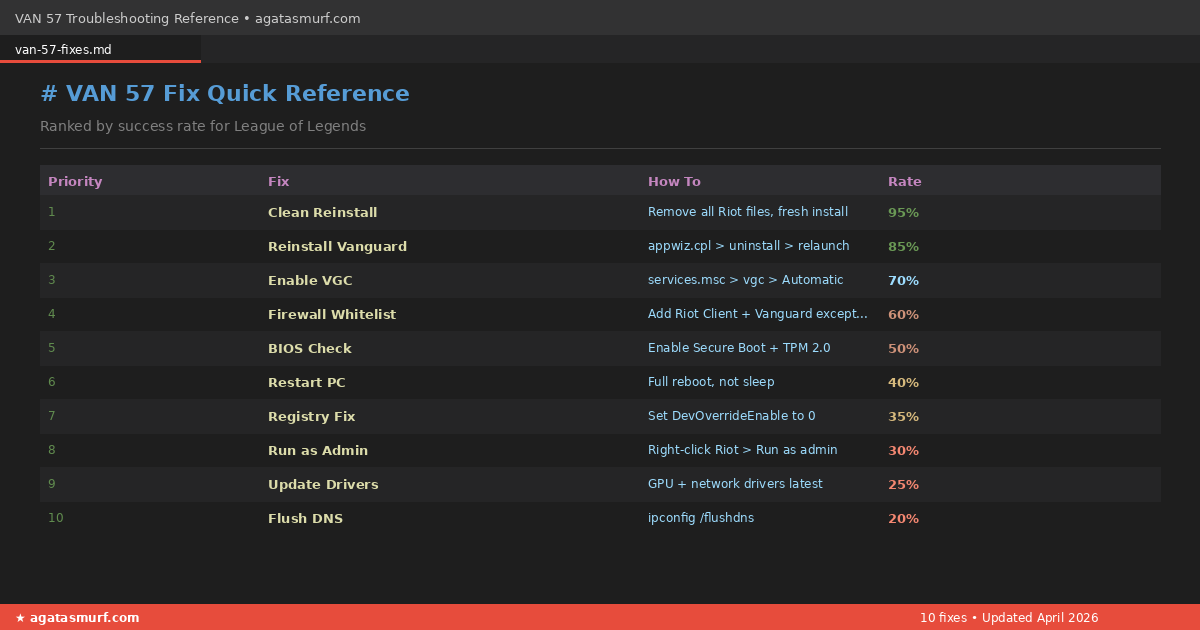
VAN 57 Fix Quick Reference
| Fix | What to Do | Success Rate |
|---|---|---|
| Clean Reinstall | Wipe all Riot files, fresh install | ~95% |
| Reinstall Vanguard | appwiz.cpl > uninstall > relaunch client | ~85% |
| Enable VGC Service | services.msc > vgc > Automatic > Start | ~70% |
| Whitelist Firewall | Add Riot Client + Vanguard to exceptions | ~60% |
| Check BIOS | Secure Boot + TPM 2.0 both enabled | ~50% |
| Restart PC | Full reboot, not sleep | ~40% |
| Flush DNS | ipconfig /flushdns + release + renew | ~20% |
Advanced Fixes for VAN 57 Error in League (If Nothing Above Worked)
Alright, so you’ve tried everything and VAN 57 is still ruining your day. So time to go deeper. But these aren’t as common though they’ll fix the trickier edge cases.
Secure Boot + TPM 2.0 in BIOS
Vanguard flat out won’t run without Secure Boot on and TPM 2.0 enabled. So no debate, no workaround. If either is off, you’re getting VAN errors until you fix it.
Don’t just jump into BIOS though. Check what your current state is first. Run dialog, msinfo32, Enter. Then the System Information window opens. Scroll through the main page looking for two rows: “Secure Boot State” should say On. “BIOS Mode” should say UEFI. If Secure Boot State says Off, you need to hop into BIOS. If BIOS Mode says Legacy, that’s a much bigger problem since Legacy BIOS mode basically requires reinstalling Windows in UEFI mode to fix. Hope you’re not there.
So to get into BIOS, restart and start mashing whatever key your motherboard uses during the POST screen. For most boards it’s F2 or Del. ASUS likes F2, MSI usually wants Del, Gigabyte is often Del too. Then once you’re in BIOS, hunt for Secure Boot (usually under Boot or Security tab) and turn it on. Then find TPM. Intel boards call it Intel PTT sometimes. AMD calls it fTPM. Whatever it’s called, enable it. Then save with F10 and exit. Boot back into Windows, And Vanguard should load.
Windows Test Signing Mode
So this one’s obscure but real. If you’ve ever installed an unsigned driver (modded controller drivers, certain audio interfaces, some capture cards, old peripheral drivers), Windows might have flipped itself into Test Signing mode. Because Vanguard categorically refuses to load in that mode.
So easy tell: look at the bottom-right of your desktop. See a faint “Test Mode” watermark over your wallpaper? That’s the smoking gun. Then Command Prompt as admin, run:
bcdedit /set testsigning off
Reboot. And the watermark disappears. Vanguard boots.
The Registry Fix Nobody Mentions
So I found this one buried in a keengamer.com comment section. Some leftover debugging tool or development environment leaves behind a registry value called DevOverrideEnable. Because if it’s set to 1, it breaks how Windows loads certain drivers, including Vanguard’s.
But back up your registry first. Seriously. If you mess up regedit you can brick Windows. Run dialog > regedit > go to:
HKEY_LOCAL_MACHINE\SOFTWARE\Microsoft\Windows NT\CurrentVersion\Image File Execution Options
Look for DevOverrideEnable. If not there, Skip this fix entirely, you don’t need it. And if it’s there and set to 1, double-click, change value to 0, OK. Close regedit. Reboot.
Clean Boot to Find the Troublemaker
Basically, a clean boot strips Windows down to just Microsoft services plus whatever you explicitly allow. If the VAN 57 error in League vanishes in clean boot, some third-party service on your normal boot is fighting Vanguard.
Run dialog > msconfig > Services tab. Tick “Hide all Microsoft services.” Then click Disable all. After that, go back and re-tick just vgc so Vanguard still loads. Startup tab > Open Task Manager. Then disable every single startup item. Apply, OK, restart.
If League is working, Perfect. Now for the detective work. Then re-enable services in batches of 3 or 4 at a time, rebooting between each batch, until the VAN 57 error in League comes back. Because whichever batch brought the error back contains your problem. So narrow it down from there. Annoying but effective.
Event Viewer: The Secret Weapon
Genuinely puzzled why most troubleshooting guides skip Event Viewer. Because Windows is literally logging exactly what’s failing, and nobody checks the logs. Run dialog > eventvwr.msc. Left sidebar: Windows Logs > System. Then scan the list for entries with Source = “vgc” or “vgk” and red error icons. Double-click one to read the details.
So two error messages you’ll see most often. “The vgc service failed to start due to the following error: Access is denied” means your antivirus or some permissions issue is blocking it. Then go to Fix 4. “The vgk driver was prevented from loading” means Secure Boot is off or test signing is on. Then go to the advanced section above.
Also, if you end up submitting a Riot Support ticket, paste the exact Event Viewer error into your ticket. Saves everyone time.
Last Resort: Clean Reinstall for VAN 57 Error in League
So tried everything and VAN 57 won’t die? Fine. Then scorched earth time. Full clean reinstall of everything Riot touched on your system. This has something like a 95% success rate because it wipes every possible source of corruption.
- Uninstall Riot Vanguard via
appwiz.cpl. - Uninstall League of Legends from the same menu.
- Open File Explorer. Delete
C:\Riot Games. Entire folder. - Delete
C:\Program Files\Riot Vanguardif it’s still hanging around. - Delete
C:\Users\[YourUsername]\AppData\Local\Riot Games. That’s where cached data lives. - Empty Recycle Bin. All of it.
- Reboot.
- Go to the official Riot Games website, download a fresh Riot Client installer.
- Install League. Vanguard auto-installs during setup.
- Reboot again.
But if VAN 57 survives all of that, your Windows install itself is probably the problem. So at that point it’s either a Windows Reset or a Riot Support ticket. And I’d try Support first, obviously.
Other VAN Codes That Aren’t VAN 57
Because Vanguard has a bunch of error codes and they all mean different things. Make sure you’re actually dealing with VAN 57 and not one of these:
| Error Code | Meaning | Fix |
|---|---|---|
| VAN 57 | Vanguard didn’t start / not running | Enable VGC service or reinstall Vanguard |
| VAN 128 | Vanguard needs a reboot | Restart PC |
| VAN 1067 | Vanguard crashed during startup | Reinstall Vanguard |
| VAN -81 | Vanguard process interrupted | Kill processes + restart |
| VAN 9001 | Secure Boot off | Enable in BIOS |
| VAN 9003 | TPM 2.0 missing | Enable in BIOS |
| VAN -102 | System policy is blocking Vanguard | Disable Exploit Protection overrides |
We’ve got a whole breakdown of every code on our LoL Vanguard errors page if you want deeper info.
Submitting a Riot Support Ticket
So the VAN 57 error League of Legends players sometimes can’t escape has beaten you. You’ve hit the wall, tried everything, and you’re ready to escalate. Cool. So don’t just fire off a ticket saying “VAN 57 help pls.” You’ll get a copy-paste response telling you to restart your computer.
Here’s what to put in your ticket instead:
- Windows version (Settings > System > About)
- Secure Boot + TPM status from
msinfo32 - List of every fix you’ve already tried. Specifics matter. “Set VGC to Automatic, reinstalled Vanguard, whitelisted in Windows Defender” is way better than “tried everything”
- Screenshot of the error popup
- Copy-pasted Event Viewer details for vgc or vgk errors
- Recent changes to your PC (new hardware? driver update? fresh Windows install?)
Because a ticket with that info gets a real human response way faster than a vague one. So been there, done that, learned the hard way.
Stop VAN 57 Error League From Coming Back
Once you finally fix the VAN 57 error League of Legends throws at you, do a few things so you don’t end up here again in a month:
One, leave the VGC service alone. Yes, even if some weirdo on Reddit tells you to disable it to save resources. It uses maybe 20 megs of RAM. That’s nothing. Disabling it guarantees VAN 57 on your next launch and now you’re back here reading this guide again.
And two, add a calendar reminder to check services.msc after every Patch Tuesday. Then takes half a minute. Just verify VGC is still set to Automatic now. Because Windows 11 in particular has an annoying habit of messing with third-party services during updates.
Also three, make your antivirus exceptions permanent, not temporary. A lot of AV suites clear temporary exceptions after an update. But permanent exceptions stick around.
And four, uninstall any “game booster” you have running. Razer Cortex, Wise Game Booster, MSI Afterburner overlays, whatever. Because zero performance benefit in modern gaming, but they constantly fight with anti-cheat systems like Vanguard, EAC, and BattlEye. So just don’t.
And five, don’t right-click the Vanguard tray icon and exit it between sessions. Some people do this thinking they’re “saving resources.” But all you’re doing is setting yourself up for a broken startup next time. Leave it running. Because it doesn’t bother anyone.
By the way, if your problem is actually the client hanging on the loading screen or you’re seeing League of Legends maintenance notices, those are different issues entirely.
Is the VAN 57 Error League of Legends a Ban?
No. Not a ban. Not a suspension. But not even close. VAN 57 is purely a Vanguard startup problem on your PC. Your account is safe. Also, actually seeing this question on Reddit almost weekly tells me Riot could do a better job of making that clear in the error message itself.
Because bans look completely different. You’d see a specific suspension message mentioning your account, usually with a duration. Not an anti-cheat popup. So if you genuinely want to double-check, you can verify your ban status through our guide.
Not trying to grind a fresh level 1 to 30? We sell LoL smurf accounts that are pre-leveled, ranked-ready, and come with a lifetime warranty. And saves you from the grind.
FAQ: VAN 57 Error League of Legends
What does the VAN 57 error League of Legends message mean?
Vanguard, the anti-cheat LoL requires, didn’t start correctly on your system. Could be the VGC service is off, could be your antivirus ate it, could be corrupted files. Whatever the cause, the game won’t launch until Vanguard is working.
Do I need to reinstall League of Legends to fix VAN 57?
Almost never. Reinstalling just Vanguard (through appwiz.cpl) plus fixing the VGC service takes care of this for maybe 95% of people. Full game reinstall is the absolute last resort.
Can antivirus software cause the VAN 57 error?
Oh yeah, big time. Kaspersky, Avast, Bitdefender, Norton all have histories of quarantining Vanguard files without notifying you. Whitelist Riot Client and Vanguard’s executable in both your AV and your firewall.
Is VAN 57 a ban or account penalty?
Nope. Zero connection. It’s a Vanguard startup error on your PC. Your account is fine.
Does VAN 57 affect both League of Legends and Valorant?
Yep, both games run the same Vanguard. Break one, you break both. In Valorant it shows up as VAL 57 or just Error Code 57. If you’re getting this in Valorant, we have a dedicated Valorant Error Code 57 guide.
How do I check if the VGC service is running?
Windows + R, type services.msc, Enter. Scroll to vgc. Look at the Status column. Should say Running. If it doesn’t, right-click, Properties, Startup type to Automatic, click Start, Apply.
Why does VAN 57 keep coming back after Windows updates?
Because Windows loves resetting third-party service configurations during major updates. The VGC service gets flipped from Automatic back to Manual, and since Vanguard depends on it, Vanguard doesn’t start at next boot. Quick fix: check services.msc after every Patch Tuesday. Takes 30 seconds, saves you from future VAN 57 popups.
Curious about your hidden MMR while you’re troubleshooting? Our MMR Checker works without needing to log in.
Last updated: April 2026
